
当屏幕变小时删除parallax.js图像
当屏幕变小时删除parallax.js图像
提问于 2016-09-18 09:27:27
我使用parallax.js在我的网站上添加视差效果。当屏幕大小小于767像素时,我想删除data-image-src属性。
我知道我应该在我的css文件中使用@media screen and (max-width: 767px) {...},但我不知道如何将图像属性设置为none。
下面是一个示例:
<html>
<head>
<title>Panagiotis Portfolio</title>
<meta charset="utf-8">
<meta name="viewport" content="width=device-width, initial-scale=1">
<link rel="stylesheet" href="https://maxcdn.bootstrapcdn.com/bootstrap/3.3.6/css/bootstrap.min.css">
<link rel="stylesheet" href="https://maxcdn.bootstrapcdn.com/font-awesome/4.6.3/css/font-awesome.min.css">
<link rel="stylesheet" href="css/custom.css">
<link rel="stylesheet" href="css/circle.css">

<script src="https://ajax.googleapis.com/ajax/libs/jquery/1.12.2/jquery.min.js"></script>
<script src="https://maxcdn.bootstrapcdn.com/bootstrap/3.3.6/js/bootstrap.min.js"></script>
<script src="https://ajax.googleapis.com/ajax/libs/angularjs/1.4.8/angular.min.js"></script>

<script type="text/javascript" src="js/parallax.js"></script>
<script type="text/javascript" src="js/index.js"></script>
</head>
<body ng-app="">
    <div ng-include src="'partials/header.html'"></div>

    <div class="parallax-window" data-parallax="scroll" data-image-src="sky.jpg">
      <div class="parallax-content">
          <h3 id="summary">Summary</h3>
          <hr>
          <div ng-include="'partials/summary.html'"></div>
      </div>

    </div>
    <!-- Some other parallax elements here -->
    </body>
</html>在我的index.js中,我添加了linusg,建议使用下面的jQuery代码,但它似乎不起作用。
$(document).ready(function() {
$(window).resize(function () {
    // Check window size
    if($(window).width() < 767) {
        // Unset data-image-src property
        $(".parallax-window").attr("data-image-src", "");
    } else {
        // Set data-image-src property
        //$(".parallax-window").attr("data-image-src", "sea.jpg");
    }
});

$(document).on('click', 'a:not([target="_blank"])', function(event){
    event.preventDefault();

    $('html, body').animate({
        scrollTop: $( $.attr(this, 'href') ).offset().top
    }, 700);
});
});
尽管数据映像src值发生了变化,但图像似乎仍然存在。
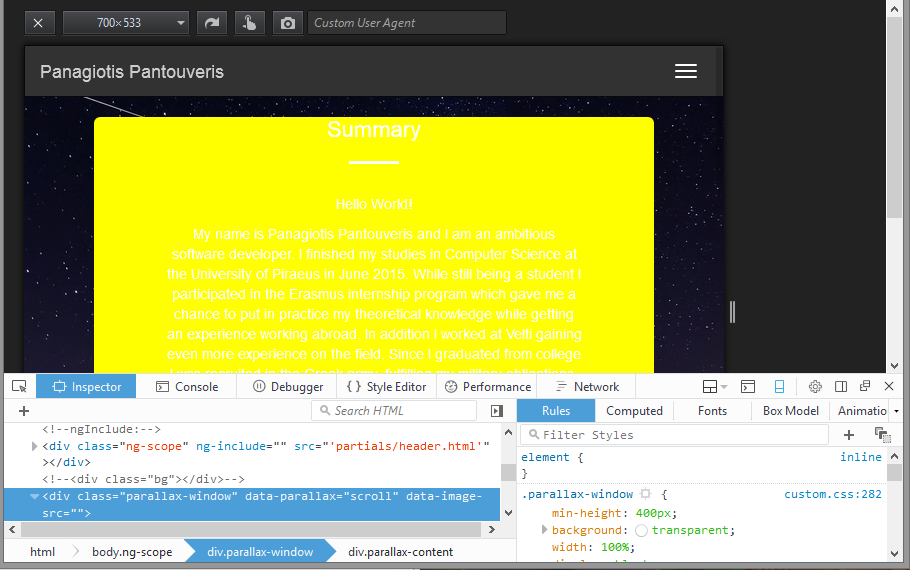
有什么想法吗?
回答 1
Stack Overflow用户
发布于 2016-09-18 09:45:02
您可以使用jQuery的$(window).width():
$(window).resize(function () {
    // Check window size
    if($(window).width() < 767) {
        // Unset data-image-src property
        $(".parallax-window").attr("data-image-src", "");
    } else {
        // Set data-image-src property
        $(".parallax-window").attr("data-image-src", "sea.jpg");
    }
});请确保将代码包装到$(document).ready(...);中,如下所示,请参阅这份文件。
完整代码:
<html>
    <head>
        <!-- Other metadata and resources -->
        <script src="https://ajax.googleapis.com/ajax/libs/jquery/3.1.0/jquery.min.js"></script>
    </head>
    <body>
        <div class="parallax-window" data-parallax="scroll" data-image-src="sea.jpg">
            <div class="parallax-content">
                <h3 id="goals">Ambitions and Goals</h3>
                <hr>
                <div ng-include="'partials/goals.html'"></div>
            </div>
        </div>
        <script>
            $(document).ready(function() {
                $(window).resize(function () {
                    // Check window size
                    if($(window).width() < 767) {
                        // Unset data-image-src property
                        $(".parallax-window").attr("data-image-src", "");
                    } else {
                        // Set data-image-src property
                        $(".parallax-window").attr("data-image-src", "sea.jpg");
                    }
                });
            });
        </script>
    </body>
</html>
希望这能有所帮助!
页面原文内容由Stack Overflow提供。腾讯云小微IT领域专用引擎提供翻译支持
原文链接:
https://stackoverflow.com/questions/39556092
复制相关文章
相似问题
腾讯云开发者

Copyright © 2013 - 2026 Tencent Cloud. All Rights Reserved. 腾讯云 版权所有
深圳市腾讯计算机系统有限公司 ICP备案/许可证号:粤B2-20090059  粤公网安备44030502008569号
腾讯云计算(北京)有限责任公司 京ICP证150476号 | 京ICP备11018762号