
如何获得hdd传输模式?
我需要得到hdd传输模式(dma或pio)并打印它,您可以在设备管理器中找到它(在屏幕截图中的红色圆圈中)。
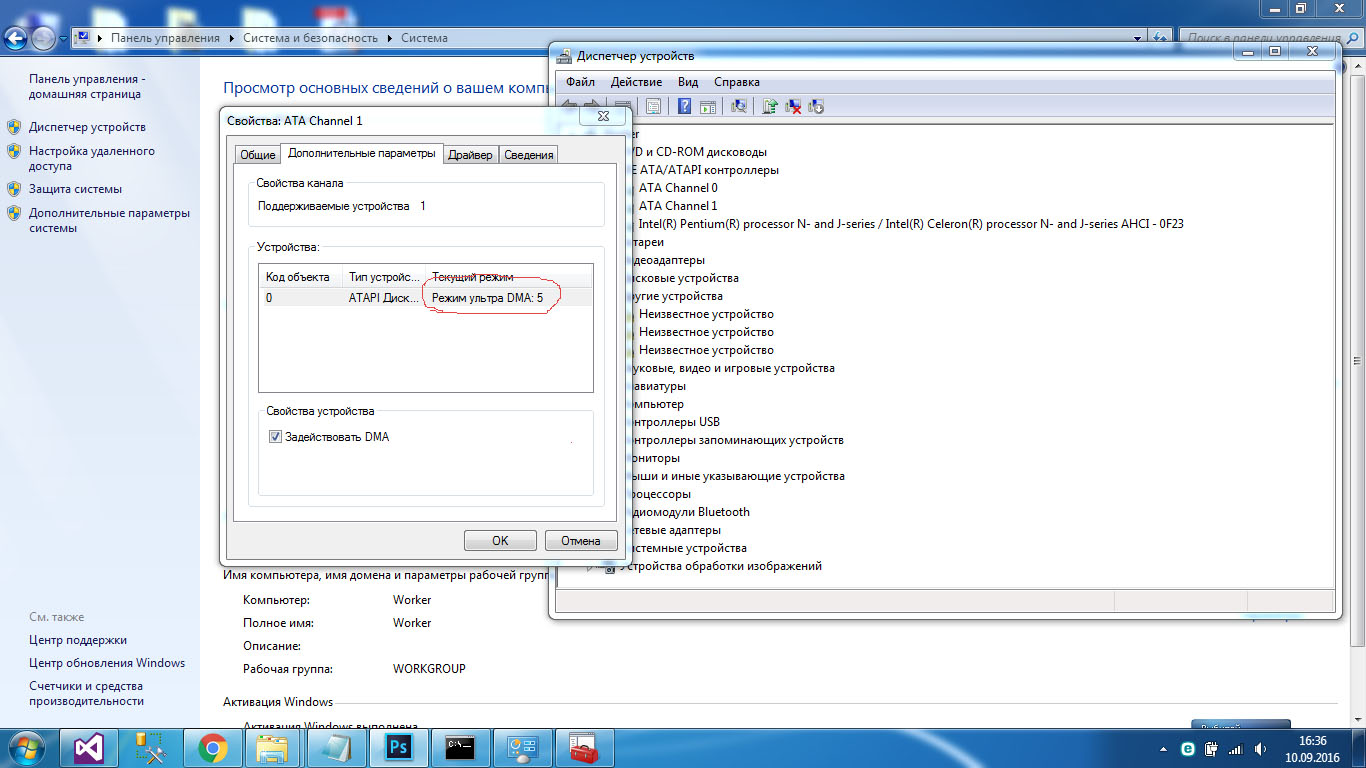
所以我需要从程序中得到红色圆圈的信息。我尝试过使用wmi类,但是Win32_DiskDrive、Win32_IDEController和其他类没有提供我需要的信息。与设备管理器最接近的属性窗口是Win32_IDEController,字段Win32_IDEController"Name“返回字符串ATA Channel 1。
我还找到了这个https://msdn.microsoft.com/en-us/library/windows/hardware/ff550142(v=vs.85).aspx,但是它使用irb.h,这是ddk(wdk)的一部分,我以前从未使用过它,所以我甚至不知道如何使用这个函数。
现在我正在学习WDK),任何语言的解决方案都会很好,在我使用C#的项目中,但是如果解决方案是用另一种语言,我可以将"DMA“或"PIO”写到该解决方案中的文件中,从C#执行.exe并从文件中读取。C#中的OFC解决方案将受到更多的欢迎。
回答 2
Stack Overflow用户
发布于 2016-09-17 08:56:15
您可以从AdapterUsesPio结构中使用描述符成员。下面是一个C++示例,演示如何查询磁盘:
#include "stdafx.h"

int main()
{
    wchar_t path[1024];
    wsprintf(path, L"\\\\?\\C:"); // or L"\\\\.\\PhysicalDrive0"

    // note we use 0, not GENERIC_READ to avoid the need for admin rights
    // 0 is ok if you only need to query for characteristics
    HANDLE device = CreateFile(path, 0, FILE_SHARE_READ | FILE_SHARE_WRITE, NULL, OPEN_EXISTING, NULL, NULL);
    if (device == INVALID_HANDLE_VALUE)
        return 0;

    STORAGE_PROPERTY_QUERY query = {};
    query.PropertyId = StorageAdapterProperty;
    query.QueryType = PropertyStandardQuery;

    STORAGE_ADAPTER_DESCRIPTOR descriptor = {};

    DWORD read;
    if (!DeviceIoControl(device, IOCTL_STORAGE_QUERY_PROPERTY,
        &query,
        sizeof(query),
        &descriptor,
        sizeof(descriptor),
        &read,
        NULL
        ))
    {
        wprintf(L"DeviceIoControl error: %i\n", GetLastError());
    }
    else
    {
        wprintf(L"AdapterUsesPio: %i\n", descriptor.AdapterUsesPio);
    }

    CloseHandle(device);
    return 0;
}Stack Overflow用户
发布于 2016-09-16 10:50:17
您可以使用autoit (https://www.autoitscript.com)直接从GUI读取它。
示例(要小心使用不同的Windows版本和不同的语言):
    Run ("mmc c:\windows\system32\devmgmt.msc")
    WinWaitActive ( "Device Manager" )
    send("{tab}{down}{down}{down}{down}{down}{down}{down}{NUMPADADD}{down}!{enter}")
    WinWaitActive ( "Primary IDE Channel Properties" )
    send("^{tab}")
    $drivemode = ControlGetText("Primary IDE Channel Properties", "", "Static4")
    ControlClick("Primary IDE Channel Properties","Cancel","Button6")
    WinKill ( "Device Manager" )
如果要在C#中使用Autoit:
https://www.autoitscript.com/forum/topic/177167-using-autoitx-from-c-net/
https://stackoverflow.com/questions/39426723
复制相似问题
腾讯云开发者

Copyright © 2013 - 2026 Tencent Cloud. All Rights Reserved. 腾讯云 版权所有
深圳市腾讯计算机系统有限公司 ICP备案/许可证号:粤B2-20090059  粤公网安备44030502008569号
腾讯云计算(北京)有限责任公司 京ICP证150476号 | 京ICP备11018762号