
如何在iOS中播放循环视频?
如何在iOS中播放循环视频?
提问于 2016-09-09 16:21:02
我如何将视频剪辑放进我的故事板?我只看到:
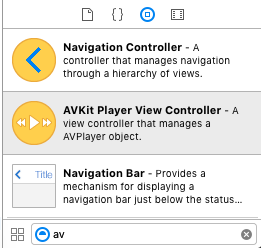
另外,我应该把.mp4文件放在哪里?
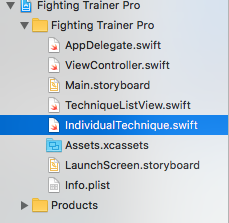
最后,在启动时,为循环视频剪辑所包含的正确代码是什么。
//insert looping video clip here我熟悉Android /java,在那里可以做到这一点,没有问题。然而,我是非常新的快速和Xcode,所以我有麻烦。
回答 2
Stack Overflow用户
回答已采纳
发布于 2016-09-09 16:27:01
制作循环录影带:-
- 将一个
UIView添加到ViewController中,相应地设置约束。 - 在一致性类中声明
UIView为@IBOutlet@IBOutlet弱var videoView : VideoPlay!//其中VideoPlay是视频播放器的CustomClass - 为视频播放器
UIVew:VideoPlay创建自定义类 导入UIKit导入AVFoundation类VideoPlay: UIView {私有var player : AVPlayer!私有变量playerLayer : AVPlayerLayer!{super.init(框架: CGRectZero) self.initializePlayerLayer() }覆盖init(框架: CGRect) { super.init(frame: frame) self.initializePlayerLayer() self.autoresizesSubviews = false }所需init?(编码器aDecoder: NSCoder) {Super.init(编码器: aDecoder) self.initializePlayerLayer() }私有函数initializePlayerLayer() { playerLayer = AVPlayerLayer() playerLayer.backgroundColor = UIColor.whiteColor().CGColor playerLayer.videoGravity = AVLayerVideoGravityResizeAspectFill self.layer.addSublayer(playerLayer) playerLayer.frame = self.bounds} func playVideoWithURL(url: NSURL) {AVPlayer= AVPlayer(URL: url) player.muted = false playerLayer.player =playerLayer.player() loopVideo( player ) } func toggleMute() { player.muted = !player.muted }函数NSNotificationCenter.defaultCenter().addObserverForName(AVPlayerItemDidPlayToEndTimeNotification,isMuted() -> Bool {返回player.muted } func loopVideo(videoPlayer: AVPlayer) {对象: nil,queue: nil) { videoPlayer.seekToTime(kCMTimeZero) videoPlayer.play() }}中的通知 - 修改StoryBoard一致性ViewController :- 类ViewController: UIViewController { @IBOutlet弱变量videoView : VideoPlay!重写func viewDidLoad() { super.viewDidLoad() let bundle: NSBundle = NSBundle.mainBundle() let moviePath: String = bundle.pathForResource("yourVideoFile_Name",ofType:"yourVideoFile_Type")!设movieUrl : NSURL = NSURL.fileURLWithPath(moviePath) videoView.playVideoWithURL(movieUrl) }.}
- 由于
videoView符合VideoPlay类,所以可以访问VideoPlay的全局函数。
至于将视频文件保存在哪里,请将其保存在主包中,即:-在您的示例中,战斗培训师Pro文件夹
例如:-
toggleMute()
isMuted()
Stack Overflow用户
发布于 2019-01-31 06:33:25
一个客观的-C版本的德拉维迪亚的答案。还包含关键的layoutSubviews方法,这样视频层实际上与视图保持相同的大小!
#import "LBVideoView.h"
#import <AVFoundation/AVFoundation.h>

@interface LBVideoView ()
{
    AVPlayer *_player;
    AVPlayerLayer *_playerLayer;
}
@end

@implementation LBVideoView
- (instancetype)initWithFrame:(CGRect)frame
{
    return [[super initWithFrame:frame] commonInit];
}
- (instancetype)initWithCoder:(NSCoder *)aDecoder
{
    return [[super initWithCoder:aDecoder] commonInit];
}

- (instancetype)commonInit
{
    _playerLayer = [AVPlayerLayer new];
    _playerLayer.backgroundColor = UIColor.clearColor.CGColor;
    _playerLayer.videoGravity = AVLayerVideoGravityResizeAspect;
    [self.layer addSublayer:_playerLayer];
    _playerLayer.frame = self.bounds;
    return self;
}

- (void)dealloc
{
    [[NSNotificationCenter defaultCenter] removeObserver:self];
}

- (void)playVideoWithURL:(NSURL*)url
{
    _player = [AVPlayer playerWithURL:url];
    _playerLayer.player = _player;
    [_player play];
    [self loopVideo];
}

- (void)loopVideo
{
    [[NSNotificationCenter defaultCenter] addObserver:self selector:@selector(movieEnded) name:AVPlayerItemDidPlayToEndTimeNotification object:nil];
}
- (void)movieEnded
{
    [_player seekToTime:kCMTimeZero];
    [_player play];
}

- (void)layoutSubviews
{
    [super layoutSubviews];
    _playerLayer.frame = self.bounds;
}

@end页面原文内容由Stack Overflow提供。腾讯云小微IT领域专用引擎提供翻译支持
原文链接:
https://stackoverflow.com/questions/39415854
复制相关文章
相似问题
腾讯云开发者

Copyright © 2013 - 2026 Tencent Cloud. All Rights Reserved. 腾讯云 版权所有
深圳市腾讯计算机系统有限公司 ICP备案/许可证号:粤B2-20090059  粤公网安备44030502008569号
腾讯云计算(北京)有限责任公司 京ICP证150476号 | 京ICP备11018762号