
Jquery提前
Jquery提前
提问于 2016-09-08 11:25:00
我正在尝试使用Jquery从json文件创建一个自动完成搜索字段,以便在类似于google的搜索输入上有一个自动完成预览,基于这个示例:http://www.runningcoder.org/jquerytypeahead/demo/ (Beer v1)。
<form>
    <div class="typeahead__container">
        <div class="typeahead__field">
        <span class="typeahead__query">
            <input class="js-typeahead-input"
                   name="q"
                   type="search"
                   autofocus
                   autocomplete="off">
        </span>
        </div>
    </div>
</form>
JAVASCRIPT
var data = {
    countries: ["Afghanistan", "Albania", "Algeria"],
    capitals: ["Abu Dhabi", "Abuja", "Accra"]
};
typeof $.typeahead === 'function' && $.typeahead({
    input: ".js-typeahead-input",
    minLength: 1,
    order: "asc",
    group: true,
    maxItemPerGroup: 5,
    groupOrder: function () {
        var scope = this,
            sortGroup = [];
        for (var i in this.result) {
            sortGroup.push({
                group: i,
                length: this.result[i].length
            });
        }
        sortGroup.sort(
            scope.helper.sort(
                ["length"],
                true, // false = desc, the most results on top
                function (a) {
                    return a.toString().toUpperCase()
                }
            )
        );
        return $.map(sortGroup, function (val, i) {
            return val.group
        });
    },
    hint: true,
    dropdownFilter: "All",
    template: "{{display}}, <small><em>{{group}}</em></small>",
    emptyTemplate: "nothing for : {{query}}",
    source: {
        country: {
            data: data.countries
        },
        capital: {
            data: data.capitals
        }
    },
    debug: true
});
我试图用
    source: {
        "coutries": {
            ajax: {
                url: "coutries.json",
                path: "data"
            }
        },
        "capitals": {
            ajax: {
                url: "capitals.json",
                path: "data"
            }
        },
}
问题是我无法添加要加载结果的JSON文件。
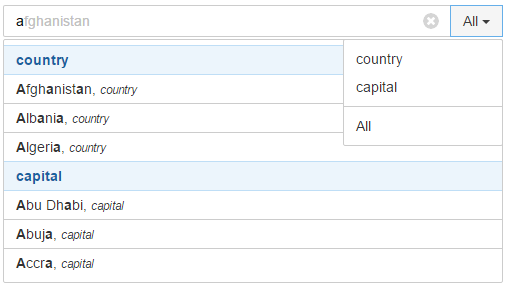
最终结果应该如下所示:
回答 1
Stack Overflow用户
发布于 2017-01-20 13:20:22
您可以使用ajax方法从数据库或您想要的其他地方获取数据。请参阅以下脚本:
$(document).ready(function(){
    $.ajax({
       type: "GET",
       url: "your ajax url",
       dataType: "json",
       success: function(data) {
            typeof $.typeahead === 'function' && $.typeahead({
                input: ".js-typeahead-input",
                minLength: 1, //minimum character length
                order: "asc",
                hint: true,
                source: data,
                debug: true
          });
       }
});页面原文内容由Stack Overflow提供。腾讯云小微IT领域专用引擎提供翻译支持
原文链接:
https://stackoverflow.com/questions/39389657
复制相关文章
相似问题
腾讯云开发者

Copyright © 2013 - 2026 Tencent Cloud. All Rights Reserved. 腾讯云 版权所有
深圳市腾讯计算机系统有限公司 ICP备案/许可证号:粤B2-20090059  粤公网安备44030502008569号
腾讯云计算(北京)有限责任公司 京ICP证150476号 | 京ICP备11018762号