
如何在Inno设置中设置“停止”和“暂停”/“恢复/播放”音乐按钮
如何在Inno设置中设置“停止”和“暂停”/“恢复/播放”音乐按钮
提问于 2016-09-07 09:11:54
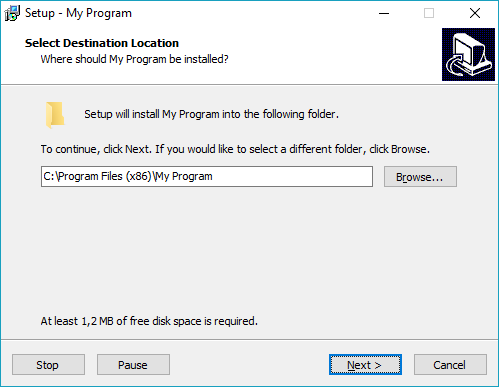
我想要创建两个按钮相邻的每个-其他在左下角的所有页面,如重新加载。
第一个按钮显示“暂停”和“恢复”命令(如果我单击“暂停”,该按钮将自动切换到“恢复”)。
另一个按钮显示停止命令(如果我单击Stop,next按钮将自动切换到从start开始播放)。
这段代码只是添加了暂停/恢复/播放从开始*按钮和停止按钮
问题是:如果我按下 Stop 按钮,音乐就会永久停止, Play form start 按钮永远不会出现。
    [Setup]
AppName=Bass Audio Project
AppVersion=1.0
DefaultDirName={pf}\Bass Audio Project

[Files]
Source: Bass.dll; Flags: dontcopy
Source: AudioFile.mp3; Flags: dontcopy


[Code]
const
  BASS_SAMPLE_LOOP = 4;
  BASS_ACTIVE_STOPPED = 0;
  BASS_ACTIVE_PLAYING = 1;
  BASS_ACTIVE_STALLED = 2;
  BASS_ACTIVE_PAUSED  = 3;
  BASS_UNICODE = $80000000;
  BASS_CONFIG_GVOL_STREAM = 5;
const
  #ifndef UNICODE
    EncodingFlag = 0;
  #else
    EncodingFlag = BASS_UNICODE;
  #endif
type
  HSTREAM = DWORD;

function BASS_Init(device: LongInt; freq, flags: DWORD;
  win: HWND; clsid: Cardinal): BOOL;
  external 'BASS_Init@files:bass.dll stdcall';
function BASS_StreamCreateFile(mem: BOOL; f: string; offset1: DWORD;
  offset2: DWORD; length1: DWORD; length2: DWORD; flags: DWORD): HSTREAM;
  external 'BASS_StreamCreateFile@files:bass.dll stdcall';
function BASS_Start: BOOL;
  external 'BASS_Start@files:bass.dll stdcall';
function BASS_Pause: BOOL;
  external 'BASS_Pause@files:bass.dll stdcall';
function BASS_Stop(): Boolean;
  external 'BASS_Stop@files:BASS.dll stdcall delayload';
function BASS_ChannelPlay(handle: DWORD; restart: BOOL): BOOL;
  external 'BASS_ChannelPlay@files:bass.dll stdcall';
function BASS_SetConfig(option: DWORD; value: DWORD ): BOOL;
  external 'BASS_SetConfig@files:bass.dll stdcall';
function BASS_ChannelIsActive(handle: DWORD): DWORD;
  external 'BASS_ChannelIsActive@files:bass.dll stdcall';
function BASS_Free: BOOL;
  external 'BASS_Free@files:bass.dll stdcall';

var
  SoundStream: HSTREAM;
  PauseResumePlayButton: TNewButton;
  StopButton: TNewButton;

procedure ResumeButtonClick(Sender: TObject); forward;

procedure PauseButtonClick(Sender: TObject);
begin
  if BASS_Pause then
  begin
    PauseResumePlayButton.Caption := 'Resume';
    PauseResumePlayButton.OnClick := @ResumeButtonClick;
  end;
end;

procedure ResumeButtonClick(Sender: TObject);
begin
  if BASS_start then
  begin
    PauseResumePlayButton.Caption := 'Pause';
    PauseResumePlayButton.OnClick := @PauseButtonClick;
  end;
end;

procedure PlayButtonClick(Sender: TObject);
begin
  if BASS_Start then
  begin
    PauseResumePlayButton.Caption := 'Pause';
    PauseResumePlayButton.OnClick := @PauseButtonClick;
  end;
end;


procedure StopButtonClick(Sender: TObject);
begin
  if BASS_Stop then
  begin
    PauseResumePlayButton.Caption := 'Play';
    PauseResumePlayButton.OnClick := @PlayButtonClick;
  end;
       begin
       BASS_Free;
       end;
end;

procedure InitializeWizard();
begin
  ExtractTemporaryFile('AudioFile.mp3');
  if BASS_Init(-1, 44100, 0, 0, 0) then
  begin
    SoundStream :=
      BASS_StreamCreateFile(
        False, ExpandConstant('{tmp}\AudioFile.mp3'), 0, 0, 0, 0,
        EncodingFlag or BASS_SAMPLE_LOOP);
    BASS_SetConfig(BASS_CONFIG_GVOL_STREAM, 2500);
    BASS_ChannelPlay(SoundStream, False);

    StopButton := TNewButton.Create(WizardForm);
    StopButton.Parent := WizardForm;
    StopButton.Left :=
      WizardForm.ClientWidth -
      WizardForm.CancelButton.Left - WizardForm.CancelButton.Width;
    StopButton.Top := WizardForm.CancelButton.Top;
    StopButton.Width :=  WizardForm.CancelButton.Width;
    StopButton.Height := WizardForm.CancelButton.Height;
    StopButton.Caption := 'Stop';
    StopButton.OnClick := @StopButtonClick;

    PauseResumePlayButton := TNewButton.Create(WizardForm);
    PauseResumePlayButton.Parent := WizardForm;
    PauseResumePlayButton.Left :=
      WizardForm.ClientWidth -
      WizardForm.NextButton.Left - WizardForm.NextButton.Width;
    PauseResumePlayButton.Top := WizardForm.CancelButton.Top;
    PauseResumePlayButton.Width :=  WizardForm.CancelButton.Width;
    PauseResumePlayButton.Height := WizardForm.CancelButton.Height;
    PauseResumePlayButton.Caption := 'Pause';
    PauseResumePlayButton.OnClick := @PauseButtonClick;
  end;
end;

procedure DeinitializeSetup;
begin
  BASS_Free;
end;回答 2
Stack Overflow用户
回答已采纳
发布于 2016-09-09 05:51:24
使用单个OnClick处理程序来实现这一点并不是一个好主意。
根据需要动态更改OnClick处理程序,以获得更直接的代码:
const
  BASS_SAMPLE_LOOP = 4;
  BASS_ACTIVE_STOPPED = 0;
  BASS_ACTIVE_PLAYING = 1;
  BASS_ACTIVE_STALLED = 2;
  BASS_ACTIVE_PAUSED  = 3;
  BASS_UNICODE = $80000000;
  BASS_CONFIG_GVOL_STREAM = 5;
const
  #ifndef UNICODE
    EncodingFlag = 0;
  #else
    EncodingFlag = BASS_UNICODE;
  #endif
type
  HSTREAM = DWORD;

function BASS_Init(device: LongInt; freq, flags: DWORD;
  win: HWND; clsid: Cardinal): Boolean;
  external 'BASS_Init@files:bass.dll stdcall';
function BASS_StreamCreateFile(mem: Boolean; f: string; offset1: DWORD;
  offset2: DWORD; length1: DWORD; length2: DWORD; flags: DWORD): HSTREAM;
  external 'BASS_StreamCreateFile@files:bass.dll stdcall';
function BASS_ChannelPlay(handle: DWORD; restart: Boolean): Boolean;
  external 'BASS_ChannelPlay@files:bass.dll stdcall';
function BASS_ChannelPause(handle: DWORD): Boolean;
  external 'BASS_ChannelPause@files:bass.dll stdcall';
function BASS_SetConfig(option: DWORD; value: DWORD ): Boolean;
  external 'BASS_SetConfig@files:bass.dll stdcall';
function BASS_ChannelIsActive(handle: DWORD): DWORD;
  external 'BASS_ChannelIsActive@files:bass.dll stdcall';

var
  SoundStream: HSTREAM;
  PauseResumePlayButton: TNewButton;
  StopButton: TNewButton;

procedure ResumeButtonClick(Sender: TObject); forward;

procedure PauseButtonClick(Sender: TObject);
begin
  if BASS_ChannelPause(SoundStream) then
  begin
    PauseResumePlayButton.Caption := 'Resume';
    PauseResumePlayButton.OnClick := @ResumeButtonClick;
  end;
end;

procedure ResumeButtonClick(Sender: TObject);
begin
  if BASS_ChannelPlay(SoundStream, False) then
  begin
    PauseResumePlayButton.Caption := 'Pause';
    PauseResumePlayButton.OnClick := @PauseButtonClick;
  end;
end;

procedure PlayButtonClick(Sender: TObject);
begin
  if BASS_ChannelPlay(SoundStream, True) then
  begin
    PauseResumePlayButton.Caption := 'Pause';
    PauseResumePlayButton.OnClick := @PauseButtonClick;
  end;
end;

procedure StopButtonClick(Sender: TObject);
begin
  if (BASS_ChannelIsActive(SoundStream) = BASS_ACTIVE_PAUSED) or
     BASS_ChannelPause(SoundStream) then
  begin
    PauseResumePlayButton.Caption := 'Play';
    PauseResumePlayButton.OnClick := @PlayButtonClick;
  end;
end;

procedure InitializeWizard();
begin
  if BASS_Init(-1, 44100, 0, 0, 0) then
  begin
    ExtractTemporaryFile('AudioFile.mp3');
    SoundStream :=
      BASS_StreamCreateFile(
        False, ExpandConstant('{tmp}\AudioFile.mp3'), 0, 0, 0, 0,
        EncodingFlag or BASS_SAMPLE_LOOP);

    if SoundStream <> 0 then
    begin
      BASS_SetConfig(BASS_CONFIG_GVOL_STREAM, 2500);

      if BASS_ChannelPlay(SoundStream, False) then
      begin
        StopButton := TNewButton.Create(WizardForm);
        StopButton.Parent := WizardForm;
        StopButton.Left :=
          WizardForm.ClientWidth -
          WizardForm.CancelButton.Left -  WizardForm.CancelButton.Width;
        StopButton.Top := WizardForm.CancelButton.Top;
        StopButton.Width :=  WizardForm.CancelButton.Width;
        StopButton.Height := WizardForm.CancelButton.Height;
        StopButton.Caption := 'Stop';
        StopButton.OnClick := @StopButtonClick;

        PauseResumePlayButton := TNewButton.Create(WizardForm);
        PauseResumePlayButton.Parent := WizardForm;
        PauseResumePlayButton.Left :=
          WizardForm.ClientWidth -
          WizardForm.NextButton.Left -  WizardForm.NextButton.Width;
        PauseResumePlayButton.Top := WizardForm.CancelButton.Top;
        PauseResumePlayButton.Width :=  WizardForm.CancelButton.Width;
        PauseResumePlayButton.Height := WizardForm.CancelButton.Height;
        PauseResumePlayButton.Caption := 'Pause';
        PauseResumePlayButton.OnClick := @PauseButtonClick;
      end;
    end;
  end;
end;- 请注意,您使用相同的参数两次调用
BASS_StreamCreateFile、BASS_SetConfig和BASS_ChannelPlay。这毫无意义。我已经把第二盘拿走了。 - 我还调整了按钮的位置。
Stack Overflow用户
发布于 2020-01-06 10:25:35
function BASS_ChannelPlay(handle: DWORD; restart: Boolean): Boolean;
  external 'BASS_ChannelPlay@files:bass.dll stdcall';
function BASS_ChannelPause(handle: DWORD): Boolean;
  external 'BASS_ChannelPause@files:bass.dll stdcall';
function BASS_ChannelIsActive(handle: DWORD): DWORD;
  external 'BASS_ChannelIsActive@files:bass.dll stdcall';

procedure MusicButtonOnClick(Sender: TObject);
begin
  if (BASS_ChannelIsActive(SoundStream) = 3)
 then
  BASS_ChannelPlay(SoundStream, False)
 else
  BASS_ChannelPause(SoundStream)
end;
在button.OnClick上添加如下:
YourButtonName.OnClick := @MusicButtonOnClick;页面原文内容由Stack Overflow提供。腾讯云小微IT领域专用引擎提供翻译支持
原文链接:
https://stackoverflow.com/questions/39365779
复制相关文章
相似问题
腾讯云开发者

Copyright © 2013 - 2026 Tencent Cloud. All Rights Reserved. 腾讯云 版权所有
深圳市腾讯计算机系统有限公司 ICP备案/许可证号:粤B2-20090059  粤公网安备44030502008569号
腾讯云计算(北京)有限责任公司 京ICP证150476号 | 京ICP备11018762号