
VBA以水平方式将垂直保存的字符串的拆分元素复制到另一个工作表中。
VBA以水平方式将垂直保存的字符串的拆分元素复制到另一个工作表中。
提问于 2016-09-07 08:54:35
我希望从此工作表中保存每个ID (第1行)的垂直保存信息:

到另一个工作表,它如下所示:
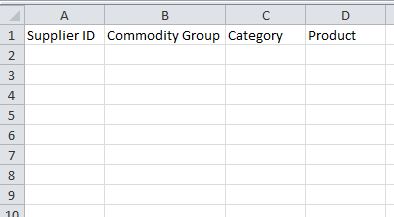
对于每一列,使用第1行中的ID,都会将技能保存为字符串。每个部分(有3)应该分别保存在B、C和D列的第二个工作表上。
使用下面我将发布的代码,没有错误。它根本什么也做不了。当在代码中使用stop时,问题似乎是我试图查找的ID项(FindIDcol,FindIDrow)仅仅是“没什么”。
我对VBA非常陌生,可能有一种过于复杂的方法或无效的代码。不过,我希望你们中的一个能帮到我。
提前感谢您的帮助!
这里我的代码:
Dim wsInput As Worksheet
Set wsInput = ActiveWorkbook.Worksheets("Supplier Skills")
Dim wsOutput As Worksheet
Set wsOutput = ActiveWorkbook.Worksheets("Search Skills")

Dim IDcolumn As Range
Dim IDrow As Range
Dim lastcol As Integer
Dim lastRow As Integer
Dim NextRow As Integer
Dim FindIDcol As Range
Dim FindIDrow As Range

With wsInput
    lastcol = .Cells(1, Columns.Count).End(xlToLeft).Column
    LastColLetter = Split(Cells(1, lastcol).Address(True, False), "$")(0)

    'For every column on Input-Sheet with Data
    For Each IDcolumn In wsInput.Range("A1:" & LastColLetter & "1")

        'Firstly, find each ID column
        FindIDcol = wsInput.Range("A1:" & LastColLetter & "1").Find(What:=IDcolumn, LookIn:=xlValues, LookAt:=xlWhole, MatchCase:=False)
        If Not FindIDcol Is Nothing Then

            'Secondly, get the respective column Letter
            IDcolLetter = Split(FindIDcol.Address, "$")(0)

                'Thirdly, find all skills saved in rows beneath this column
                lastRow = .Range(IDcolLetter & .Rows.Count).End(xlUp).row
                For Each IDrow In wsInput.Range(IDcolLetter & "1:" & IDcolLetter & lastRow)

                    'Fourthly, get the respective row-number for each skill
                    FindIDrow = wsInput.Range(IDcolLetter & "2:" & IDcolLetter & lastRow).Find(What:=IDrow, LookIn:=xlValues, LookAt:=xlWhole, MatchCase:=False)
                    IDrowNumber = Split(FindIDrow.Address, "$")(1)

                    'Fifthly, split the strings in 3 parts
                    Dim myElements() As String
                    myElements = Split(wsInput.Range(IDcolLetter & IDrowNumber).value, "\")

                    'Sixthly, for every skill of that supplier, copy the ID in A, CG in B, Category in C and Product in D
                    NextRow = wsOutput.Range("A" & Rows.Count).End(xlUp).row + 1

                    wsInput.Range(IDcolLetter & "1").Copy Destination:=wsOutput.Range("A" & NextRow) 'ID
                    wsOutput.Range("B" & NextRow) = myElements(0)                                 'Commodity Group
                    wsOutput.Range("C" & NextRow) = myElements(1)                                 'Category
                    wsOutput.Range("D" & NextRow) = myElements(2)                                 'Product

                Next IDrow

        End If

    Next IDcolumn

End With回答 1
Stack Overflow用户
回答已采纳
发布于 2016-09-07 10:48:28
站在显示的数据结构上,如果我正确地解释了您的目标,您可以简化代码如下:
Option Explicit

Sub main()
    Dim wsOutput As Worksheet
    Dim colCell As Range, rowCell As Range
    Dim outputRow As Long

    Set wsOutput = Worksheets("Output") '<--| change "Output" to your actual output sheet name
    outputRow = 2 '<--| initialize output row to 2 (row 1 is for headers)

    With Worksheets("Input") '<--| reference input sheet (change "Input" to your actual input sheet name)
        For Each colCell In .Range("A1", .Cells(1, .Columns.Count).End(xlToLeft)).SpecialCells(XlCellType.xlCellTypeConstants) '<--| iterate over its row 1 non blank cells
            For Each rowCell In .Range(colCell.Offset(1), colCell.End(xlDown)) '<--| iterate over current column rows from row 2 down to last contiguous non empty one
                wsOutput.Cells(outputRow, 1) = colCell.Value '<--| write ID in column 1 of current output row
                wsOutput.Cells(outputRow, 2).Resize(, 3) = Split(rowCell.Value, "\") '<--| write other info from column 2 rightwards of current output row
                outputRow = outputRow + 1 '<--| update output row
            Next rowCell
        Next colCell
    End With
End Sub
如果您处理任何ID (空白单元格)以下的输入表非连续数据或下面没有数据的ID,则需要进行一些更改。
页面原文内容由Stack Overflow提供。腾讯云小微IT领域专用引擎提供翻译支持
原文链接:
https://stackoverflow.com/questions/39365406
复制相关文章
相似问题
腾讯云开发者

Copyright © 2013 - 2026 Tencent Cloud. All Rights Reserved. 腾讯云 版权所有
深圳市腾讯计算机系统有限公司 ICP备案/许可证号:粤B2-20090059  粤公网安备44030502008569号
腾讯云计算(北京)有限责任公司 京ICP证150476号 | 京ICP备11018762号