
在音乐符号软件中向JPanel添加图形的正确方法
我一直在开发一个音乐记谱软件,我想用它来训练我的音乐学生的视觉阅读能力。
我想知道我是否采取了正确的方法,或者是否有更好的方法。
我已经成功地使用了支持音乐符号的unicodes和字体来制作clef、notes和staff对象,这些代码使用如下代码:
public static void spaceStaff(Graphics g){
    Graphics2D g2 = (Graphics2D) g;
    g2.setRenderingHint(RenderingHints.KEY_ANTIALIASING, RenderingHints.VALUE_ANTIALIAS_ON);
    Font font = new Font("Bravura", Font.PLAIN, 32);
    g2.setFont(font);
    g2.drawString("\uD834\uDD1A", note.spacing-2, staffDistance);
    note.spacing = note.spacing + 16;
}
然后,我有一个名为Surface的类,它将注释绘制到一个JPanel上:
public class Surface extends JPanel {
@Override
public void paintComponent(Graphics g){
    super.paintComponent(g);
    staff.spaceStaff(g);
    clef.drawGclef(g);//not given in example code above
    note.drawCrotchet(g, note.B1);//not given in example code above
   }
}
我使用此代码启动应用程序并显示音乐音符:
public class SightreadHelper extends JFrame {

public SightreadHelper(){
    initUI();
}

private void initUI() {

    JButton button = new JButton("add notes"); //explanation for this button below
    button.setSize(150, 75);
    button.setVisible(true);
    add( button );

    button.addActionListener( new ActionListener()
    {
        public void actionPerformed(ActionEvent e)
        {
            repaint();//this doesn't work as I expect: explanation below
        }
    });

    Surface srf = new Surface();
    add(new Surface());
    setSize(700, 1000);
    setLocationRelativeTo(null);
    setDefaultCloseOperation(JFrame.EXIT_ON_CLOSE);
}
public static void main(String[] args) {
    EventQueue.invokeLater(new Runnable() {
        @Override
        public void run() {
            SightreadHelper srh = new SightreadHelper();
            srh.setVisible(true);
        }
    });
  }

}
该按钮应该在现有注释的末尾添加注释,但它没有。
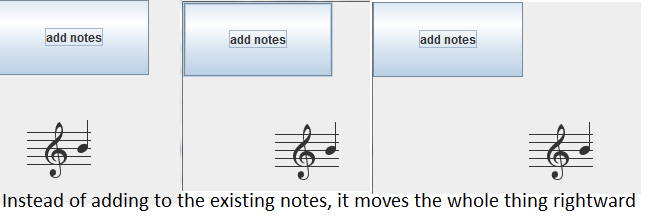
我用正确的程序做我想做的事吗?非常感谢你的帮助。我看到了这个问题,但它并没有帮助我:在JAVA中重新绘制小程序而不丢失以前的内容
回答 2
Stack Overflow用户
发布于 2016-09-05 13:35:54
一般来说,您的方法可能会起作用,但如果您倾向于将其推送到应用程序中,则可以使用简单的结构化方法来正确工作。这里缺少数据模型。您的软件直接绘制注释,而没有表示内部状态的模型。
您应该看看模型视图控制器抽象模式。首先开发一个数据模型,这与呈现笔记无关。
然后,您开始为单个元素(如音符)开发可视化。您将根据数据模型告诉您的内容在面板中组合组件并呈现它们。这就是在doPaintComponent方法中应该做的事情。
单击“添加注意事项”按钮时,应执行以下步骤:
- 在模型中添加一个注释
- 您的模型创建一个ui事件,结果调用重绘方法,甚至可能是布局方法重新绘制ui,理想情况下,只重新绘制需要重新绘制的部分。
如果在呈现过程中没有看到某些内容,请确保首先检查以下内容:
- 您的呈现代码是否由awt线程调用?
- 你的组件可见吗?
- 你想画的位置对吗?
您也许应该多读一本关于开发自定义swing组件(如Oracle教程自定义Swing组件 )的教程。
我知道,在短期内,答案可能并不能真正帮助您,但我认为,在尝试让您的代码运行之前,最好先了解UI开发的概念。
Stack Overflow用户
发布于 2016-09-06 13:38:46
可视化乐谱的类,它应该嵌入到应用程序中,而不是在其on上启动框架。它只演示MVC编码模式。可视化严格地描述了模型(NoteSequence)的意思。
package com.musicsheet;

import javax.swing.*;
import java.awt.*;
import java.awt.event.ActionEvent;
import java.beans.PropertyChangeEvent;
import java.beans.PropertyChangeListener;
public class MusicSheetComponent extends JPanel implements PropertyChangeListener {
  private NoteSequence noteSequence;
  public MusicSheetComponent(NoteSequence noteSequence) {
    this.noteSequence = noteSequence;
    this.noteSequence.addNoteSequenceChangedListener(this);
  }
  public static void main(String[] args) {

    SwingUtilities.invokeLater(() -> {
      JFrame f = new JFrame();
      NoteSequence noteSequence = new NoteSequence(); // the model
      f.setLayout(new BorderLayout()); // how should the screen be layouted
      f.add(new MusicSheetComponent(noteSequence), BorderLayout.CENTER); // the sheet component is the view, it renders whatever the model
                                                    // tells
      f.add(new JButton(new AbstractAction("Add note") {
        @Override
        public void actionPerformed(ActionEvent e) {
          noteSequence.addNote(new NoteSequence.Note((int)(Math.random()*5)));   // add a note on a random line
        }
      }), BorderLayout.SOUTH);
      f.setSize(320, 240);
      f.setVisible(true);
    });
  }

  @Override
  protected void paintComponent(Graphics g2d) {
    super.paintComponent(g2d);
    Graphics2D g = (Graphics2D) g2d; // graphics2d has more functions
    int w = getWidth();
    int h = getHeight();
    int lines = 5;
    int spacing = h / lines;
    paintSheetBackground(g, w, h, spacing);
    drawNotes(g, spacing);
  }

  private void paintSheetBackground(Graphics2D g, int w, int h, int spacing) {
    g.setColor(Color.white);
    g.fillRect(0, 0, w, h);

    g.setColor(Color.black);
    for (int i = 0; i < 5; i++) {
      final int y2 = i * spacing;
      g.drawLine(0, y2, w, y2);
    }
  }

  private void drawNotes(Graphics2D g, int heigtSpacing) {
    int xSpacing = 30;
    int x = 0;
    for (NoteSequence.Note note : noteSequence.getNotes()) {
      int y = (int) (note.getLine()*heigtSpacing);
      g.fillOval(x, y-3, 7, 6); // -3 because note should sit on line
      x+= xSpacing;
    }
  }

  @Override
  public void propertyChange(PropertyChangeEvent evt) {
    if (NoteSequence.PROP_NOTE_ADDED.equals(evt.getPropertyName()) || NoteSequence.PROP_NOTE_REMOVED.equals(evt.getPropertyName())) {
      repaint();
    }
  }
}
接下来,对乐谱或音符序列建模的类。
package com.musicsheet;

import java.beans.PropertyChangeEvent;
import java.beans.PropertyChangeListener;
import java.beans.PropertyChangeSupport;
import java.util.ArrayList;
import java.util.Collections;
import java.util.List;

/**
 * The model class, that holds all notes.
 */
public class NoteSequence {
  public static final String PROP_NOTE_ADDED = "noteAdded";
  public static final String PROP_NOTE_REMOVED = "noteRemoved";

  private PropertyChangeSupport propertyChangeSupport = new PropertyChangeSupport(this);
  private final List<Note> notes = new ArrayList<>();

  public List<Note> getNotes() {
    return Collections.unmodifiableList(notes);
  }

  /**
   * is called by the UI or a button listener when a note should be added to this music sheet / notesequence
   * @param note
   */
  public void addNote(Note note) {
    this.notes.add(note);
    propertyChangeSupport.firePropertyChange(new PropertyChangeEvent(this, PROP_NOTE_ADDED, null, note));
  }

  public void removeNote(Note note) {
    this.notes.remove(note);
    propertyChangeSupport.firePropertyChange(new PropertyChangeEvent(this, PROP_NOTE_REMOVED, note, null));
  }

  void addNoteSequenceChangedListener(PropertyChangeListener listener) {
    propertyChangeSupport.addPropertyChangeListener(listener);
  }

  // not really needed atm
  void removeNoteSequenceChangedListener(PropertyChangeListener listener) {
    propertyChangeSupport.removePropertyChangeListener(listener);
  }

  /**
   * a single note.
   */
  public static class Note {
    private float line; // where does the note sit
    private float timestampSinceBeginning; // not used, but you have to know WHEN a note is played
    // ... more properties, e.g. name, or modifiers or whatever

    public Note(float line) { // this is certainly to easy, since notes can sit in between lines,
      // i did not try to think deeply into it, to define a better model
      this.line = line;
    }

    public float getLine() {
      return line;
    }

    public float getTimestampSinceBeginning() {
      return timestampSinceBeginning;
    }
  }
}https://stackoverflow.com/questions/39331361
复制相似问题
腾讯云开发者

Copyright © 2013 - 2026 Tencent Cloud. All Rights Reserved. 腾讯云 版权所有
深圳市腾讯计算机系统有限公司 ICP备案/许可证号:粤B2-20090059  粤公网安备44030502008569号
腾讯云计算(北京)有限责任公司 京ICP证150476号 | 京ICP备11018762号