
无法在Magenta接口中初始化捕获会话
我遵循了洋红MIDI界面中的指令,但未能启动捕获会话。基本上,即使在我将VMPK (Virtual钢琴键盘)中的调制轮设置为最大值( 127 )之后,也不会发生任何事情。
我使用下面的shell脚本启动Magenta界面。
#!/bin/bash
echo "Hello, MIDI!"

CURR_DIR=`pwd`
TMP_DIR=$CURR_DIR/tmp

cd ~/git/magenta

# List all available ports
bazel-bin/magenta/interfaces/midi/midi --list

bazel-bin/magenta/interfaces/midi/midi \
--input_port="VMPK Output" \
--output_port="VMPK Input" \
--generator_name=attention_rnn \
--checkpoint=$TMP_DIR/attention_rnn/logdir/run1/train \
--hparams="{'batch_size':32,'rnn_layer_sizes':[32, 32]}"
这是一个输出。
Hello, MIDI!
Input ports: 'VMPK Output'
Output ports: 'VMPK Input'
WARNING:tensorflow:<tensorflow.python.ops.rnn_cell.BasicLSTMCell object at 0x11cbccad0>: Using a concatenated state is slower and will soon be deprecated.  Use state_is_tuple=True.
WARNING:tensorflow:<tensorflow.python.ops.rnn_cell.BasicLSTMCell object at 0x11cbcce10>: Using a concatenated state is slower and will soon be deprecated.  Use state_is_tuple=True.
WARNING:tensorflow:<tensorflow.contrib.rnn.python.ops.rnn_cell.AttentionCellWrapper object at 0x11cbccb90>: Using a concatenated state is slower and will soon be deprecated.  Use state_is_tuple=True.
Waiting for start control signal...
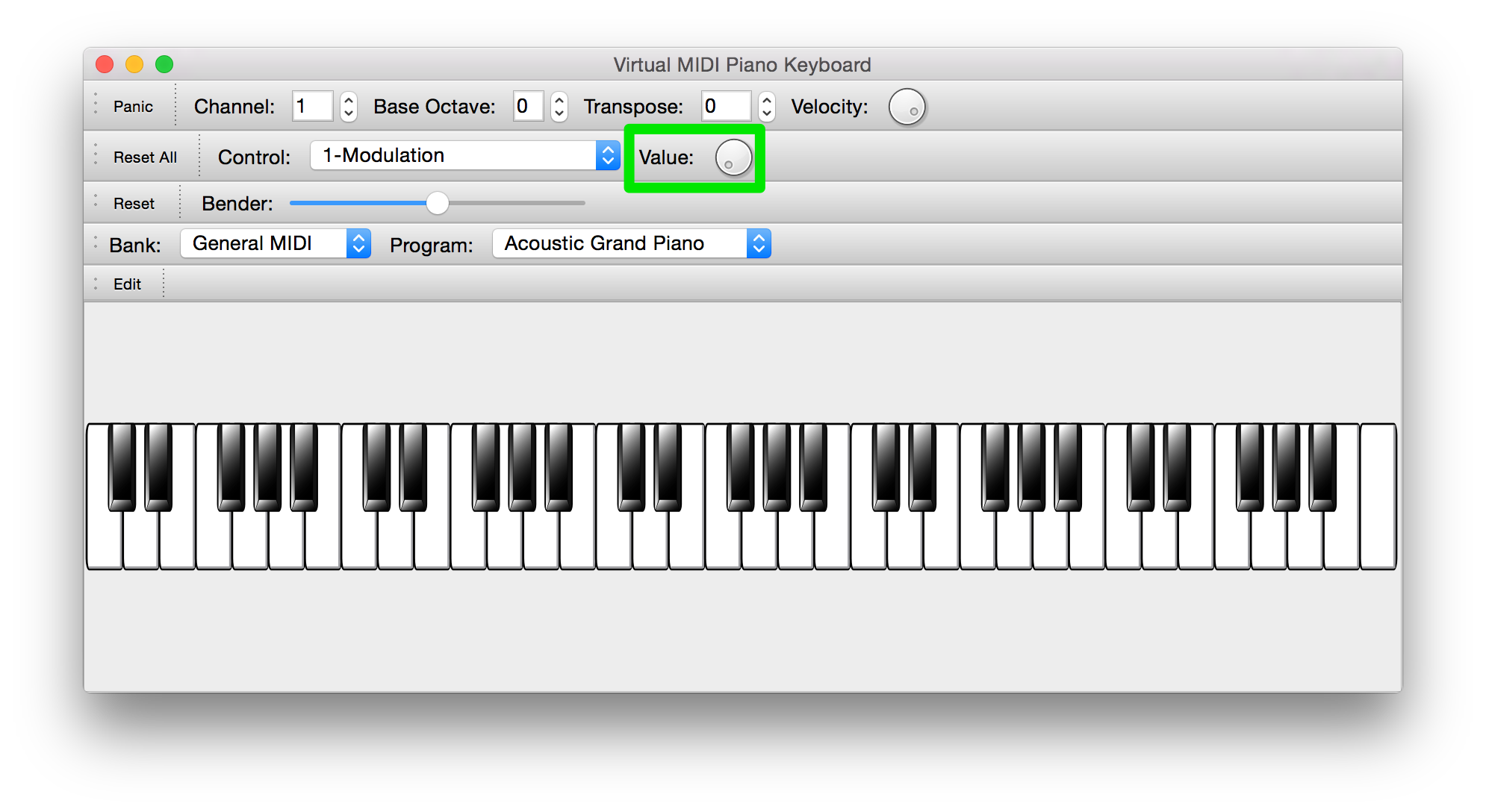
此时,我旋转VMPK上的调制轮,它被一个绿色的方框包围,如下图所示,但是即使值设置为127,也不会发生任何事情。
我的环境是:
- Mac Yosemite 10.10.5
- Python 2.7.11
- Tensorflow 0.10.0rc0
- 品红86ea30ab27adf5923902d0f297ca42bd12bcb4d1
回答 4
Stack Overflow用户
发布于 2016-09-14 07:22:32
最后,问题得到了解决。
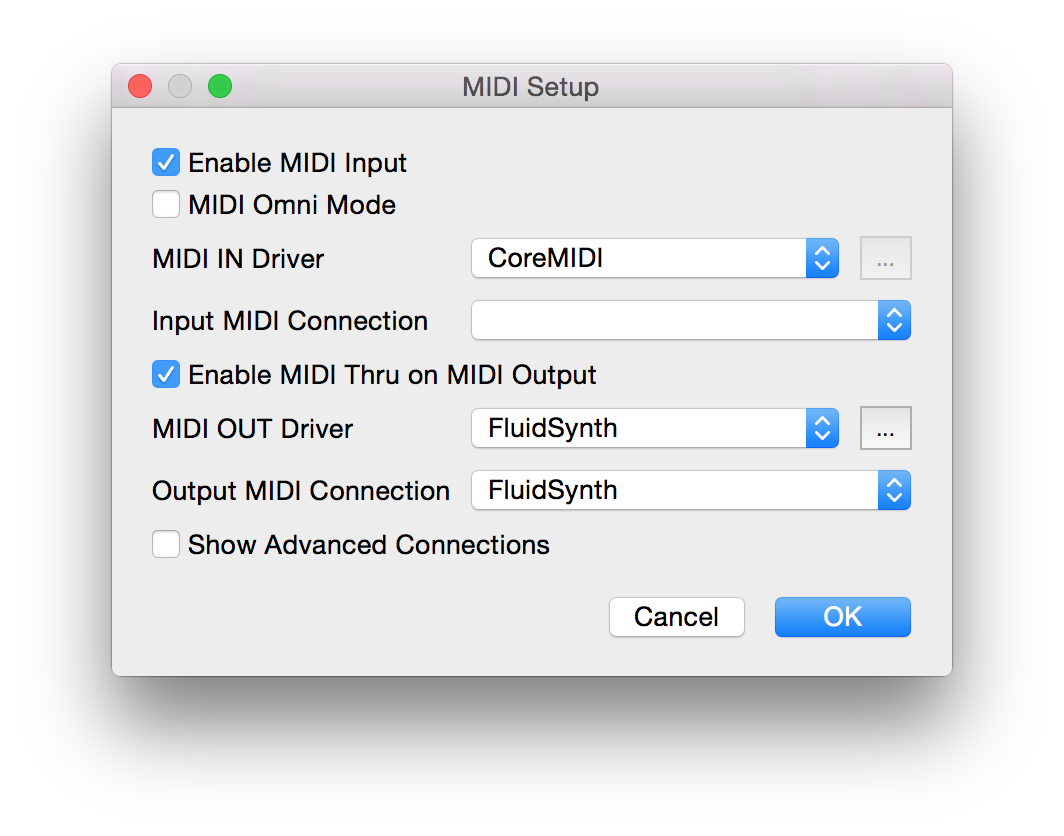
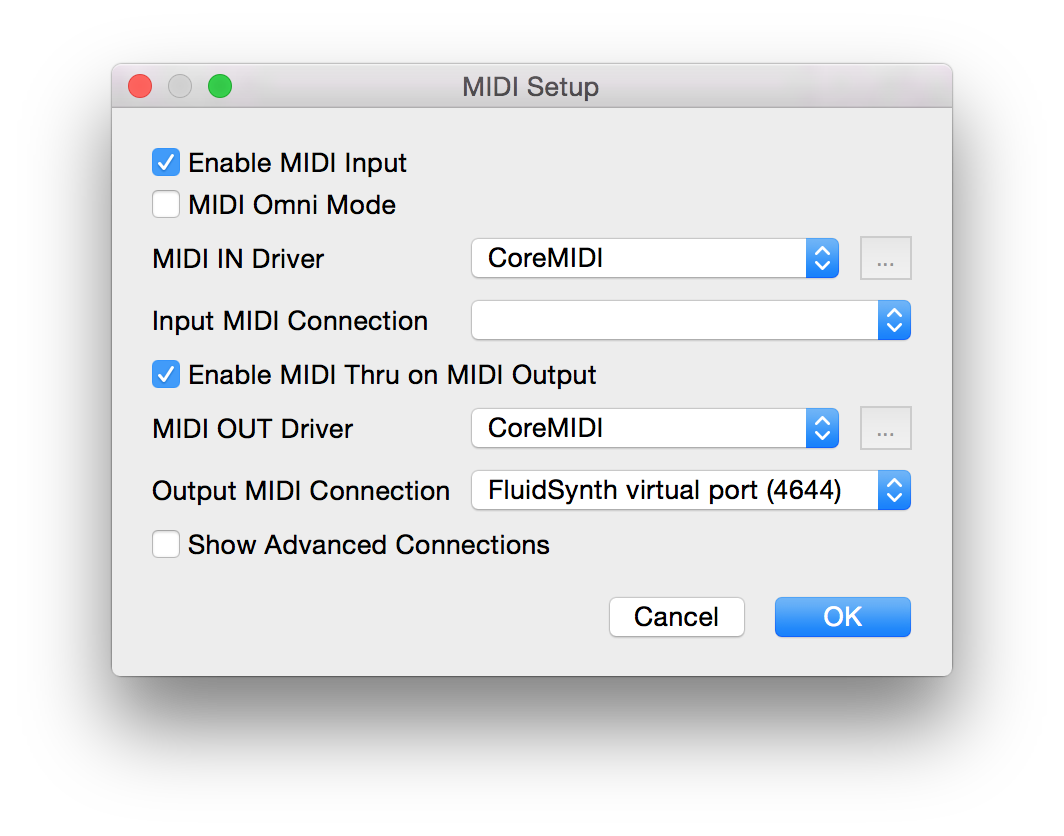
问题是VMPK中MIDI连接的配置。
这是不起作用的设置。
这是一个很好的环境。
亚当,非常感谢你的帮助和耐心。
Stack Overflow用户
发布于 2016-09-06 06:57:52
通过将MIDI驱动程序从FluidSynth更改为CoreMIDI,我成功地在Magenta接口中初始化了捕获会话。我可以通过将调制轮的值设置为127来启动捕获会话,并通过将其设置为0来完成会话。此外,我可以“看到”键是自动按下生成的序列。这是我终端上的输出。
Waiting for start control signal...
Capturing notes until stop control signal..........................................................Done
Generating response...Done
Playing sequence.....................................................Done
然而,在这次修改之后,我完全失去了声音.我可以在视觉上“看到”钢琴的琴键被产生的声音按下,但我什么也听不到。这种声音的丢失一直存在,直到我将MIDI驱动程序设置回原来的设置,即FluidSynth。然后,我失去了初始化Magenta接口的方法.
有人知道吗?
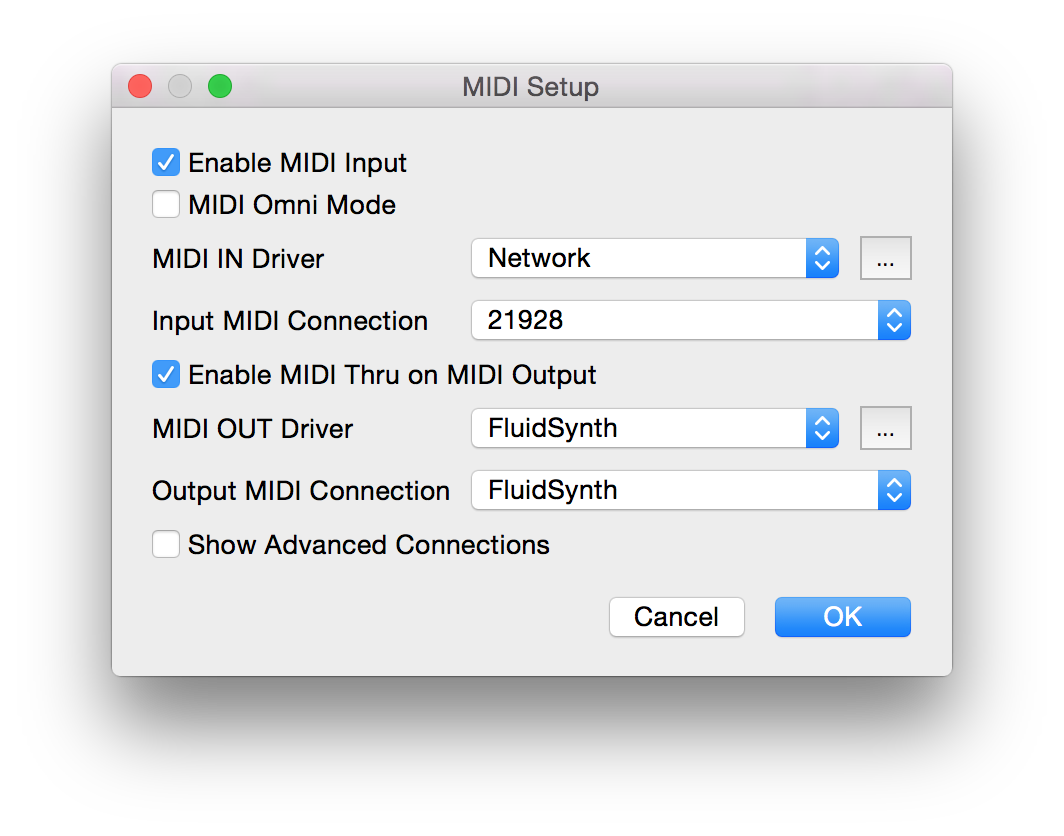
下面是我对VMPK连接的默认设置(编辑> MIDI连接)。在这种情况下,
- 我无法初始化Magenta接口
- 我能听到钢琴的声音
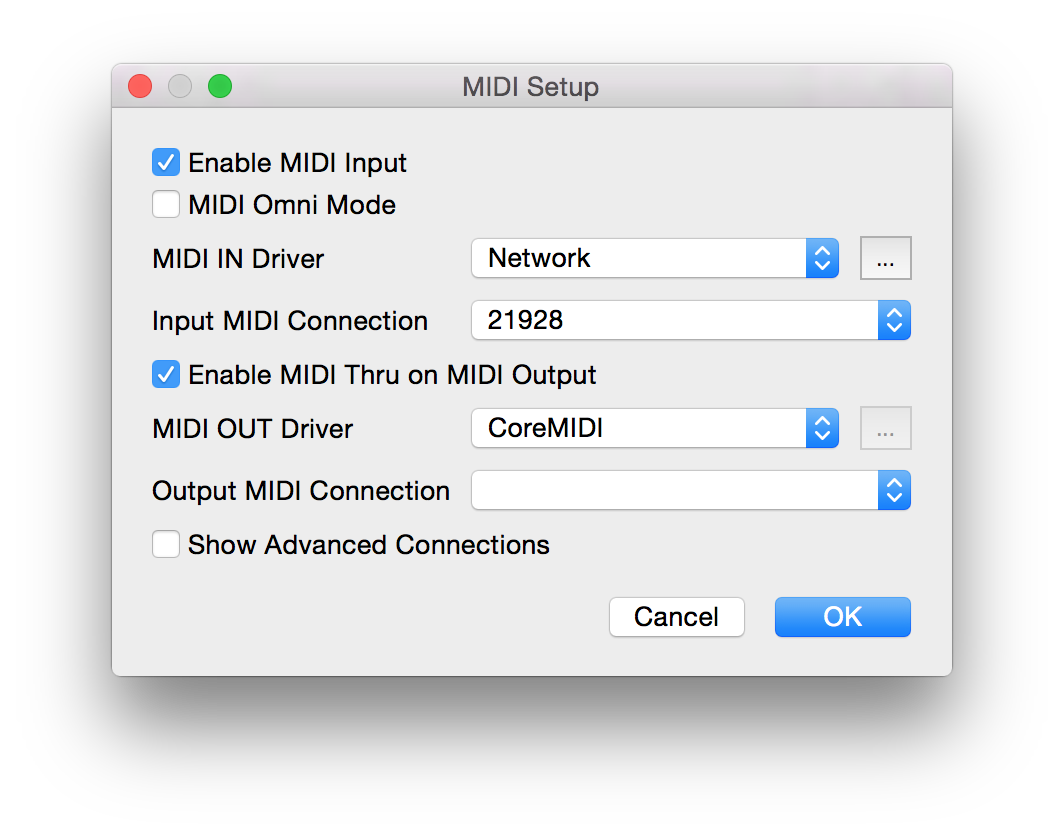
这是我修改的VMPK连接设置。在这种情况下,
- 我可以初始化Magenta接口并生成序列。
- 我听不到钢琴的声音
Stack Overflow用户
发布于 2016-09-11 17:00:29
这是我对这个问题的回答:“你现在是否已经启动了流体合成?你也应该在列表中看到它。-亚当·罗伯茨。”
不没有。所以我做了下面的事。我首先使用名为FluidR3 3_GM2-2.SF2的声音字体移到目录中。然后在控制台中键入以下命令。
fluidsynth -a coreaudio>标记出现在控制台中,因此我输入了以下命令。
> load FluidR3_GM2-2.SF2然后出现以下消息。
loaded SoundFont has ID 1然后我打开VMPK应用程序。首先,我使用Edit>MIDI连接将MIDI驱动程序更改为CoreMIDI,并输出到FluidSynth virtual port (20082)的MIDI连接。
然后输入以下命令,
bazel-bin/magenta/interfaces/midi/midi --list 并获得以下输出:
Input ports: 'VMPK Output'
Output ports: 'FluidSynth virtual port (20082)', 'VMPK Input'
这个输出看起来很好,但我仍然不能听到所产生的声音,即使我可以用我的键盘和旋律来优化模型。
这是我在控制台上得到的输出。
Input ports: 'VMPK Output'
Output ports: 'FluidSynth virtual port (20082)', 'VMPK Input'
WARNING:tensorflow:<tensorflow.python.ops.rnn_cell.BasicLSTMCell object at 0x11cbbe910>: Using a concatenated state is slower and will soon be deprecated.  Use state_is_tuple=True.
WARNING:tensorflow:<tensorflow.python.ops.rnn_cell.BasicLSTMCell object at 0x11cbbe210>: Using a concatenated state is slower and will soon be deprecated.  Use state_is_tuple=True.
Waiting for start control signal...
Capturing notes until stop control signal..................................Done
Generating response...Done
Playing sequence..........................................Done
Capturing notes until stop control signal..........................................Done
Generating response...Done
Playing sequence...........................................Done https://stackoverflow.com/questions/39313066
复制相似问题
腾讯云开发者

Copyright © 2013 - 2026 Tencent Cloud. All Rights Reserved. 腾讯云 版权所有
深圳市腾讯计算机系统有限公司 ICP备案/许可证号:粤B2-20090059  粤公网安备44030502008569号
腾讯云计算(北京)有限责任公司 京ICP证150476号 | 京ICP备11018762号