
用Okio创建WAV文件
用Okio创建WAV文件
提问于 2016-08-30 23:27:23
我的系统需要使用WAV文件数组的字节创建一个WAV文件。目前,它使用Okio在缓冲区上读取和写入数据,然后将数据写入最终文件。
我跟踪这个文档和这个堆栈溢出问题:
- http://tiny.systems/software/soundProgrammer/WavFormatDocs.pdf
- https://stackoverflow.com/a/12370312/2430555
还有..。
- Okio: 1.10.0
- 科特林: 1.0.2-1
- Java: 1.7
我创建了以下代码:
fun mixAudios() {

    try {

        //Create the file used to storage the mixed audio file.
        val file = File(directory, finalFileName)

        //Open the buffer for this file.
        val bufferedSink = Okio.buffer(Okio.appendingSink(file))

        //Data header of the file.
        val header = Buffer()

        //Data of the file.
        val data = Buffer()

        //Do a action for every audio.
        audios.forEach {

            //Try to read the file, if success, return the file.
            Okio.buffer(Okio.source(File(it.address)))?.let { file ->

                //Create a new buffer for every audio address.
                val buffer = Buffer()

                //Read every byte on the buffer.
                file.readAll(buffer)

                //Remove the first 44 items of the buffer.
                buffer.readByteArray(44)

                //Get the buffer and write every byte on the sink.
                data.writeAll(buffer)

                //Close the sink.
                buffer.close()
                file.close()
            }
        }

        //Count of bytes on the data buffer.
        val fileSize = data.size().toInt()

        //The data is ready to be written on the sink.
        data.close()

        val totalFileSize = fileSize + 36
        val byteRate = (SAMPLE_RATE * CHANNELS * BYTES_PER_SAMPLE) / 8

        //Write the header of the final file.
        header.writeUtf8("RIFF")

            //Write the total file size (with the header)
            .writeByte(totalFileSize and 0xff)
            .writeByte((totalFileSize shr 8) and 0xff)
            .writeByte((totalFileSize shr 16) and 0xff)
            .writeByte((totalFileSize shr 24) and 0xff)
    //      .writeIntLe(fileSize) //Inform the size of the chunk, including the header.

            .writeUtf8("WAVE") //Inform the type of file.
            .writeUtf8("fmt ") //Add the "fmt" letters
            .writeIntLe(samplingRate) //fmt chunk

            .writeByte(AUDIO_FORMAT_PCM) //This byte represents the audio format (PCM).
            .writeByte(0)

            .writeByte(CHANNELS) //This byte represents the channels of the audio.
            .writeByte(0)

            //Write the sample rate
            .writeByte(SAMPLE_RATE and 0xff)
            .writeByte((SAMPLE_RATE shr 8) and 0xff)
            .writeByte((SAMPLE_RATE shr 16) and 0xff)
            .writeByte((SAMPLE_RATE shr 24) and 0xff)
    //      .writeIntLe(SAMPLE_RATE) //The sample rate of the audio

            //Write the byte rate
            .writeByte(byteRate and 0xff)
            .writeByte((byteRate shr 8) and 0xff)
            .writeByte((byteRate shr 16) and 0xff)
            .writeByte((byteRate shr 24) and 0xff)
    //      .writeIntLe((SAMPLE_RATE * CHANNELS * BYTES_PER_SAMPLE) / 8) //Byte rate

            .writeByte(CHANNELS * BYTES_PER_SAMPLE / 8) //Block align
            .writeByte(0)

            .writeByte(BYTES_PER_SAMPLE) //Bytes per sample
            .writeByte(0)

            .writeUtf8("data") //File content size

            .writeByte(fileSize and 0xff)
            .writeByte((fileSize shr 8) and 0xff)
            .writeByte((fileSize shr 16) and 0xff)
            .writeByte((fileSize shr 24) and 0xff)
    //      .writeIntLe(fileSize)

            .close()

        with (bufferedSink) {
            writeAll(header)
            writeAll(data)
            close() //Close and write the file on the memory.
        }

        //Do the rest...

        } catch (e: Exception) {
        if (debugEnabled) {
            e.printStackTrace()
        }
      }
    }
该文件生成成功,但当我试图打开这个音频在任何媒体播放器,它似乎已损坏。
当我试图探索生成的音频文件的字节时,结果如下所示:
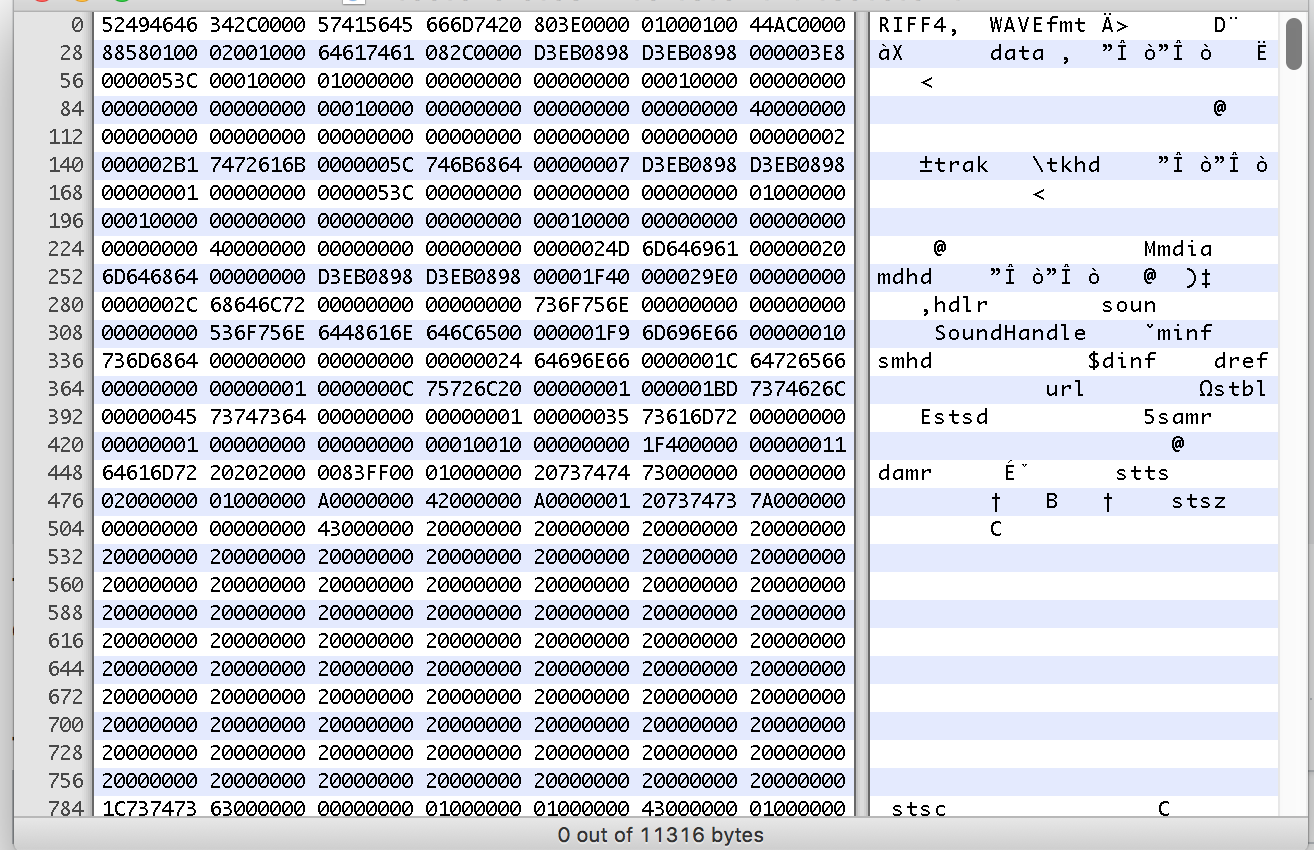
我不知道我写的标题是否正确,你能帮我解决这个问题吗?
谢谢!
回答 1
Stack Overflow用户
回答已采纳
发布于 2016-08-31 10:45:01
您从哪里获得samplingRate的值?您正在编写803E00(即16000),但实际上应该是100000(即16表示原始PCM格式)。
在标题的这一点上,您应该编写fmt块的大小。
我希望这能解决你的问题
页面原文内容由Stack Overflow提供。腾讯云小微IT领域专用引擎提供翻译支持
原文链接:
https://stackoverflow.com/questions/39238559
复制相关文章
相似问题
腾讯云开发者

Copyright © 2013 - 2026 Tencent Cloud. All Rights Reserved. 腾讯云 版权所有
深圳市腾讯计算机系统有限公司 ICP备案/许可证号:粤B2-20090059  粤公网安备44030502008569号
腾讯云计算(北京)有限责任公司 京ICP证150476号 | 京ICP备11018762号