
如何使用iText在小尺寸页面中放置文本和图像
我需要制作一个PDF页面,如下所示:
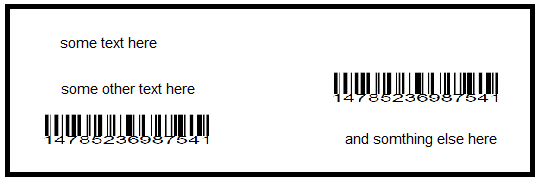
我在制作两个小页面上的专栏时遇到了问题。
这是我的密码:
public void createSizedPdf(String dest) throws IOException, DocumentException {

        Document document = new Document();
        PdfWriter writer = PdfWriter.getInstance(document, new FileOutputStream(dest));
        document.setMargins(5,5,5,5);
        Rectangle one = new Rectangle(290,100);
        one.setBackgroundColor(Color.YELLOW);
        document.setPageSize(one);
        document.open();

        Paragraph consigneeName = new Paragraph("Ahmed");
        Paragraph address = new Paragraph("Casa ST 121");
        String codeBL = "14785236987541";

        PdfContentByte cb = writer.getDirectContent();

        Barcode128 code128 = new Barcode128();
        code128.setBaseline(9);
        code128.setSize(9);
        code128.setCode(codeBL);
        code128.setCodeType(Barcode128.CODE128);
        Image code128Image = code128.createImageWithBarcode(cb, null, null);
        Paragraph right = new Paragraph();
        right.add(consigneeName);
        right.add(address);
        right.add(code128Image);

        Chunk glue = new Chunk(new VerticalPositionMark());
        Paragraph p = new Paragraph();
        p.add(right);
        p.add(new Chunk(glue));
        p.add(code128Image);

       document.add(p);
       document.close();
}回答 1
Stack Overflow用户
发布于 2016-08-30 08:38:21
解决问题的一种方法是使用AcroForm字段创建一个模板PDF。您可以手动创建一个很好的设计,然后通过将数据(文本、条形码)放在作为占位符的字段定义的适当位置,以编程方式填写表单。
另一种方法是从头开始创建PDF,这是您在查看代码时所采取的方法。
您的问题并不完全清楚,因为您共享您的代码,但您没有解释您正在经历的问题。正如我已经评论过的:
你不能缩放图像吗?是否无法定义较小的字体大小?是否无法创建具有特定维度的表?你说我在制作两个小页面的专栏时遇到了问题,但你忘了描述这些问题。
你没有回答这些问题,这让人很难回答你的问题。堆栈溢出阅读器唯一能做的事情就是在你的地方做你的工作。这不是堆栈溢出的目的。
此外,对您的问题的答案是如此琐碎,以致于堆栈溢出的读者很难理解为什么您发布了一个问题。
如果您说您需要在两列中添加数据(文本和条形码),实际上您是说要创建一个表。这就是这样一个表格的例子:
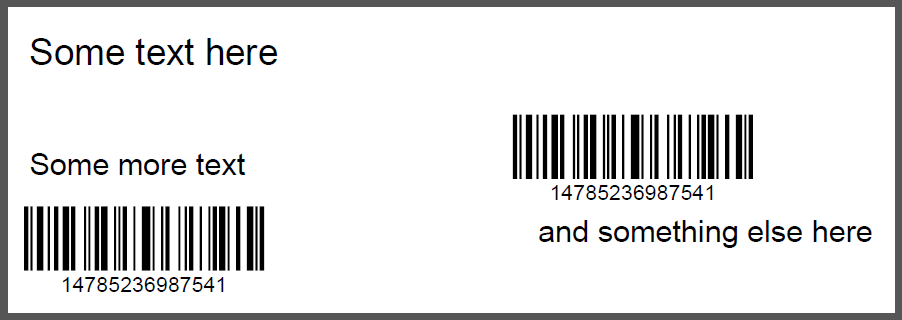
如果您查看SmallTable示例,您可以看到它是如何构建的。
您需要一个PDF,它的大小为290×100个用户单位,每边有5个用户单元。这意味着您有一个表的空间为280乘90个用户单位。看看你的屏幕截图,我会说你有一列160个用户单元和120个用户单元。我还要说,您有三行,每个用户单元高30个。
好吧,那你为什么不根据这些维度创建一个表呢?
public void createPdf(String dest) throws IOException, DocumentException {
    Rectangle small = new Rectangle(290,100);
    Font smallfont = new Font(FontFamily.HELVETICA, 10);
    Document document = new Document(small, 5, 5, 5, 5);
    PdfWriter writer = PdfWriter.getInstance(document, new FileOutputStream(dest));
    document.open();
    PdfPTable table = new PdfPTable(2);
    table.setTotalWidth(new float[]{ 160, 120 });
    table.setLockedWidth(true);
    PdfContentByte cb = writer.getDirectContent();
    // first row
    PdfPCell cell = new PdfPCell(new Phrase("Some text here"));
    cell.setFixedHeight(30);
    cell.setBorder(Rectangle.NO_BORDER);
    cell.setColspan(2);
    table.addCell(cell);
    // second row
    cell = new PdfPCell(new Phrase("Some more text", smallfont));
    cell.setFixedHeight(30);
    cell.setVerticalAlignment(Element.ALIGN_MIDDLE);
    cell.setBorder(Rectangle.NO_BORDER);
    table.addCell(cell);
    Barcode128 code128 = new Barcode128();
    code128.setCode("14785236987541");
    code128.setCodeType(Barcode128.CODE128);
    Image code128Image = code128.createImageWithBarcode(cb, null, null);
    cell = new PdfPCell(code128Image, true);
    cell.setBorder(Rectangle.NO_BORDER);
    cell.setFixedHeight(30);
    table.addCell(cell);
    // third row
    table.addCell(cell);
    cell = new PdfPCell(new Phrase("and something else here", smallfont));
    cell.setBorder(Rectangle.NO_BORDER);
    cell.setHorizontalAlignment(Element.ALIGN_RIGHT);
    table.addCell(cell);
    document.add(table);
    document.close();
}
在这个例子中,
- 学习如何更改单元格中内容的字体,
- 学习如何改变水平和垂直对齐,
- 你会学到如何缩放条形码使其适合细胞,
- ..。
所有这些功能在正式文档中都有解释。正如我之前所说:你没有解释你的问题的本质。你的文件里有什么不清楚?你有什么问题?
https://stackoverflow.com/questions/39203479
复制相似问题
腾讯云开发者

Copyright © 2013 - 2026 Tencent Cloud. All Rights Reserved. 腾讯云 版权所有
深圳市腾讯计算机系统有限公司 ICP备案/许可证号:粤B2-20090059  粤公网安备44030502008569号
腾讯云计算(北京)有限责任公司 京ICP证150476号 | 京ICP备11018762号