
nodejs exec在实际终端中提供除函数调用之外的其他输出
nodejs exec在实际终端中提供除函数调用之外的其他输出
提问于 2016-08-22 15:04:31
我的问题是,当我通过child_process.exec在nodejs中运行终端命令时,会得到另一个输出,而不是在真正的终端中运行该命令。
我的代码如下所示:
function checkLocalIP() {
    logger.debug("Checking the local IP");

    execute("ifconfig | grep -Eo 'inet (addr:)?([0-9]*\.){3}[0-9]*' | grep -Eo '([0-9]*\.){3}[0-9]*' | grep -v '127.0.0.1'", function(localIP) {
        if(isIp.v4(localIP)) {
            logger.debug("Local IP found",{localIP:localIP});
            return true;
        } else {
            logger.error("Local IP not found",{localIP:localIP});
            return false;
        }
    });
}

function execute(command, callback){
    logger.debug("Executing command: "+command,{command:command});
    exec(command, function(error, stdout, stderr){
        callback(stdout);
    });
}
如果我在一个真正的终端中运行这个命令,我只会得到这样的IP:
$ ifconfig | grep -Eo 'inet (addr:)?([0-9]*\.){3}[0-9]*' | grep -Eo '([0-9]*\.){3}[0-9]*' | grep -v '127.0.0.1'
$ 192.168.178.222
但是在nodejs中,我得到这个字符串为stdout:
"ine\nt 127.0\n.0.1\nine\nt 192.168\n.178.222"我想知道为什么输出不相似,为什么nodejs调用也输出127.0.0.1IP,因为它在命令中被排除在外。
回答 2
Stack Overflow用户
回答已采纳
发布于 2016-08-23 07:03:22
记得逃避\。请记住,在js中,就像在C语言或类似语言中一样,\在字符串中有一个特殊的含义:notation
所以你的绳子:
"ifconfig | grep -Eo 'inet (addr:)?([0-9]*\.){3}[0-9]*' | grep -Eo '([0-9]*\.){3}[0-9]*' | grep -v '127.0.0.1'"解释为:
ifconfig | grep -Eo 'inet (addr:)?([0-9]*.){3}[0-9]*' | grep -Eo '([0-9]*.){3}[0-9]*' | grep -v '127.0.0.1'注意缺少的\。这显然会导致使用错误的正则表达式。
要修复它,请转义您的\
"ifconfig | grep -Eo 'inet (addr:)?([0-9]*\\.){3}[0-9]*' | grep -Eo '([0-9]*\\.){3}[0-9]*' | grep -v '127.0.0.1'"Stack Overflow用户
发布于 2016-08-22 15:53:19
这是一个很好的问题,我不知道为什么节点要这么做。
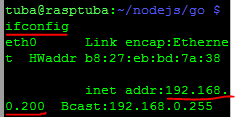
但也许你可以修复它删除所有的"\n“字符。nodejs输出中的"\n“表示”行尾“,因此搜索将提供所需的结果。
可能结果就像下面的图像一样:
页面原文内容由Stack Overflow提供。腾讯云小微IT领域专用引擎提供翻译支持
原文链接:
https://stackoverflow.com/questions/39082943
复制相关文章
相似问题
腾讯云开发者

Copyright © 2013 - 2026 Tencent Cloud. All Rights Reserved. 腾讯云 版权所有
深圳市腾讯计算机系统有限公司 ICP备案/许可证号:粤B2-20090059  粤公网安备44030502008569号
腾讯云计算(北京)有限责任公司 京ICP证150476号 | 京ICP备11018762号