
可阻TableView信元
可阻TableView信元
提问于 2016-08-22 01:55:16
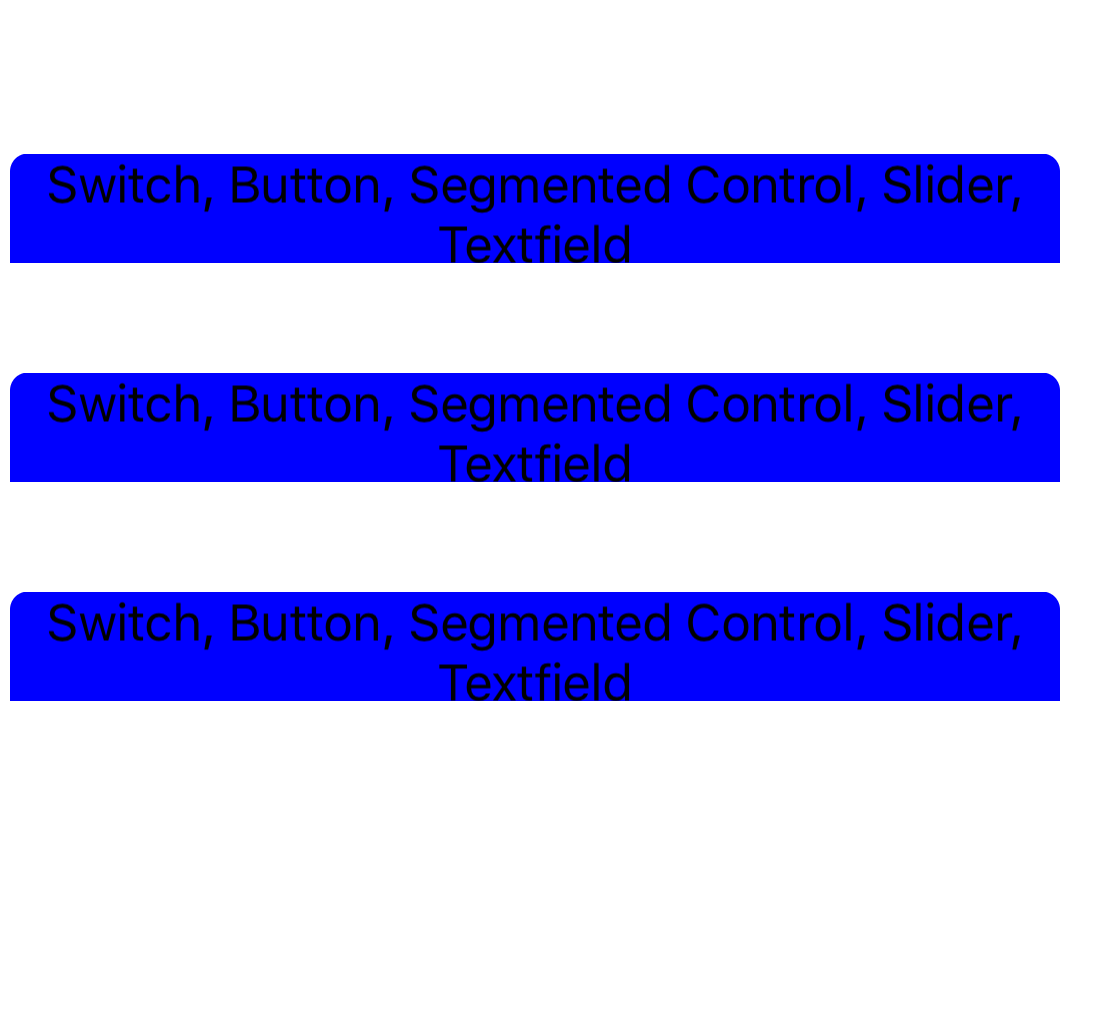
因此,我一直在尝试创建一个通用的聊天泡泡外观,在UITableView单元格内有一个可调整大小的视图和标签。在我尝试添加可调整大小的功能之前,一切都进行得很顺利。它只在底部切断一点点(或者不给任何空间),而且我以前也没有使用过像这样的完全动态的单元格,所以我不知道如何解决这个问题。我尝试添加一个20 it缓冲区,但没有帮助。非常感谢您的帮助!(代码在下面)
import QuartzCore
import UIKit

class ViewController: UIViewController, UITableViewDataSource, UITableViewDelegate {

    @IBOutlet weak var tableView: UITableView!

    var listOfStrings = [String] ()

    override func viewDidLoad() {
        super.viewDidLoad()

        // Do any additional setup after loading the view, typically from a nib.

     // When I Uncomment the 2 lines below, the cell cuts off and only displays a little bit of the blue view.
  //  self.tableView.rowHeight = UITableViewAutomaticDimension
  //         self.tableView.estimatedRowHeight = 75
        listOfStrings.append("Switch, Button, Segmented Control, Slider, Textfield")
        listOfStrings.append("Switch, Button, Segmented Control, Slider, Textfield")
        listOfStrings.append("Switch, Button, Segmented Control, Slider, Textfield")
    }


    func tableView(tableView: UITableView, didSelectRowAtIndexPath indexPath: NSIndexPath) {
        print(indexPath.row)
    }

    func tableView(tableView: UITableView, cellForRowAtIndexPath indexPath: NSIndexPath) -> UITableViewCell {

        let cell = self.tableView.dequeueReusableCellWithIdentifier("someCell") as! SomeTableViewCell

        cell.contentView.viewWithTag(0)!.backgroundColor = UIColor.clearColor()
        let size = cell.layer.bounds
        let tableSize = self.tableView.layer.bounds
        let viewCGR = CGRect(x: size.minX, y: size.height/2, width: tableSize.width, height: size.height/2)
        let view: UIView = UIView(frame: viewCGR)

        let labelCGR = CGRect(x: 0, y: 0, width: viewCGR.width, height: viewCGR.height)
        let label: UILabel = UILabel(frame: labelCGR)
        label.numberOfLines = 0

        label.preferredMaxLayoutWidth = CGRectGetWidth(tableView.bounds)


        label.textAlignment = NSTextAlignment.Center
        label.text = listOfStrings[indexPath.row]
        label.sizeToFit()
        self.tableView.updateConstraints()


        let newViewCGR = CGRect(x: viewCGR.minX, y: viewCGR.minY, width: label.frame.width+20, height: label.frame.height+20)
        view.frame = newViewCGR
        view.sizeToFit()
        label.textColor = UIColor.blackColor()
         label.center.x = view.center.x
       //  self.tableView.updateConstraints()
        view.addSubview(label)
        self.tableView.updateConstraints()
        view.backgroundColor = UIColor.blueColor()
        view.layer.cornerRadius = 6
        cell.addSubview(view)
         self.tableView.updateConstraints()
        return cell

    }

    func tableView(tableView: UITableView, numberOfRowsInSection section: Int) -> Int {
        return listOfStrings.count
    }

    override func didReceiveMemoryWarning() {
        super.didReceiveMemoryWarning()
        // Dispose of any resources that can be recreated.
    }


}
顺便说一句,我不使用autolayout +约束来获得使气泡能够出现在左侧或右侧的功能(取决于传入还是传出)。
回答 3
Stack Overflow用户
发布于 2016-08-22 02:58:52
Stack Overflow用户
发布于 2016-08-22 03:56:09
您不必计算高度单元格的高度行。在viewDidLoad()中添加以下代码
    tableView.rowHeight = UITableViewAutomaticDimension
tableView.estimatedRowHeight = 50Stack Overflow用户
发布于 2016-08-22 04:27:57
@Ryan使用以下方法使用文本查找单元格的高度,
  CGRect textRect =
  [attributedText boundingRectWithSize:CGSizeMake(cellWidth, CGFLOAT_MAX)
  options:(NSStringDrawingUsesLineFragmentOrigin|NSStringDrawingUsesFontLeading)
  context:nil];
调用此方法
heightForRowAtIndexPath:
并将单元格的高度设置为textRect.size.height
页面原文内容由Stack Overflow提供。腾讯云小微IT领域专用引擎提供翻译支持
原文链接:
https://stackoverflow.com/questions/39070438
复制相关文章
相似问题
腾讯云开发者

Copyright © 2013 - 2026 Tencent Cloud. All Rights Reserved. 腾讯云 版权所有
深圳市腾讯计算机系统有限公司 ICP备案/许可证号:粤B2-20090059  粤公网安备44030502008569号
腾讯云计算(北京)有限责任公司 京ICP证150476号 | 京ICP备11018762号