
引导手风琴菜单不工作
引导手风琴菜单不工作
提问于 2016-08-18 07:19:09
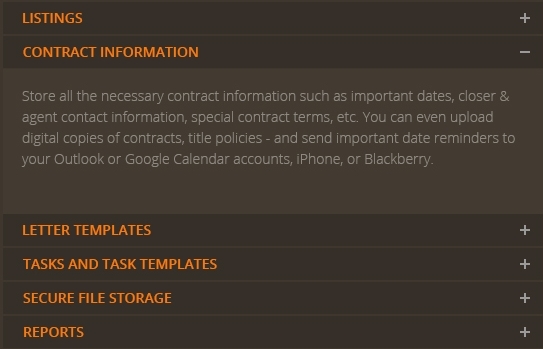
我设计了一个手风琴菜单,如图中所示。如果您单击一个菜单,打开的菜单将得到closed.This是手风琴的功能。但在这个设计中,我一个接一个地单击菜单,但前面的菜单没有关闭。如何解决这个问题?提前感谢
jQuery(document).ready(function () {
    var acc = document.getElementsByClassName("accordion");
    var i;
    for (i = 0; i < acc.length; i++) {
        acc[i].onclick = function () {
            this.classList.toggle("active");
            this.nextElementSibling.classList.toggle("show");
        };
    }

});.boot-accordian {
padding-top: 2%;
}
.boot-accordian button.accordion {
text-transform: uppercase;
background-color: #362f29;
color: #e96f0a;
cursor: pointer;
width: 100%;
border: none;
border-top: 1px solid #3e352c;
border-bottom: 1px solid #3e352c;
text-align: left;
outline: none;
font-size: 15px;
transition: 0.4s;
padding: 0.8% 1% 0.8% 3%;
}
.boot-accordian .para {
padding-left: 1px;
padding-top: 2%;
font-size: 15px;
}
.boot-accordian button.accordion.active,
.boot-accordian button.accordion:hover {
background-color: #362f29;
}
.boot-accordian button.accordion:after {
font-size: 13px;
font-family: FontAwesome;
content: "\f067";
float: right;
}
.boot-accordian button.accordion.active:after {
content: "\f068";
font-family: FontAwesome;
font-size: 13px;
}
.boot-accordian div.panel {
padding: 0 18px;
display: none;
background-color: #433a31;
}
.boot-accordian div.panel.show {
display: block;
margin: 0;
padding-bottom: 5%;
}<script src="https://ajax.googleapis.com/ajax/libs/jquery/2.1.1/jquery.min.js"></script>
<div class="boot-accordian">
<button class="accordion">listings</button>
<div class="panel">
<p class="para">Store all the necessary contract information such as important dates, closer & agent contact information, special contract teams, etc. You can even upload digital copies of contracts, title policies - and send important date reminders to your Outlook or Google Calendar accounts, iphone or Blackberry.</p>
</div>
<button class="accordion">contract information</button>
<div class="panel">
<p class="para">Store all the necessary contract information such as important dates, closer & agent contact information, special contract teams, etc. You can even upload digital copies of contracts, title policies - and send important date reminders to your Outlook or Google Calendar accounts, iphone or Blackberry.</p>
</div>
<button class="accordion">letter templates</button>
<div class="panel">
<p class="para">Store all the necessary contract information such as important dates, closer & agent contact information, special contract teams, etc. You can even upload digital copies of contracts, title policies - and send important date reminders to your Outlook or Google Calendaraccounts, iphone or Blackberry.</p>
</div>
<button class="accordion">tasks and task templates</button>
<div class="panel">
<p class="para">Store all the necessary contract information such as important dates, closer & agent contact information, special contract teams, etc. You can even upload digital copies of contracts, title policies - and send important date reminders to your Outlook or Google Calendar accounts, iphone or Blackberry.</p>
</div>
<button class="accordion">secure file storage</button>
<div class="panel">
<p class="para">Store all the necessary contract information such as important dates, closer & agent contact information, special contract teams, etc. You can even upload digital copies of contracts, title policies - and send important date reminders to your Outlook or Google Calendar accounts, iphone or Blackberry.</p>
</div>
<button class="accordion">reports</button>
<div class="panel">
<p class="para">Store all the necessary contract information such as important dates, closer & agent contact information, special contract teams, etc. You can even upload digital copies of contracts, title policies - and send important date reminders to your Outlook or Google Calendar accounts, iphone or Blackberry.</p>
</div>
</div>
回答 4
Stack Overflow用户
回答已采纳
发布于 2016-08-18 07:27:37
请看一下这种jQuery方法:
if (!$(this).hasClass("active")) {
     var oldAcc = $(".accordion.active");
     oldAcc.toggleClass("active");
     oldAcc.next().toggleClass("show");
}
有了上面的代码,我们将得到对已经打开的手风琴的引用,并在打开另一个手风琴之前关闭它。
jQuery(document).ready(function() {

  $(".accordion").click(function() {
    if (!$(this).hasClass("active")) {
      var oldAcc = $(".accordion.active");
      oldAcc.toggleClass("active");
      oldAcc.next().toggleClass("show");
    }
    $(this).toggleClass("active");
    $(this).next().toggleClass("show");


  });

});.boot-accordian {
padding-top: 2%;
}
.boot-accordian button.accordion {
text-transform: uppercase;
background-color: #362f29;
color: #e96f0a;
cursor: pointer;
width: 100%;
border: none;
border-top: 1px solid #3e352c;
border-bottom: 1px solid #3e352c;
text-align: left;
outline: none;
font-size: 15px;
transition: 0.4s;
padding: 0.8% 1% 0.8% 3%;
}
.boot-accordian .para {
padding-left: 1px;
padding-top: 2%;
font-size: 15px;
}
.boot-accordian button.accordion.active,
.boot-accordian button.accordion:hover {
background-color: #362f29;
}
.boot-accordian button.accordion:after {
font-size: 13px;
font-family: FontAwesome;
content: "\f067";
color: @color_24;
float: right;
}
.boot-accordian button.accordion.active:after {
content: "\f068";
font-family: FontAwesome;
font-size: 13px;
}
.boot-accordian div.panel {
padding: 0 18px;
display: none;
background-color: #433a31;
}
.boot-accordian div.panel.show {
display: block;
margin: 0;
padding-bottom: 5%;
}<script src="https://ajax.googleapis.com/ajax/libs/jquery/2.1.1/jquery.min.js"></script>
<div class="boot-accordian">
<button class="accordion">listings</button>
<div class="panel">
<p class="para">Store all the necessary contract information such as important dates, closer & agent contact information, special contract teams, etc. You can even upload digital copies of contracts, title policies - and send important date reminders to your Outlook
or Google Calendar accounts, iphone or Blackberry.</p>
</div>
<button class="accordion">contract information</button>
<div class="panel">
<p class="para">Store all the necessary contract information such as important dates, closer & agent contact information, special contract teams, etc. You can even upload digital copies of contracts, title policies - and send important date reminders to your Outlook
or Google Calendar accounts, iphone or Blackberry.</p>
</div>
<button class="accordion">letter templates</button>
<div class="panel">
<p class="para">Store all the necessary contract information such as important dates, closer & agent contact information, special contract teams, etc. You can even upload digital copies of contracts, title policies - and send important date reminders to your Outlook
or Google Calendaraccounts, iphone or Blackberry.</p>
</div>
<button class="accordion">tasks and task templates</button>
<div class="panel">
<p class="para">Store all the necessary contract information such as important dates, closer & agent contact information, special contract teams, etc. You can even upload digital copies of contracts, title policies - and send important date reminders to your Outlook
or Google Calendar accounts, iphone or Blackberry.</p>
</div>
<button class="accordion">secure file storage</button>
<div class="panel">
<p class="para">Store all the necessary contract information such as important dates, closer & agent contact information, special contract teams, etc. You can even upload digital copies of contracts, title policies - and send important date reminders to your Outlook
or Google Calendar accounts, iphone or Blackberry.</p>
</div>
<button class="accordion">reports</button>
<div class="panel">
<p class="para">Store all the necessary contract information such as important dates, closer & agent contact information, special contract teams, etc. You can even upload digital copies of contracts, title policies - and send important date reminders to your Outlook
or Google Calendar accounts, iphone or Blackberry.</p>
</div>
</div>
Stack Overflow用户
发布于 2016-08-18 07:30:27
注意:--首先,这不是引导手风琴
下面是解决方案,只需单击以下2行
$(".accordion").removeClass("active");
$(".panel").removeClass("show");最好用这种方式写些东西(纯JQuery)
jQuery(document).ready(function() {
    $(".accordion").click(function(){
    $(".accordion").removeClass("active");
    $(".panel").removeClass("show");
    $(this).addClass("active");
    $(this).next(".panel").addClass("show");
  })
});Stack Overflow用户
发布于 2016-08-18 07:32:33
如果您只是想让一个滑下去,而另一个滑回,请使用以下代码:
$('.accordion').click(function() {
    var targetElement = $(this).next('.panel');
    targetElement.slideToggle();
    targetElement.siblings('.panel').slideUp();
});这里的示例CODEPEN
好好享受..。:)
页面原文内容由Stack Overflow提供。腾讯云小微IT领域专用引擎提供翻译支持
原文链接:
https://stackoverflow.com/questions/39012121
复制相关文章
相似问题
腾讯云开发者

Copyright © 2013 - 2026 Tencent Cloud. All Rights Reserved. 腾讯云 版权所有
深圳市腾讯计算机系统有限公司 ICP备案/许可证号:粤B2-20090059  粤公网安备44030502008569号
腾讯云计算(北京)有限责任公司 京ICP证150476号 | 京ICP备11018762号