
如何使用jpeg-js模块/节点JS缓冲区反转scanline?
我一直在摆弄jpeg-js模块和Node缓冲区,并试图创建一个小命令行程序,该程序可以修改解码的JPEG缓冲区数据,并在保存新的JPEG之前创建X个反向扫描行和X个普通扫描行的模式。换句话说,我希望翻转图像的部分,但不是整个映像本身(当然,有很多模块可以完成这样的任务,但不是我所拥有的特定用例)。
为了创建反向/正常的行模式,我一直在逐行读取/写入,并将该行的一部分保存到变量中,然后从scanline末尾开始,然后以4字节( RGBA值的alloc )的方式递增,直到行开始。程序代码:
'use strict';
const fs = require('fs');
const jpeg = require('jpeg-js');
const getPixels = require('get-pixels');

let a = fs.readFileSync('./IMG_0006_2.jpg');
let d = Buffer.allocUnsafe(a.width * a.height * 4);
let c = jpeg.decode(a);

let val = false; // track whether normal or reversed scanlines
let lineWidth = b.width * 4;
let lineCount = 0;
let track = 0;
let track2 = 0;
let track3 = 0;
let curr, currLine; // storage for writing/reading scnalines, respectively
let limit = {
    one: Math.floor(Math.random() * 141),
    two: Math.floor(Math.random() * 151),
    three: Math.floor(Math.random() * 121)
};
if (limit.one < 30) {
    limit.one = 30;
}
if (limit.two < 40) {
    limit.two = 40;
}
if (limit.two < 20) {
    limit.two = 20;
}
let calc = {};
calc.floor = 0;
calc.ceil = 0 + lineWidth;

d.forEach(function(item, i) {
    if (i % lineWidth === 0) {
        lineCount++;
        /*  // alternate scanline type, currently disabled to figure out how to succesfully reverse image
        if (lineCount > 1 && lineCount % limit.one === 0) {
            // val = !val;
        }
        */
        if (lineCount === 1) {
            val = !val; // setting alt scanline check to true initially
        } else if (calc.floor + lineWidth < b.data.length - 1) {
            calc.floor += lineWidth;
            calc.ceil += lineWidth;
        }
        currLine = c.data.slice(calc.floor, calc.ceil); // current line
        track = val ? lineWidth : 0; // tracking variable for reading from scanline
        track2 = val ? 4 : 0; // tracking variable for writing from scanline
    }
    //check if reversed and writing variable has written 4 bytes for RGBA
        //if so, set writing source to 4 bytes at end of line and read from there incrementally
    if (val && track2 === 4) {
        track2 = 0; // reset writing count
        curr = currLine.slice(track - 4, track); // store 4 previous bytes as writing source
        if (lineCount === 1 && lineWidth - track < 30) console.log(curr); //debug
    } else {
        curr = currLine; //set normal scanline
    }

    d[i] = curr[track2];

    // check if there is no match between data source and decoded image
    if (d[i] !== curr[track2]) {
        if (track3 < 50) {
            console.log(i);
        }
        track3++;
    }
    track2++; //update tracking variable
    track = val ? track - 1 : track + 1; //update tracking variable


});


var rawImageData = {
    data: d,
    width: b.width,
    height: b.height
};
console.log(b.data.length);
console.log('errors\t', track3);
var jpegImageData = jpeg.encode(rawImageData, 100);

fs.writeFile('foo2223.jpg', jpegImageData.data);
唉,我编写的逆扫描线代码不正确。不幸的是,我只能成功地逆转我的测试图像的红色通道(见左下方),蓝色和绿色通道只是变成模糊的模糊。配色方案应该看起来像正确的图像。
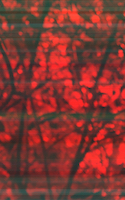
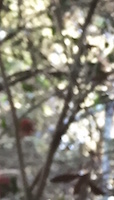
我在这里做错什么了?
回答 1
Stack Overflow用户
发布于 2016-08-19 15:20:00
对于反向行,存储4个字节的切片(4个字节=1个像素),然后正确地写入像素(红色)的第一个值。但是在下一次迭代中,您用currLine覆盖片currLine,其余的通道会得到错误的值。
if (val && track2 === 4) {
    track2 = 0; // reset writing count
    curr = currLine.slice(track - 4, track); // store 4 previous bytes as writing source
    if (lineCount === 1 && lineWidth - track < 30) console.log(curr); //debug
} else {
    curr = currLine; //set normal scanline
}- 迭代0:
val == true,track2 == 4,将curr设置为下一个像素,编写红色通道。 - 迭代1:
val == true,track2 == 1,(val && track2 === 4) == false,将curr设置为currLine,编写绿色通道。
您可以移动track2 === 4分支以避免这种情况:
if (val) {
  if (track2 === 4) {
    track2 = 0; // reset writing count
    curr = currLine.slice(track - 4, track); // store 4 previous bytes as writing source
    if (lineCount === 1 && lineWidth - track < 30) console.log(curr); //debug
  }
} else {
  curr = currLine; //set normal scanline
}
固定代码应该如下所示:
function flipAlt(input, output) {
  const fs = require('fs');
  const jpeg = require('jpeg-js');

  let a = fs.readFileSync(input);
  let b = jpeg.decode(a);
  let d = Buffer.allocUnsafe(b.width * b.height * 4);

  let val = false; // track whether normal or reversed scanlines
  let lineWidth = b.width * 4;
  let lineCount = 0;
  let track = 0;
  let track2 = 0;
  let track3 = 0;
  let curr, currLine; // storage for writing/reading scnalines, respectively
  let limit = {
    one: Math.floor(Math.random() * 141),
    two: Math.floor(Math.random() * 151),
    three: Math.floor(Math.random() * 121)
  };
  if (limit.one < 30) {
    limit.one = 30;
  }
  if (limit.two < 40) {
    limit.two = 40;
  }
  if (limit.two < 20) {
    limit.two = 20;
  }
  let calc = {};
  calc.floor = 0;
  calc.ceil = 0 + lineWidth;

  d.forEach(function(item, i) {
    if (i % lineWidth === 0) {
      lineCount++;
      if (lineCount > 1) {
        val = !val;
      }
      if (lineCount === 1) {
        val = !val; // setting alt scanline check to true initially
      } else if (calc.floor + lineWidth < b.data.length - 1) {
        calc.floor += lineWidth;
        calc.ceil += lineWidth;
      }
      currLine = b.data.slice(calc.floor, calc.ceil); // current line
      track = val ? lineWidth : 0; // tracking variable for reading from scanline
      track2 = val ? 4 : 0; // tracking variable for writing from scanline
    }
    //check if reversed and writing variable has written 4 bytes for RGBA
    //if so, set writing source to 4 bytes at end of line and read from there incrementally
    if (val) {
      if (track2 === 4) {
        track2 = 0; // reset writing count
        curr = currLine.slice(track - 4, track); // store 4 previous bytes as writing source
        if (lineCount === 1 && lineWidth - track < 30) console.log(curr); //debug
      }
    } else {
      curr = currLine; //set normal scanline
    }

    d[i] = curr[track2];

    // check if there is no match between data source and decoded image
    if (d[i] !== curr[track2]) {
      if (track3 < 50) {
        console.log(i);
      }
      track3++;
    }
    track2++; //update tracking variable
    track = val ? track - 1 : track + 1; //update tracking variable

  });

  var rawImageData = {
    data: d,
    width: b.width,
    height: b.height
  };
  console.log(b.data.length);
  console.log('errors\t', track3);
  var jpegImageData = jpeg.encode(rawImageData, 100);

  fs.writeFile(output, jpegImageData.data);
}

flipAlt('input.jpg', 'output.jpg');
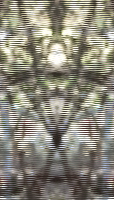
您可以使用像房客这样的实用程序库,而不是跟踪数组索引,它应该使事情变得更容易:
function flipAlt(input, output) {
  const fs = require('fs');
  const jpeg = require('jpeg-js');
  const _ = require('lodash');

  const image = jpeg.decode(fs.readFileSync(input));
  const lines = _.chunk(image.data, image.width*4);
  const flipped = _.flatten(lines.map((line, index) => {
    if (index % 2 != 0) {
      return line;
    }
    const pixels = _.chunk(line, 4);
    return _.flatten(pixels.reverse());
  }));

  const imageData = jpeg.encode({
    width: image.width,
    height: image.height,
    data: new Buffer(flipped)
  }, 100).data;

  fs.writeFile(output, imageData);
}

flipAlt('input.jpg', 'output.jpg');https://stackoverflow.com/questions/38948111
复制相似问题
腾讯云开发者

Copyright © 2013 - 2026 Tencent Cloud. All Rights Reserved. 腾讯云 版权所有
深圳市腾讯计算机系统有限公司 ICP备案/许可证号:粤B2-20090059  粤公网安备44030502008569号
腾讯云计算(北京)有限责任公司 京ICP证150476号 | 京ICP备11018762号