
如何用比正式文档更多的方式定制App图形?
如何用比正式文档更多的方式定制App图形?
提问于 2016-08-13 13:32:51
最近发布的一个UndocumentedMatlab中的文章提到应用程序设计器数字实际上是使用Dojo工具包的网页。这意味着理论上我们可以直接操作HTML,以实现其他不可用的某些UI自定义。
下面是appears图形定义的一个示例,如appears生成的.m文件中所示(在MATLAB R2016a上):
classdef domDemo < matlab.apps.AppBase

    % Properties that correspond to app components
    properties (Access = public)
        UIFigure     matlab.ui.Figure          % UI Figure
        LabelListBox matlab.ui.control.Label   % List Box
        ListBox      matlab.ui.control.ListBox % Item 1, Item 2, Item 3, It...
    end

    methods (Access = private)

        % Code that executes after component creation
        function startupFcn(app)

        end
    end

    % App initialization and construction
    methods (Access = private)

        % Create UIFigure and components
        function createComponents(app)

            % Create UIFigure
            app.UIFigure = uifigure;
            app.UIFigure.Position = [100 100 260 147];
            app.UIFigure.Name = 'UI Figure';
            setAutoResize(app, app.UIFigure, true)

            % Create LabelListBox
            app.LabelListBox = uilabel(app.UIFigure);
            app.LabelListBox.HorizontalAlignment = 'right';
            app.LabelListBox.Position = [50 93 44 15];
            app.LabelListBox.Text = 'List Box';

            % Create ListBox
            app.ListBox = uilistbox(app.UIFigure);
            app.ListBox.Position = [109 36 100 74];

        end
    end

    methods (Access = public)

        % Construct app
        function app = domDemo()

            % Create and configure components
            createComponents(app)

            % Register the app with App Designer
            registerApp(app, app.UIFigure)

            % Execute the startup function
            runStartupFcn(app, @startupFcn)

            if nargout == 0
                clear app
            end
        end

        % Code that executes before app deletion
        function delete(app)

            % Delete UIFigure when app is deleted
            delete(app.UIFigure)
        end
    end
end
...which看起来是这样的:
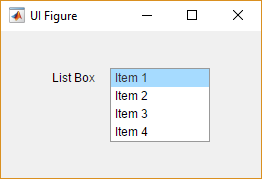
根据uilistbox的文档(该文档将我们重定向到复选框属性上的页面以获得完整的属性列表),没有办法操作例如列表项的文本对齐。如果是这样,
问题:我们如何在示例应用程序中操作
ListBox,使其内容与中心对齐,即使这样的设置对我们不可用?
回答 1
Stack Overflow用户
回答已采纳
发布于 2016-08-13 13:32:51
为了在这项任务中取得成功,我们需要以下几点:
- 找到HTML/CSS的位置(这样我们就可以操纵它们)。
- 查找要编辑的DOM元素。
- 找出我们需要做的改变。
- 找到一种使用MATLAB操作元素的方法。
一步一步工作:
1.查找图形的HTML/CSS存储/定位位置
win = struct(struct(struct(app).UIFigure).Controller).Container.CEF;
URL = win.URL; % Needed only for testing in browser
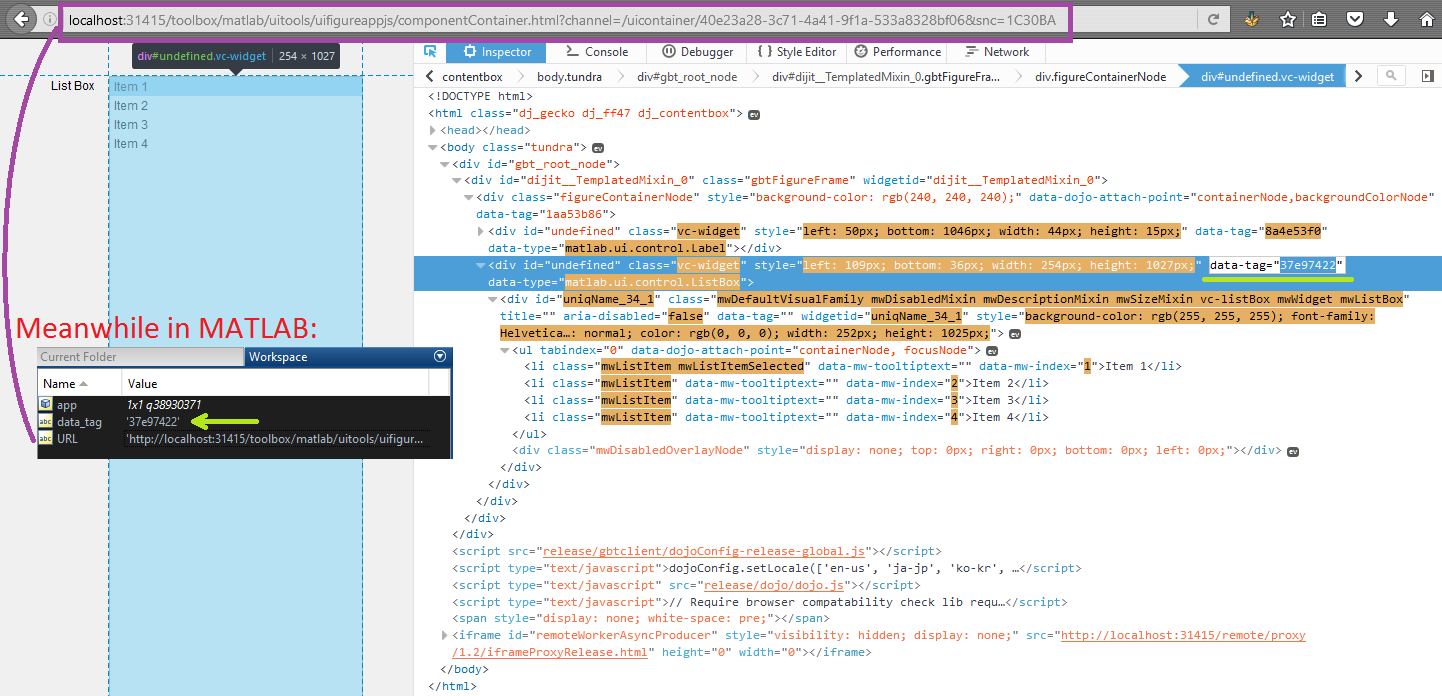
2.找到我们需要编辑的DOM元素
data_tag = char(struct(app.ListBox).Controller.ProxyView.PeerNode.getId);使用浏览器进行验证:
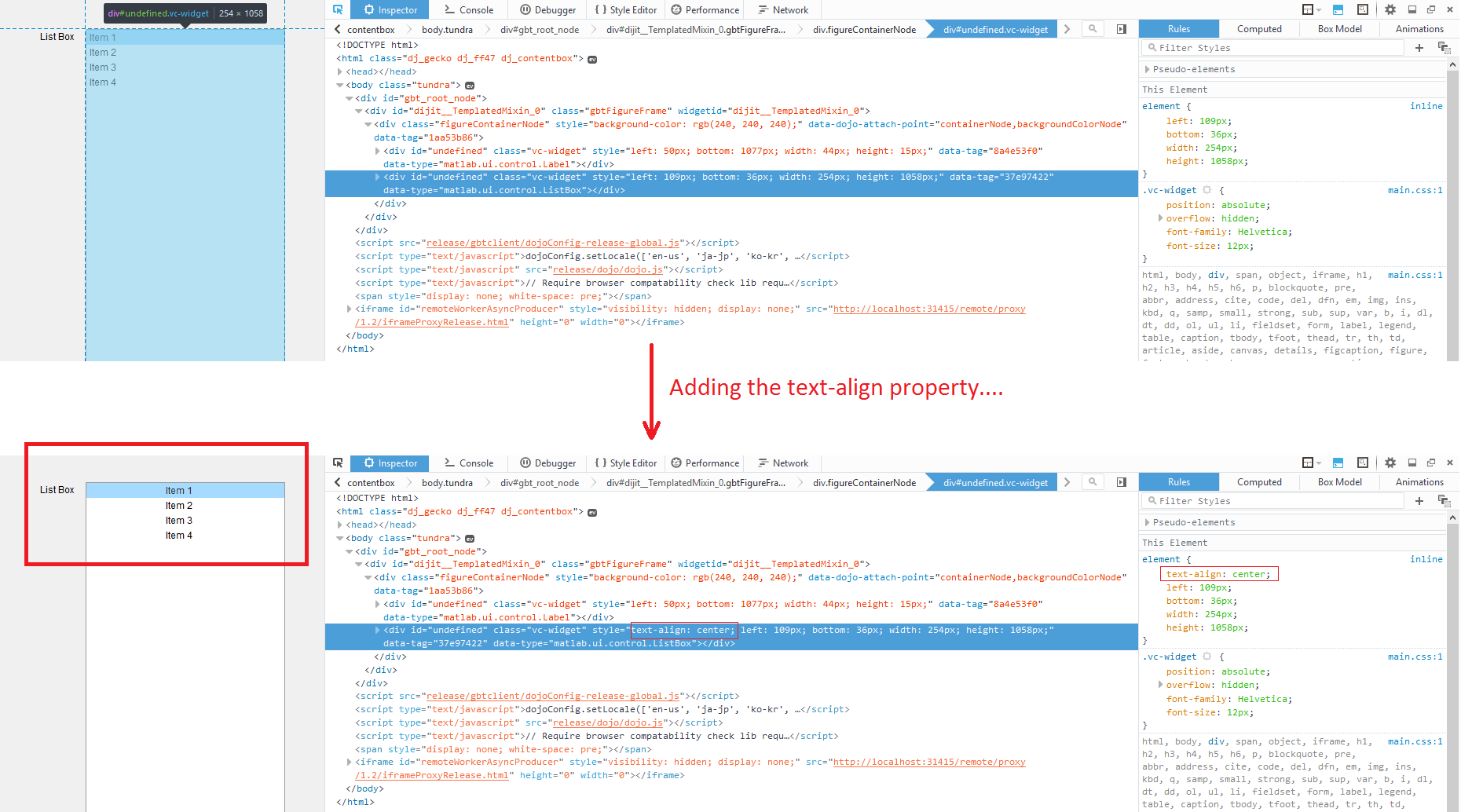
3.找出我们需要做的改变
因为我们想要操作文本对齐,我们谷歌一些相关的关键字,并找到属性。然后我们手动地尝试它,看看它是否真的有效:
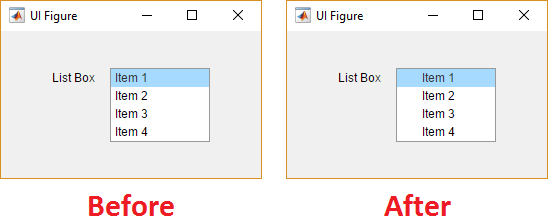
4.找出一种利用MATLAB操纵元素的方法。
win.executeJS(['dojo.style(dojo.query("[data-tag^=''' data_tag ''']")[0],"textAlign","center")']);
此答案的完整代码:
classdef domDemo < matlab.apps.AppBase

    % Properties that correspond to app components
    properties (Access = public)
        UIFigure     matlab.ui.Figure          % UI Figure
        LabelListBox matlab.ui.control.Label   % List Box
        ListBox      matlab.ui.control.ListBox % Item 1, Item 2, Item 3, It...
    end

    methods (Access = private)

        % Code that executes after component creation
        function startupFcn(app)
          % Customizations (aka "MAGIC GOES HERE"):
          drawnow; rez = [];
          warning off MATLAB:HandleGraphics:ObsoletedProperty:JavaFrame
          warning off MATLAB:structOnObject
          while ~strcmp(rez,'"center"')
            try
              % 1. Get a handle to the webwindow:
              win = struct(struct(struct(app).UIFigure).Controller).Container.CEF;
              % 2. Find which element of the DOM we want to edit (as before):
              data_tag = char(struct(app.ListBox).Controller.ProxyView.PeerNode.getId);
              % 3. Manipulate the DOM via a JS command
              rez = win.executeJS(['dojo.style(dojo.query("[data-tag^=''' ...
                data_tag ''']")[0],"textAlign","center")']);
            catch
              pause(1); % Give the figure (webpage) some more time to load
            end
          end
        end
    end

    % App initialization and construction
    methods (Access = private)

        % Create UIFigure and components
        function createComponents(app)

            % Create UIFigure
            app.UIFigure = uifigure;
            app.UIFigure.Position = [100 100 260 147];
            app.UIFigure.Name = 'UI Figure';
            setAutoResize(app, app.UIFigure, true)

            % Create LabelListBox
            app.LabelListBox = uilabel(app.UIFigure);
            app.LabelListBox.HorizontalAlignment = 'right';
            app.LabelListBox.Position = [50 93 44 15];
            app.LabelListBox.Text = 'List Box';

            % Create ListBox
            app.ListBox = uilistbox(app.UIFigure);
            app.ListBox.Position = [109 36 100 74];

        end
    end

    methods (Access = public)

        % Construct app
        function app = domDemo()

            % Create and configure components
            createComponents(app)

            % Register the app with App Designer
            registerApp(app, app.UIFigure)

            % Execute the startup function
            runStartupFcn(app, @startupFcn)

            if nargout == 0
                clear app
            end
        end

        % Code that executes before app deletion
        function delete(app)

            % Delete UIFigure when app is deleted
            delete(app.UIFigure)
        end
    end
end页面原文内容由Stack Overflow提供。腾讯云小微IT领域专用引擎提供翻译支持
原文链接:
https://stackoverflow.com/questions/38933254
复制相关文章
相似问题
腾讯云开发者

Copyright © 2013 - 2026 Tencent Cloud. All Rights Reserved. 腾讯云 版权所有
深圳市腾讯计算机系统有限公司 ICP备案/许可证号:粤B2-20090059  粤公网安备44030502008569号
腾讯云计算(北京)有限责任公司 京ICP证150476号 | 京ICP备11018762号