
ASP.NET核心+ IIS如何设置证书
我们正在本地上运行一个带有ASP.NET核心的web。我们使用的是在主机文件中配置的自定义域名。
这很好,但我们必须不时地手动信任Chrome中的站点,因此我们希望设置IIS来使用我们的SSL证书。
IIS在launchSettings.json中配置:
"iisExpress": {
  "applicationUrl": "http://applocal.ourdomain.com:5000",
  "sslPort": 44300
}
如何配置IIS以使用SSL证书?
回答 4
Stack Overflow用户
发布于 2016-08-15 10:40:04
在计算机上安装证书,然后在cmd中运行:
"C:\Program Files (x86)\IIS Express\IisExpressAdminCmd.exe" setupSslUrl -url:https://my.domain.name:<port> -CertHash:<Certificate thumbprint>Stack Overflow用户
发布于 2020-06-23 04:34:47
首先制作一个新的证书,并替换主机名,确保它在本地机器上生成。
Powershell:New-SelfSignedCertificate -NotBefore (Get-Date) -NotAfter (Get-Date).AddYears(1) -Subject "YOUR.DOMAIN.NAME" -KeyAlgorithm "RSA" -KeyLength 2048 -HashAlgorithm "SHA256" -CertStoreLocation "Cert:\LocalMachine\My" -KeyUsage KeyEncipherment -FriendlyName "HTTPS PROJECTNAME development certificate" -TextExtension @("2.5.29.19={critical}{text}","2.5.29.37={critical}{text}1.3.6.1.5.5.7.3.1","2.5.29.17={critical}{text}DNS=YOUR.DOMAIN.NAME")
现在,我们需要将它复制到本地机器的受信任证书中:打开"mmc“,为本地计算机的证书管理器(而不是个人用户)添加管理单元,找到证书并将其复制到”受信任的根证书颁发机构“
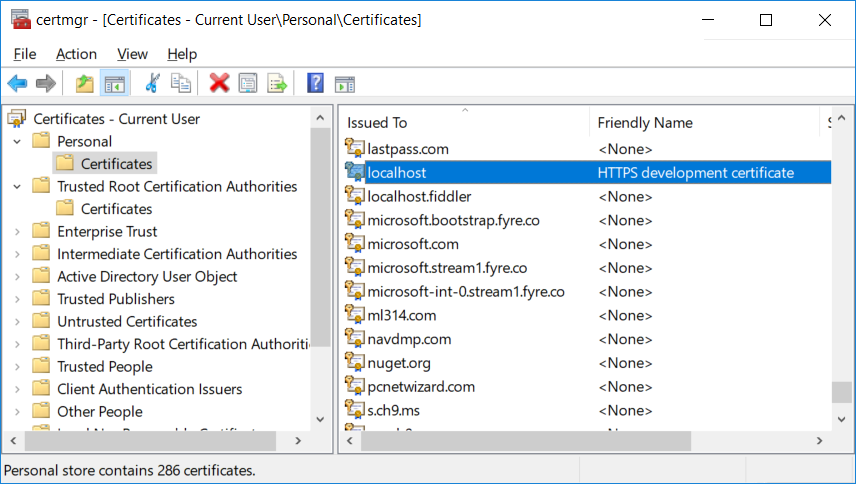
打开证书并复制“拇指指纹”详细信息。
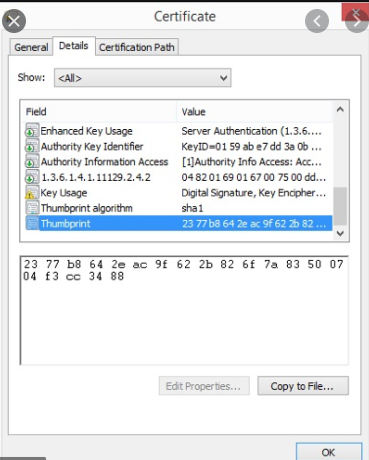
接下来,您需要告诉IIS使用此证书。打开管理cmd提示符,导航到C:\Program Files (x86)\IIS Express上的IIS文件夹,然后运行:
IisExpressAdminCmd.exe setupSslUrl -url:https://YOUR.DOMAIN.NAME:PORTNUMBER -CertHash:THUMBPRINT
感谢:https://improveandrepeat.com/2020/05/how-to-change-the-https-certificate-in-iis-express/
https://stackoverflow.com/a/38953547/1079267
https://devblogs.microsoft.com/aspnet/configuring-https-in-asp-net-core-across-different-platforms/
Stack Overflow用户
发布于 2016-08-11 12:41:29
Jexus为您提供了添加服务器证书和更改站点绑定的用户界面。
https://stackoverflow.com/questions/38894814
复制相似问题
腾讯云开发者

Copyright © 2013 - 2026 Tencent Cloud. All Rights Reserved. 腾讯云 版权所有
深圳市腾讯计算机系统有限公司 ICP备案/许可证号:粤B2-20090059  粤公网安备44030502008569号
腾讯云计算(北京)有限责任公司 京ICP证150476号 | 京ICP备11018762号