
从Google电子表格接收实时更新
从Google电子表格接收实时更新
提问于 2016-08-03 16:01:23
我正在尝试建立与谷歌电子表格的双向同步。我可以使用V4将数据集中的更改推送到Google电子表格中。
现在,每当有人实时或近乎实时地编辑或添加新行时,我都希望能够从Google电子表格中获得更新。
任何能为我指明正确方向的帮助都是非常感谢的。
回答 1
Stack Overflow用户
回答已采纳
发布于 2016-08-04 10:51:37
您可以通过使用Tools-> Notification手动完成此操作。
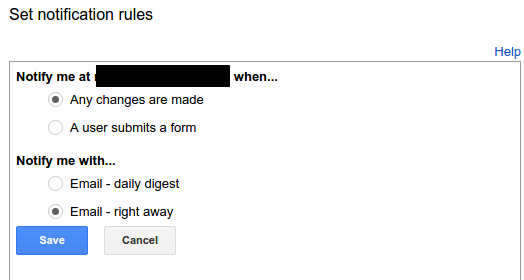
如果文件位于Google中,您可以尝试使用推送通知:要使用推送通知,您需要做三件事:
注册接收URL的域。例如,如果计划使用
//mydomain.com/notifications作为接收URL,则需要注册//mydomain.com。设置您的接收URL,或“Web钩子”回调接收器。这是一个HTTPS服务器,它处理资源更改时触发的API通知消息。为要查看的每个资源终结点设置一个通知通道。通道指定通知消息的路由信息。作为通道设置的一部分,您可以标识要接收通知的特定URL。每当通道的资源发生变化时,Drive都会将通知消息作为POST请求发送到该URL。
谷歌漫游视频在这里。
您也可以使用Appscript。这个简单的黑客来自于这个所以线
var sheet = **whatever**;//The spreadsheet where you will be making changes
var range = **whatever**;//The range that you will be checking for changes
var compSheet = **whatever**;//The sheet that you will compare with for changes
function checkMatch(){
  var myCurrent = sheet.getRange(range).getValues();
  var myComparison = compSheet.getRange(range).getvalues();
  if(myCurrent == myComparison){//Checks to see if there are any differences
    for(i=0;i<compSheet.length;++i){ //Since getValues returns a 'multi-dimensional' array, 2 for loops are used to compare each element
     for(j=0;j<compSheet[i].length;++i){
      if(myCurrent[i][j] != myComparison[i][j]){//Determines if there is a difference;
       //***Whatever you want to do with the differences, put them here***
     }
    }

    myEmailer(sheet.getUrl());//Passes the url of sheet to youur emailer function
    compSheet.getRange(range).setValues(myCurrent);//Updates compSheet so that next time is can check for the next series of changes
    }
}页面原文内容由Stack Overflow提供。腾讯云小微IT领域专用引擎提供翻译支持
原文链接:
https://stackoverflow.com/questions/38748534
复制相关文章
相似问题
腾讯云开发者

Copyright © 2013 - 2026 Tencent Cloud. All Rights Reserved. 腾讯云 版权所有
深圳市腾讯计算机系统有限公司 ICP备案/许可证号:粤B2-20090059  粤公网安备44030502008569号
腾讯云计算(北京)有限责任公司 京ICP证150476号 | 京ICP备11018762号