
MVVM中的WritableBitmap到ImageSource
最终目标:使用WPF和MVVM打印二维条形码:
背景信息(可能不相关)--我的解决方案中有两个项目。一个项目控制我的业务逻辑,第二个项目控制标签的打印逻辑、创建和打印。我正在为IPC使用命名管道。我正在使用MVVM,并有一个Xaml模板来设计标签,并在运行时填充它的属性并打印它。这一切都正常工作。
更多信息:(可能是相关的),我正在使用第三方库来创建2D条形码。这是工作的,调用使条形码返回一个可写位图
问题:我正在尝试将可写位图数据库到模板上的图像控件。
public void FooBar(string[] LabelProperties)
{
    try
    {
        BarcodeWriter writer = new BarcodeWriter()
        {
           Format = BarcodeFormat.PDF_417,
           Options = new ZXing.Common.EncodingOptions
           {
              Height = 50,
              Width = 132,
              Margin = 0
           }
        };

        var wb = writer.Write("Some String");

        System.Windows.Controls.Image newImage = new System.Windows.Controls.Image()
        {
           Height = 50,
           HorizontalAlignment = HorizontalAlignment.Left,
           Name = "image",
           Stretch = Stretch.None,
           VerticalAlignment = VerticalAlignment.Top,
           Width = 132,
           Source = wb,
        };

        this.BarCodeImage = newImage;
    }
    catch (Exception e)
    {
        Console.WriteLine(e.Message.ToString().Trim());
    }
}
值得注意的是,我不能将WritableBitmap直接放置到BarCodeImage.Source
this.BarCodeImage.Source = wb;因为我使用的是MVVM设计,所以BarCodeImage不是实例化的,所以如果我尝试将某个东西设置为它的Source,它将抛出一个空引用。
模板中的XAML
<Image Height="50"
       HorizontalAlignment="Left"
       Margin="10,2,0,0"
       Name="image"
       Stretch="None"
       VerticalAlignment="Top"
       Width="132"
       Source="{Binding lblBarCodeImage}" />
我的思想,因为我必须实例化一个新的Controls.Image(),然后将其设置为BarCodeImage,这在某种程度上破坏了这一点。
Other Things--我可以向其他类和展示MVVM是正确设置的,但是所有其他控件都是正确的--尽管它们都是我正在绑定的字符串--没有其他图像控件。
我也尝试过将WritableBitmap转换成字节数组和tried using this solution, but that also did not work
回答 2
Stack Overflow用户
发布于 2016-08-01 18:04:12
不要在后面的代码中创建图像控件!
相反,声明ImageSource类型的视图模型属性,并在XAML中将图像控件的Source属性绑定到该视图模型属性。
视图模型:
public class YourViewModel : INotifyPropertyChanged
{
    public event PropertyChangedEventHandler PropertyChanged;

    private ImageSource barCodeImage;

    public ImageSource BarCodeImage
    {
        get { return barCodeImage; }
        set
        {
            barCodeImage = value;
            PropertyChanged?.Invoke(this, new PropertyChangedEventArgs("BarCodeImage"));
        }
    }

    ...
}
XAML:
<Image ... Source="{Binding BarCodeImage}"/>在后面的代码中,将WriteableBitmap分配给BarCodeImage属性:
yourViewModel.BarCodeImage = wb;Stack Overflow用户
发布于 2016-08-01 17:11:35
您应该拥有一个类似于这样的BitmapImage属性:
    private BitmapImage photoSelected;

    public BitmapImage PhotoSelected
    {
        get { return photoSelected; }
        set { photoSelected = value; OnPropertyChanged("PhotoSelected"); }
    }
然后,在你想要做的事情上,你要这样做:
PhotoSelected = new BitmapImage(new Uri(@"pack://application:,,,/Images/4.png"));将/ image /4.png替换为从解决方案级别开始的映像路径。例如,这就是我的解决方案树达到这一点的样子:
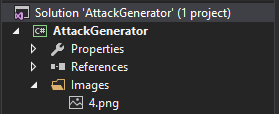
用于绑定的XAML:
<Image x:Name="BitMapImage" Source="{Binding PhotoSelected, Mode=TwoWay}" RenderOptions.BitmapScalingMode="HighQuality"/>https://stackoverflow.com/questions/38703800
复制相似问题
腾讯云开发者

Copyright © 2013 - 2026 Tencent Cloud. All Rights Reserved. 腾讯云 版权所有
深圳市腾讯计算机系统有限公司 ICP备案/许可证号:粤B2-20090059  粤公网安备44030502008569号
腾讯云计算(北京)有限责任公司 京ICP证150476号 | 京ICP备11018762号