
用于javascript链接的UI外部的闪亮模块命名空间
用于javascript链接的UI外部的闪亮模块命名空间
提问于 2016-07-25 19:07:39
我试图使用闪亮的模块来重新使用UI和服务器代码来呈现三个共享相同演示文稿的不同数据集。
使用基于javascript的模式弹出链接在UI /服务器代码之外创建时,在处理命名空间时遇到了一些挑战。
这是我的不工作应用程序代码:
library(shiny)
library(shinyBS)
library(DT)

df <- data.frame(id = c('a', 'b', 'c'), value = c(1, 2, 3))

on_click_js = "
Shiny.onInputChange('myLinkName', '%s');
$('#myModal').modal('show')
"

convert_to_link = function(x) {
  as.character(tags$a(href = "#", onclick = sprintf(on_click_js, x), x))
}
df$id_linked <- sapply(df$id, convert_to_link)
df <- df[, c('id_linked', 'value')]

mySampleUI <- function(id) {
  ns <- NS(id)

  fluidPage(
    mainPanel(
      dataTableOutput(ns('myDT')),
      bsModal(id = 'myModal',
              title = 'My Modal Title',
              trigger = '',
              size = 'large',
              textOutput(ns('modalDescription'))
      ),
      width = 12
    )
  )
}

ui <- fluidPage(mySampleUI('myUI'))

myServerFunc <- function(input, output, session, df) {
  output$myDT <- DT::renderDataTable({
    datatable(df, escape = FALSE, selection='none')
  })
  output$modalDescription <- renderText({
    sprintf('My beautiful %s', input$myLinkName)
  })
}

server <- function(input, output) {
  callModule(myServerFunc, 'myUI', df)
}

shinyApp(ui = ui, server = server)一个工作版本将成功地在模式弹出的描述部分中显示myLinkName。此代码不能工作的原因是UI组件ID值是在UI代码之外创建的,而没有名称空间包含。我明白了。但是,我无法找到如何重新处理它,以便使名称空间匹配。
有什么想法/选择吗?
回答 1
Stack Overflow用户
发布于 2016-07-26 08:40:08
我已经创建了一个示例应用程序,它将向datatable的每一行添加一个按钮,如果按下该按钮,它将根据该行创建一个情节。注意,单击的行也会被记录下来供以后使用,并保存在一个名为SelectedRow()的变量中。如果你需要更多的澄清,请告诉我
rm(list = ls())
library(DT)
library(shiny)
library(shinyBS)
library(shinyjs)
library(shinydashboard)

# This function will create the buttons for the datatable, they will be unique
shinyInput <- function(FUN, len, id, ...) {inputs <- character(len)
                                           for (i in seq_len(len)) {
                                             inputs[i] <- as.character(FUN(paste0(id, i), ...))}
                                           inputs
}

ui <- dashboardPage(
  dashboardHeader(title = "Simple App"),
  dashboardSidebar(
    sidebarMenu(id = "tabs",
                menuItem("Menu Item 1", tabName = "one", icon = icon("dashboard"))
    )
  ),
  dashboardBody(
    tabItems(
      tabItem(tabName = "one",h2("Datatable Modal Popup"),
              DT::dataTableOutput('my_table'),uiOutput("popup")
              )
    )
  )
)

server <- function(input, output, session) {
  my_data <- reactive({
    testdata <- mtcars
    as.data.frame(cbind(View = shinyInput(actionButton, nrow(testdata),'button_', label = "View", onclick = 'Shiny.onInputChange(\"select_button\",  this.id)' ),testdata))
  })
  output$my_table <- DT::renderDataTable(my_data(),selection = 'single',options = list(searching = FALSE,pageLength = 10),server = FALSE, escape = FALSE,rownames= FALSE)

  # Here I created a reactive to save which row was clicked which can be stored for further analysis
  SelectedRow <- eventReactive(input$select_button,{
    as.numeric(strsplit(input$select_button, "_")[[1]][2])
  })

  # This is needed so that the button is clicked once for modal to show, a bug reported here
  # https://github.com/ebailey78/shinyBS/issues/57
  observeEvent(input$select_button, {
    toggleModal(session, "modalExample", "open")
  })

  output$popup <- renderUI({
    print(input$select_button)
    bsModal("modalExample", "Sample Plot", "", size = "large",
            column(12,renderPlot(plot(rnorm(1:10),type="l",col="red",main = paste0("You selected Row Number: ",SelectedRow())))
                   )
            )
  })
}

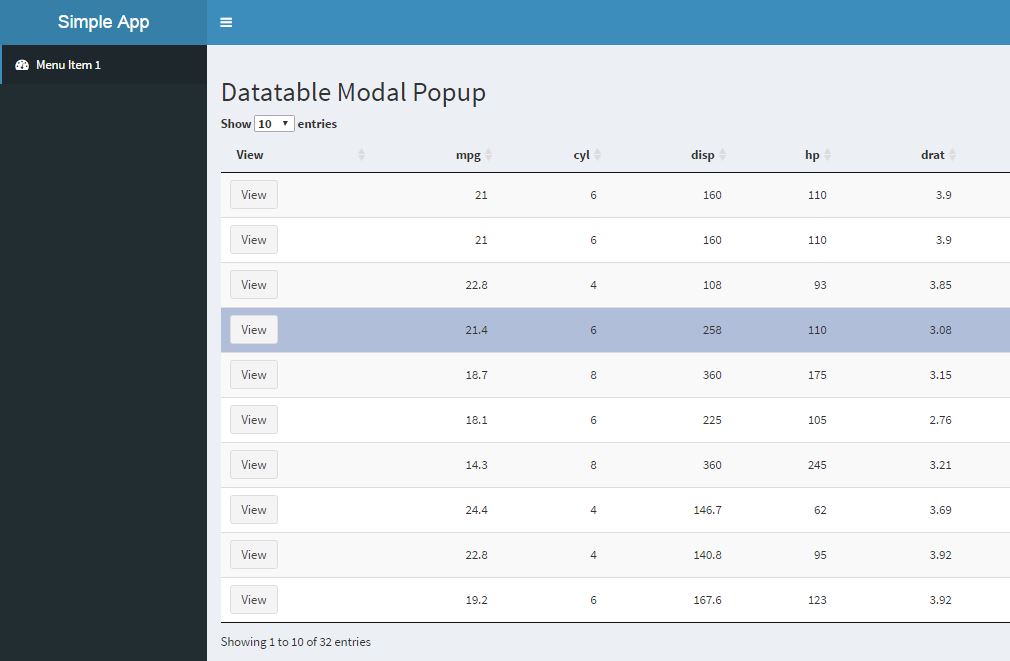
shinyApp(ui, server)步骤1:生成带有按钮的表
如您所见,每一行都有一个名为View的按钮
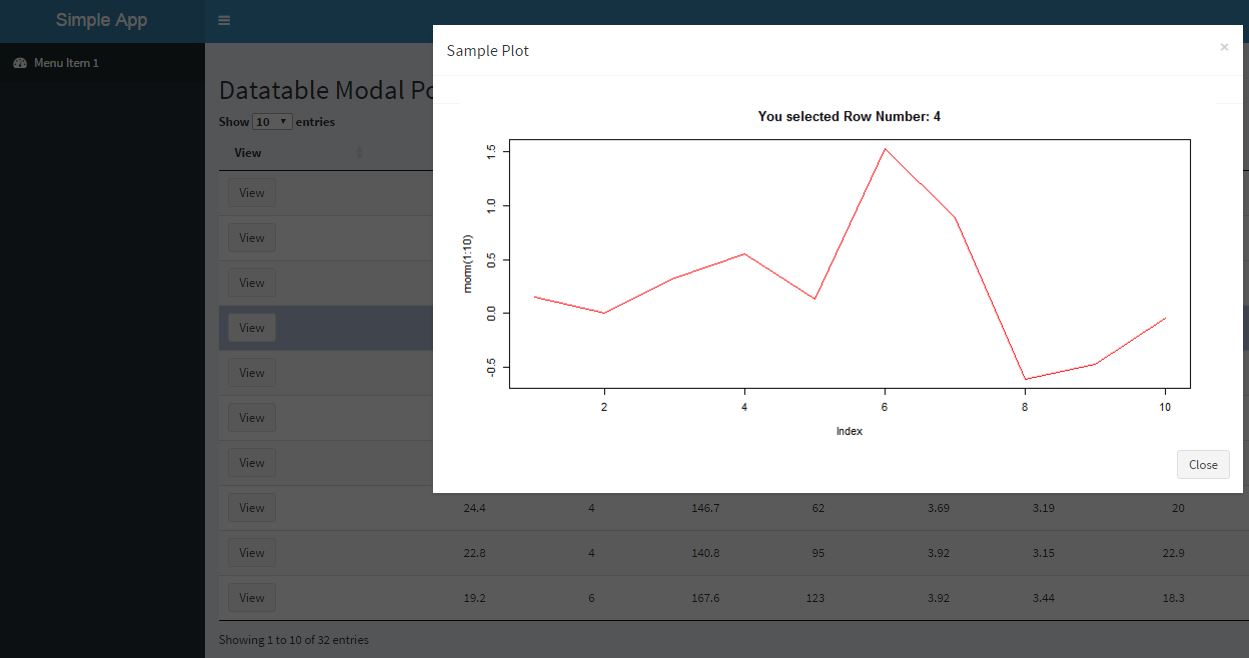
步骤2:单击按钮后,将生成
请注意,根据单击的行更改了绘图的标题。
页面原文内容由Stack Overflow提供。腾讯云小微IT领域专用引擎提供翻译支持
原文链接:
https://stackoverflow.com/questions/38575655
复制相关文章
相似问题
腾讯云开发者

Copyright © 2013 - 2026 Tencent Cloud. All Rights Reserved. 腾讯云 版权所有
深圳市腾讯计算机系统有限公司 ICP备案/许可证号:粤B2-20090059  粤公网安备44030502008569号
腾讯云计算(北京)有限责任公司 京ICP证150476号 | 京ICP备11018762号