
TextBlock.Inlines -添加水平线
TextBlock.Inlines -添加水平线
提问于 2016-07-23 21:26:23
下面我是添加日志条目除以水平线
 Dim vLogText = vLog.Split("^")
            Dim vRows As Integer = vLogText.Length - 1
            For i As Integer = 0 To vRows
                Dim Subrow As String = vLogText(i)
                LogTB.Inlines.Add(Subrow)
                LogTB.Inlines.Add(New Line With {.X1 = 0, .Y1 = 0, .X2 = 300, .Y2 = 0, .Stroke = New SolidColorBrush(Colors.Gray), .StrokeThickness = 4.0})
            Next
这是可以的,如果我想要一个预设的长度(在上面的例子中是300 )-但是如果它需要伸展到容器的整个宽度,这是如何完成的?
谢谢
加上回答Anjum提供的答复
下面是加入网格的方法..。
#Region "Right Grid"

Private Function RightGrid() As Grid
    Try
        Dim MainGrid As New Grid
        Dim vGrid As New Grid
        Dim SV As New ScrollViewer
        With SV
            .Name = "RightGrid_SV"
            .Content = vGrid
            .VerticalScrollBarVisibility = ScrollBarVisibility.Auto
        End With
        RegisterControl(WorkOrder_Grid, SV)
        MainGrid.Children.Add(SV)


        'Add in the status and log

        Dim LogLB As New Label
        With LogLB
            .Name = "WorkOrder_LogLB"
        End With
        RegisterControl(WorkOrder_Grid, LogLB)
        vGrid.Children.Add(LogLB)

        If IsNewRecord = True Then
            'Add some help data
            Dim SP As New StackPanel


            Dim HeaderTB As New TextBlock
            With HeaderTB
                .Text = "ADDING A NEW WORK ORDER" & Environment.NewLine
                .HorizontalAlignment = HorizontalAlignment.Center
                .FontWeight = FontWeights.Bold
            End With

            Dim DatesHeaderTB As New TextBlock
            With DatesHeaderTB
                .Text = "Dates"
                .TextDecorations = TextDecorations.Underline
            End With

            Dim DatesContentTB As New TextBlock
            With DatesContentTB
                .Text = "Enter the Work Order date and the date the Work needs to be completed by." & Environment.NewLine
                .TextWrapping = TextWrapping.Wrap
            End With

            Dim UnitHeaderTB As New TextBlock
            With UnitHeaderTB
                .Text = "Unit/Common Area"
                .TextDecorations = TextDecorations.Underline
            End With

            Dim vUnit As String = "If the Work Order relates to a homeowners property, insert the details using the button. "
            vUnit += "If the homeowners have a registered account they will be updated by email each time the Work Order status is changed!" & Environment.NewLine & Environment.NewLine
            vUnit += "If the Work Order relates to a common area (e.g. Recreation grounds, Clubhouse...) just enter a short description of that area." & Environment.NewLine
            Dim UnitContentTB As New TextBlock
            With UnitContentTB
                .Text = vUnit
                .TextWrapping = TextWrapping.Wrap
            End With

            Dim TypeHeaderTB As New TextBlock
            With TypeHeaderTB
                .Text = "Work Type"
                .TextDecorations = TextDecorations.Underline
            End With

            Dim TypeContentTB As New TextBlock
            With TypeContentTB
                .Text = "A short description of the type of work (e.g. Spinklers, Lights not working...)" & Environment.NewLine
                .TextWrapping = TextWrapping.Wrap
            End With

            Dim DetailsHeaderTB As New TextBlock
            With DetailsHeaderTB
                .Text = "Details/Instructions"
                .TextDecorations = TextDecorations.Underline
            End With

            Dim DetailsContentTB As New TextBlock
            With DetailsContentTB
                .Text = "Add any more details or instructions to help the supplier." & Environment.NewLine
                .TextWrapping = TextWrapping.Wrap
            End With

            Dim SupplierHeaderTB As New TextBlock
            With SupplierHeaderTB
                .Text = "Supplier"
                .TextDecorations = TextDecorations.Underline
            End With

            Dim SupplierContentTB As New TextBlock
            With SupplierContentTB
                .Text = "Insert the supplier using the button." & Environment.NewLine & Environment.NewLine & "You can still save the Work Order without entering a supplier, but the Work Order document will not be generated!" & Environment.NewLine
                .TextWrapping = TextWrapping.Wrap
            End With

            Dim EmailHeaderTB As New TextBlock
            With EmailHeaderTB
                .Text = "Supplier Email"
                .TextDecorations = TextDecorations.Underline
            End With

            Dim EmailContentTB As New TextBlock
            With EmailContentTB
                .Text = "The default email address will be loaded when you insert the supplier (this can be overridden) " & Environment.NewLine & Environment.NewLine & "If the email address is blank, or not valid, the Work Order document will not be emailed, but generated as a PDF to print locally and mail!" & Environment.NewLine
                .TextWrapping = TextWrapping.Wrap
            End With

            Dim ImageHeaderTB As New TextBlock
            With ImageHeaderTB
                .Text = "Upload Image"
                .TextDecorations = TextDecorations.Underline
            End With

            Dim ImageContentTB As New TextBlock
            With ImageContentTB
                .Text = "If you have a photograph of the work required, browse to the image. It will be included in the Work Order document." & Environment.NewLine
                .TextWrapping = TextWrapping.Wrap
            End With

            Dim CostHeaderTB As New TextBlock
            With CostHeaderTB
                .Text = "Estimated Cost"
                .TextDecorations = TextDecorations.Underline
            End With

            Dim vCost As String = "If you enter an estimated cost the Work Order will be authorised up to that amount" & Environment.NewLine & Environment.NewLine
            vCost += "If the supplier is unable to carry out the work for this amount or less (or the field is left at zero) the work will not be authorised and they must revert back to the sender with a quote!" & Environment.NewLine & Environment.NewLine
            vCost += "When estimated costs are used a lot it is a good idea to check the supplier invoices do not regularly equal (or a dollar or two less) than the estimated amount!!" & Environment.NewLine

            Dim CostContentTB As New TextBlock
            With CostContentTB
                .Text = vCost
                .TextWrapping = TextWrapping.Wrap
            End With

            Dim SiteHeaderTB As New TextBlock
            With SiteHeaderTB
                .Text = "Smart Manager"
                .TextDecorations = TextDecorations.Underline
                .Foreground = New SolidColorBrush(Colors.Blue)
            End With

            Dim SiteContentTB As New TextBlock
            With SiteContentTB
                .Text = "You can also enter Work Orders, whilst on-site, with a Smart Phone or Tablet using Smart Manager!" & Environment.NewLine
                .TextWrapping = TextWrapping.Wrap
                .Foreground = New SolidColorBrush(Colors.Blue)
            End With

            With SP.Children
                .Add(HeaderTB)
                .Add(DatesHeaderTB)
                .Add(DatesContentTB)
                .Add(UnitHeaderTB)
                .Add(UnitContentTB)
                .Add(TypeHeaderTB)
                .Add(TypeContentTB)
                .Add(DetailsHeaderTB)
                .Add(DetailsContentTB)
                .Add(SupplierHeaderTB)
                .Add(SupplierContentTB)
                .Add(EmailHeaderTB)
                .Add(EmailContentTB)
                .Add(ImageHeaderTB)
                .Add(ImageContentTB)
                .Add(CostHeaderTB)
                .Add(CostContentTB)
                .Add(SiteHeaderTB)
                .Add(SiteContentTB)
            End With

            LogLB.Content = SP
        End If

        Return MainGrid
    Catch ex As Exception
        EmailError(ex)
        Return Nothing
    End Try
End Function
..and是主网格的一部分.
Private Function CentreGrid() As Grid
    Try
        Dim vGrid As New Grid
        For i As Integer = 0 To 2
            Dim vCol As New ColumnDefinition
            If i = 1 Then
                vCol.Width = New GridLength(5, GridUnitType.Auto)
            End If
            vGrid.ColumnDefinitions.Add(vCol)
        Next

        Dim vLeftGrid As Grid = LeftGrid()
        Grid.SetColumn(vLeftGrid, 0)
        vGrid.Children.Add(vLeftGrid)

        Dim vGridSplitter As New GridSplitter
        With vGridSplitter
            .VerticalAlignment = Windows.VerticalAlignment.Stretch
            .HorizontalAlignment = Windows.HorizontalAlignment.Center
            .ResizeBehavior = GridResizeBehavior.PreviousAndNext
            .Background = New SolidColorBrush(Colors.Blue)
            .Width = 5
            .Margin = New Thickness(5)
        End With
        Grid.SetColumn(vGridSplitter, 1)
        vGrid.Children.Add(vGridSplitter)

        Dim vRightGrid As Grid = RightGrid()
        Grid.SetColumn(vRightGrid, 2)
        vGrid.Children.Add(vRightGrid)

        Return vGrid
    Catch ex As Exception
        EmailError(ex)
        Return Nothing
    End Try
End Function
当页面打开时,这是水平线的样子(蓝色的那条)
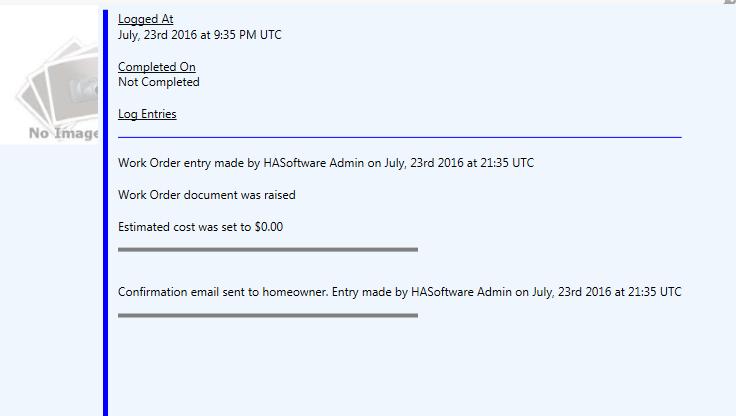
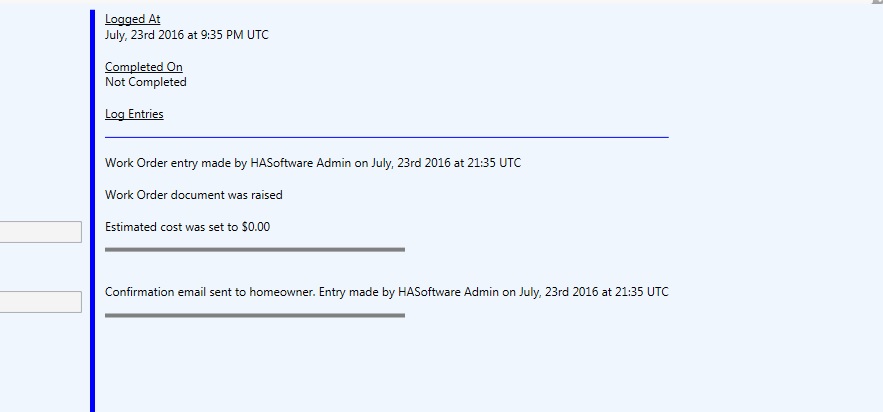
..and --这是当GridSplitter向左移动时会发生的事情(如果窗口变大了,情况也是一样)。
回答 2
Stack Overflow用户
回答已采纳
发布于 2016-07-24 08:37:57
最好是为X2属性设置一个X2,并将其设置为TextBlock的ActualWidth。
下面是C#代码,您可以将其更改为VB.net:
        Line line = new Line() { Stroke = Brushes.Blue};
        Binding binding = new Binding("ActualWidth");
        binding.RelativeSource = new RelativeSource() { Mode=RelativeSourceMode.FindAncestor, AncestorType=typeof(TextBlock) };
        BindingOperations.SetBinding(line, Line.X2Property, binding);

LogTB.Inlines.Add(line);Stack Overflow用户
发布于 2016-07-24 03:38:54
我不会在这种情况下使用代码隐藏。绝对痛苦。如果将大多数UI开发局限于XAML前端,您会发现使用WPF要容易得多。试试像这样的东西
<Window x:Class="WpfApplication3.MainWindow"
        xmlns="http://schemas.microsoft.com/winfx/2006/xaml/presentation"
        xmlns:x="http://schemas.microsoft.com/winfx/2006/xaml"
        xmlns:d="http://schemas.microsoft.com/expression/blend/2008"
        xmlns:mc="http://schemas.openxmlformats.org/markup-compatibility/2006"
        xmlns:local="clr-namespace:WpfApplication3"
        xmlns:sys="clr-namespace:System;assembly=mscorlib"
        mc:Ignorable="d"
        Title="MainWindow" Height="350" Width="525">
    <Grid>
        <Grid.Resources>
            <DataTemplate x:Key="MyTemplate">
                <StackPanel Orientation="Vertical">
                    <TextBlock Text="{Binding}" />
                    <Line X1="0" X2="{Binding ActualWidth, RelativeSource={RelativeSource Self}}" Stroke="Black" />
                </StackPanel>
            </DataTemplate>
        </Grid.Resources>
        <ItemsControl ItemTemplate="{StaticResource MyTemplate}">
            <ItemsControl.Items>
                <sys:String>One</sys:String>
                <sys:String>Two</sys:String>
                <sys:String>Three</sys:String>
            </ItemsControl.Items>
        </ItemsControl>
    </Grid>
</Window>页面原文内容由Stack Overflow提供。腾讯云小微IT领域专用引擎提供翻译支持
原文链接:
https://stackoverflow.com/questions/38546565
复制相关文章
相似问题
腾讯云开发者

Copyright © 2013 - 2026 Tencent Cloud. All Rights Reserved. 腾讯云 版权所有
深圳市腾讯计算机系统有限公司 ICP备案/许可证号:粤B2-20090059  粤公网安备44030502008569号
腾讯云计算(北京)有限责任公司 京ICP证150476号 | 京ICP备11018762号