
数组公式为正则公式
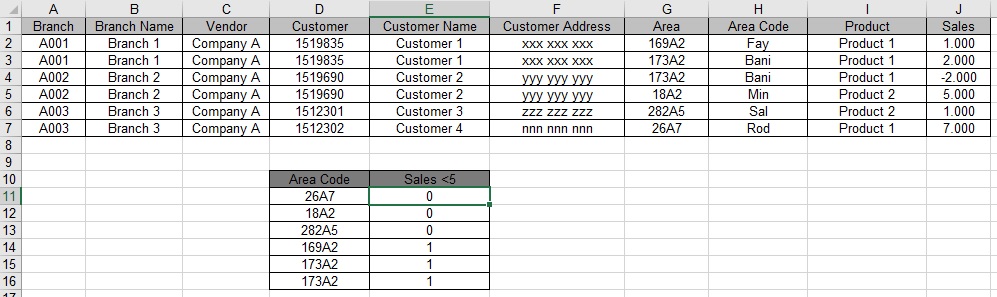
大家好,通过使用数组公式来计算(在上面的示例中):
只购买不到5台产品的唯一客户数,其中区号仅与相邻的D单元匹配
我在E11中使用了以下数组公式:
=SUM(IF(FREQUENCY(IF($G$2:$G$7=D11,
   IF($I$2:$I$7="Product 1",IF($J$2:$J$7<5,IF($E$2:$E$7<>"",
   MATCH($E$2:$E$7,$E$2:$E$7,0))))),ROW($E$2:$E$7)-ROW(G2)+1),1))
这个公式做得很好,同时通过包含大量行和列的庞大数据库使用此公式,excel只需3分钟就能计算出一个单元格,如果这样继续下去是很糟糕的。
有没有办法把这个数组公式转换成常规的数组公式.任何帮助都将受到最大的感谢.提前感谢
回答 2
Stack Overflow用户
发布于 2016-07-24 22:21:10
很抱歉你的回答太迟了。
我创建了一个UDF,重点是在不多次运行整个范围的情况下进行多次计算。
Public Function getCounts(AreaStr As Variant, AreaRng As Range, CustomerRng As Range, ProductRng As Range, SalesRng As Range, Optional ProductName As String = "Product 1", Optional lessThan As Double = 5) As Variant

  'make sure AreaStr is an array
  If TypeOf AreaStr Is Range Then AreaStr = AreaStr.Value2
  If Not IsArray(AreaStr) Then
    AreaStr = Array(AreaStr)
    ReDim Preserve AreaStr(1 To 1)
  End If

  'shorten the range (this way you can use whole columns)
  If SalesRng(SalesRng.Cells.Count).Formula = "" Then Set SalesRng = SalesRng.Parent.Range(SalesRng.Cells(1), SalesRng(SalesRng.Cells.Count).End(xlUp))

  'make sure all ranges have the same size
  Set AreaRng = AreaRng.Resize(SalesRng.Rows.Count)
  Set CustomerRng = CustomerRng.Resize(SalesRng.Rows.Count)
  Set ProductRng = ProductRng.Resize(SalesRng.Rows.Count)

  'Load values in variables to increase speed
  Dim SalesValues As Variant, UserValues As Variant, ProductValues As Variant
  SalesValues = AreaRng
  UserValues = CustomerRng
  ProductValues = ProductRng

  'create temporary arrays to hold the values
  Dim buffer() As Variant, expList() As Variant
  ReDim buffer(1 To UBound(UserValues))
  ReDim expList(1 To UBound(AreaStr), 1 To 1)

  Dim i As Long, j As Double, k As Long
  For i = 1 To UBound(AreaStr)
    expList(i, 1) = buffer
  Next

  buffer = Array(buffer, buffer)
  buffer(0)(1) = 0

  For i = 1 To UBound(UserValues)
    If ProductValues(i, 1) = ProductName Then 'this customer purchased our product
      j = Application.IfError(Application.Match(UserValues(i, 1), buffer(0), 0), 0)
      If j = 0 Then 'first time this customer in this calculation
        j = i
        buffer(0)(j) = UserValues(i, 1) 'remember the customer name (to not calculate him again later)
        If Application.SumIfs(SalesRng, CustomerRng, UserValues(i, 1), ProductRng, ProductName) < lessThan Then
          buffer(1)(j) = 1 'customer got less than "lessThan" -> remember that
        End If
      End If
      If buffer(1)(j) = 1 Then 'check if we need to count the customer
        k = Application.IfError(Application.Match(SalesValues(i, 1), AreaStr, 0), 0) 'check if the area is one of the areas we are looking for
        If k Then expList(k, 1)(j) = 1 'it is -> set 1 for this customer/area combo
      End If
    End If
  Next

  For i = 1 To UBound(AreaStr) 'sum each area
    expList(i, 1) = Application.Sum(expList(i, 1))
  Next

  getCounts = expList 'output array

End Function
我假设您可以在没有我帮助的情况下将它作为一个UDF来包含。
在工作表中,您将使用E11:E16 (例如)
=getCounts(D11:D15,G2:G7,E2:E7,I2:I7,J2:J7)只需选择E11:E16的范围并输入公式,然后用CSE确认。
你也可以只使用=getCounts(D11,$G$2:$G$7,$E$2:$E$7,$I$2:$I$7,$J$2:$J$7)在E11然后复制下来..。但那会很慢的。
诀窍是,我们计算每一个客户的集合之和,它至少买了一次。然后,我们存储1,如果它小于您的标准。这适用于一般数组。你要寻找的每一个区域,都会有自己的阵列。在这里,我们也将1存储在相同的pos中。因为每个同事只有一次计算,所以让他多做一次并不重要。
这个公式将被简单地使用如下:
getCounts(AreaStr,AreaRng,CustomerRng,ProductRng,SalesRng,[ProductName],[lessThan])- AreaStr:你要找的区号。应该是由多个单元格组成的数组,以使udf值得使用。
- AreaRng:存储区域名称的范围
- CustomerRng:存储客户名称的范围
- ProductRng:存储产品名称的范围
- SalesRng:存储销售计数的范围
- ProductName (可选):您正在寻找的产品。如果省略,将是“产品1”
- lessThan (可选):产品之和的触发点。如果省略,将是5
大部分部分应该自我解释,但如果你还有任何问题,只需问;)
Stack Overflow用户
发布于 2016-07-24 21:40:40
好的,我不确定我是否理解所有的条件和积累,但这里有一个VBA函数,我认为应该这样做。
首先,从菜单中打开VBA。然后在VBA中,从Insert菜单中创建一个新模块(只让它是Module1)。然后将以下两个函数粘贴到VBA模块中。
Public Function AreaUniqueCustomersLessThan(ReportAreaRange, AreaRange, ProductRange, SalesRange, CustomerRange)
  On Error GoTo Err1
    Dim RptAreas() As Variant
    Dim Areas() As Variant, Products() As Variant, Sales() As Variant, Customers As Variant

    RptAreas = ArrayFromRange(ReportAreaRange)

    Areas = ArrayFromRange(AreaRange)
    Products = ArrayFromRange(ProductRange)
    Sales = ArrayFromRange(SalesRange)
    Customers = ArrayFromRange(CustomerRange)

    Dim r As Long, s As Long    'report and source rows indexes
    Dim mxr As Long, mxs As Long
    mxr = UBound(RptAreas, 1)
    mxs = UBound(Areas, 1)


    'encode the ReportAreasList into accumulation array indexes
    Dim AreaCustomers() As Collection
    Dim i As Long, j As Long
    Dim colAreas As New Collection

    ReDim AreaCustomers(1 To mxr)
    For r = 1 To mxr
        On Error Resume Next
            'Do we have the area already?
            j = colAreas(RptAreas(r, 1))
        If Err.Number <> 0 Then
            'Add a new area to the collection and array
            i = i + 1
            colAreas.Add i, RptAreas(r, 1)
            Set AreaCustomers(i) = New Collection
            j = i
        End If
    Next r

    'now scan the source rows, accumulating distinct customers
    ' for any ReportAreas
    For s = 1 To mxs
        'is this row's Arera in the report Area list?
        i = 0
        On Error Resume Next
            i = colAreas(Areas(s, 1))
        On Error GoTo Err1
        If i > 0 Then

            'this is a report Area code, so check the conditions
            If Products(s, 1) = "Product 1" Then
                If Sales(s, 1) < 5 Then

                    On Error Resume Next    'just ignore any duplicate errors
                        AreaCustomers(i).Add Customers(s, 1), Customers(s, 1)
                    On Error GoTo Err1

                End If
            End If

        End If
    Next s

    'finally, return to the report area codes, returning the distinct count
    ' of customers
    Dim count() As Variant
    ReDim count(1 To mxr, 1 To 1)
    For r = 1 To mxr
        count(r, 1) = AreaCustomers(colAreas(RptAreas(r, 1))).count
    Next r

    AreaUniqueCustomersLessThan = count  ' "foo"
    Exit Function

Err1:
    AreaUniqueCustomersLessThan = "%ERR(" & Str(Err.Number) & ")%" & Err.Description
    Exit Function
    Resume

End Function


'handle all of the cases, checking and conversions to convert
' a variant range into an array of Variant(1 to n, 1 to 1)
' (we do this because it makes data access very fast)
Function ArrayFromRange(varRange As Variant)
    Dim rng As Range
    Dim A() As Variant

    Set rng = varRange

    'Check for degenerate cases
    If rng Is Nothing Then
        'do nothing
    ElseIf rng.count = 0 Then
        'do nothing

    ElseIf rng.count = 1 Then
        ReDim A(1 To 1, 1 To 1)
        A(1, 1) = rng.Value

    Else
        A = rng.Value
    End If

    ArrayFromRange = A
End Function
最后,转到您的数组公式区域并粘贴到以下数组公式中,用于"Sales < 5“列表:{=AreaUniqueCustomersLessThan(D$11:D$16, G$2:G$7, I$2:I$7,J$2:J$7,E$2:E$7)}注意到,第一个范围必须与数组公式范围本身的长度相同。其他四个范围(源数据范围)都应该是相同的长度(它们不必与第一个范围相同的长度)。
https://stackoverflow.com/questions/38546464
复制相似问题
腾讯云开发者

Copyright © 2013 - 2026 Tencent Cloud. All Rights Reserved. 腾讯云 版权所有
深圳市腾讯计算机系统有限公司 ICP备案/许可证号:粤B2-20090059  粤公网安备44030502008569号
腾讯云计算(北京)有限责任公司 京ICP证150476号 | 京ICP备11018762号