
Ajax添加详细信息时出错
Ajax添加详细信息时出错
提问于 2016-07-21 07:02:33
你好,frndz,我需要一个帮助,我试图通过我的表单添加细节,但没有得到任何value..and错误反映为“添加请求失败”..can,任何人解决了我的错误,我没有得到为此做什么。这是我的代码webapp.js
  // Add company button
$(document).on('click', '#add_employee', function(e){
e.preventDefault();
$('.lightbox_content h2').text('Add Employee');
$('#form_employee button').text('Add');
$('#form_employee').attr('class', 'form add');
$('#form_employee').attr('data-id', '');
$('#form_employee .field_container label.error').hide();
$('#form_employee .field_container').removeClass('valid').removeClass('error');
$('#form_employee #ID').val('');
$('#form_employee #Name').val('');
$('#form_employee #Lastname').val('');
$('#form_employee #Email').val('');
$('#form_employee #Username').val('');
$('#form_employee #Password').val('');
$('#form_employee #Mobile').val('');
$('#form_employee #Website').val('');
show_lightbox();
});

// Add company submit form
$(document).on('submit', '#form_employee.add', function(e){
e.preventDefault();
// Validate form
if (form_employee.valid() == true){
  // Send company information to database
  hide_ipad_keyboard();
  hide_lightbox();
  show_loading_message();
  var form_data = $('#form_employee').serialize();
  var request   =

  $.ajax({
    url:          'data.php',
    cache:        false,
    data:         {job:"add_employee",form_data},
    dataType:     'json',
    contentType:  'application/json; charset=utf-8',
    type:         'get'
  });

  request.done(function(output){
    if (output.result == 'success'){
      // Reload datable
      table_employee.api().ajax.reload(function(){
        hide_loading_message();
        var Name = $('#Name').val();
        show_message("Employee Name '" + Name + "' added successfully.", 'success');
      }, true);
    } else {
      hide_loading_message();
      show_message('Add request failed', 'error');
    }
  });
  request.fail(function(jqXHR, textStatus){
    hide_loading_message();
    show_message('Add request failed: ' + textStatus, 'error');
  });
}
});
data.php
<?php
// Database details
$db_server   = 'localhost';
$db_username = 'root';
$db_password = '';
$db_name     = 'example1';

// Get job (and id)
$job = '';
$id  = '';
if (isset($_GET['job'])){
 $job = $_GET['job'];
if ($job == 'get_employee' ||
  $job == 'get_employee_detail'   ||
  $job == 'add_employee'   ||
  $job == 'edit_employee'  ||
  $job == 'delete_employee'){
if (isset($_GET['id'])){
  $id = $_GET['id'];
  if (!is_numeric($id)){
    $id = '';
  }
}
} else {
$job = '';
 }
 }

// Prepare array
$mysql_data = array();

// Valid job found
if ($job != ''){

 // Connect to database
 $db_connection = mysqli_connect($db_server, $db_username, $db_password,  $db_name);
 if (mysqli_connect_errno()){
$result  = 'error';
$message = 'Failed to connect to database: ' . mysqli_connect_error();
$job     = '';
}
if ($job == 'add_employee'){

 // Add company
 $query = "INSERT INTO employees SET ";
 if (isset($_GET['ID']))        { $query .= "ID       = '" . mysqli_real_escape_string($db_connection, $_GET['ID'])      . "', "; }
 if (isset($_GET['Name']))      { $query .= "Name     = '" . mysqli_real_escape_string($db_connection, $_GET['Name'])    . "', "; }
 if (isset($_GET['Lastname']))   { $query .= "Lastname = '" . mysqli_real_escape_string($db_connection, $_GET['Lastname']). "', "; }
 if (isset($_GET['Email']))      { $query .= "Email    = '" . mysqli_real_escape_string($db_connection, $_GET['Email'])   . "', "; }
 if (isset($_GET['Username']))   { $query .= "Username = '" . mysqli_real_escape_string($db_connection, $_GET['Username']). "', "; }
 if (isset($_GET['Password']))   { $query .= "Password = '" . mysqli_real_escape_string($db_connection, $_GET['Password']). "', "; }
 if (isset($_GET['Mobile']))     { $query .= "Mobile   = '" . mysqli_real_escape_string($db_connection, $_GET['Mobile'])  . "', "; }
 if (isset($_GET['Website']))   { $query .= "Website  = '" . mysqli_real_escape_string($db_connection, $_GET['Website']) . "'";   }
 $query = mysqli_query($db_connection, $query);
 if (!$query){
  $result  = 'error';
  $message = 'add Employee error';
  } else {
  $result  = 'success';
  $message = 'Employees added success';
  }

  // Close database connection
  mysqli_close($db_connection);

  }

 // Prepare data
 $data = array(
 "result"  => $result,
 "message" => $message,
 "data"    => $mysql_data
   );

 // Convert PHP array to JSON array
$json_data = json_encode($data);
print $json_data;
?>


  **index.html**
  <!doctype html>
  <html lang="en" dir="ltr">
   <head>
  <title>Table</title>
  <meta charset="utf-8">
  <meta name="viewport" content="width=1000, initial-scale=1">
  <meta http-equiv="X-UA-Compatible" content="IE=Edge">
  <link rel="stylesheet" href="//fonts.googleapis.com/css?family=Oxygen:400,700">
   <link rel="stylesheet" href="//maxcdn.bootstrapcdn.com/font-awesome/4.3.0/css/font-awesome.min.css">
   <link rel="stylesheet" href="design.css">
  <script src="https://code.jquery.com/jquery-2.1.1.min.js" type="text/javascript"></script>
  <script charset="utf-8" src="//ajax.googleapis.com/ajax/libs/jquery/1.11.2/jquery.min.js"></script>
  <script charset="utf-8" src="//cdn.datatables.net/1.10.0/js/jquery.dataTables.js"></script>
  <script charset="utf-8" src="http://cdn.jsdelivr.net/jquery.validation/1.13.1/jquery.validate.min.js"></script>
  <script src="http://cdn.jsdelivr.net/jquery.validation/1.15.0/jquery.validate.min.js"> </script>
  <script src="http://cdn.jsdelivr.net/jquery.validation/1.15.0/additional-methods.min.js"></script>
<script charset="utf-8" src="webapp.js"></script>

 </head>
 <body>

<div id="page_container">

  <h1>Details of Employees</h1>

  <button type="button" class="button" id="add_employee">Add Employees</button>

  <table class="datatable" id="table_employee">
    <thead>
      <tr>
        <th>ID</th>
        <th>Name</th>
        <th>Lastname</th>
        <th>Email</th>
        <th>Username</th>
        <th>Password</th>
        <th>Mobile No</th>
        <th>Website</th>
        <th>Functions</th>
      </tr>
    </thead>
    <tbody>
    </tbody>
  </table>

</div>

<div class="lightbox_bg"></div>

<div class="lightbox_container">
  <div class="lightbox_close"></div>
  <div class="lightbox_content">

    <h2>Add Employees</h2>
    <form class="form add" id="form_employee" data-id="" novalidate>

      <div class="input_container">
        <label for="Name">Name: <span class="required">*</span></label>
        <div class="field_container">
          <input type="text" class="text" name="Name" id="Name"  value="" required>
        </div>
      </div>
      <div class="input_container">
        <label for="Lastname">Lastname: <span class="required">*</span></label>
        <div class="field_container">
          <input type="text" class="text" name="Lastname" id="Lastname"  value="" required>
        </div>
      </div>
      <div class="input_container">
        <label for="Email">Email: <span class="required">*</span></label>
        <div class="field_container">
          <input type="text" class="text" name="Email" id="Email"  value="" required>
        </div>
      </div>
      <div class="input_container">
        <label for="Username">Username: <span class="required">*</span></label>
        <div class="field_container">
          <input type="text"  class="text" name="Username" id="Username" value="" required>
        </div>
      </div>
      <div class="input_container">
        <label for="Password">Password: <span class="required">*</span></label>
        <div class="field_container">
          <input type="password" class="text" name="Password" id="Password" value=""  placeholder="eg. X8df90EO" required>
        </div>
      </div>
      <div class="input_container">
        <label for="Mobile">Mobile: <span class="required">*</span></label>
        <div class="field_container">
          <input type="text"  class="text" name="Mobile" id="Mobile"  maxlength="10" pattern="[7-9]{1}[0-9]{9}" placeholder="Only 10 digit Mobile no"required>
        </div>
      </div>
      <div class="input_container">
        <label for="Website">Website: <span class="required">*</span>   </label>
        <div class="field_container">
          <input type="text" class="text" name="Website" id="Website" value=""  placeholder="https://www.domain.com" required>
        </div>
      </div>
      <div class="button_container">
        <button type="submit">Add Employees</button>
      </div>
    </form>

  </div>
</div>

<div id="message_container">
  <div id="message" class="success">
    <p>This is a success message.</p>
  </div>
</div>

<div id="loading_container">
  <div id="loading_container2">
    <div id="loading_container3">
      <div id="loading_container4">
        Loading, please wait...
      </div>
    </div>
  </div>
</div>

 </body>
</html>回答 2
Stack Overflow用户
回答已采纳
发布于 2016-07-21 08:38:45
将submit HTML代码更改为<input type="submit" value="Add Employees"></input>
并使用我的javascript源
<script type="text/javascript">
    $( "#form_employee" ).submit(function( event ) {
        var data = $(this).serializeArray();
        data.push(
            {name: "job", value: "add_employee"}
        );
        data = JSON.stringify(data);
        $.ajax({
            type: "POST",
            url: "jsOnChange.php", //Set-Your-URL-Here
            data: data,
            contentType: "application/json; charset=utf-8",
            dataType: "json",
            async: false,
            error: function(e)
            {
                alert(JSON.stringify(e, null, 4));
            },
            success: function(strDrivers){
                alert(JSON.stringify(strDrivers, null, 4));
            }
        });
    });

</script>
在.php侦听器中
<?php
ini_set("allow_url_fopen", true);
$jsonStr = file_get_contents("php://input"); //read the HTTP body.
echo $jsonStr;
?>
你会得到
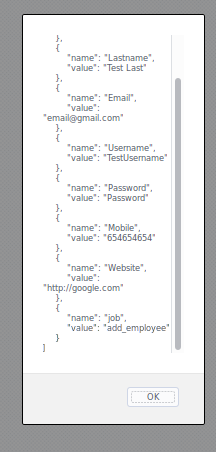
希望能帮上忙!
Stack Overflow用户
发布于 2016-07-21 08:02:26
我想你的代码在这个地方有些错误
var form_data = $('#form_employee').serialize();
  var request   =

  $.ajax({
    url:          'data.php',
    cache:        false,
    data:         {job:"add_employee",form_data},
    dataType:     'json',
    contentType:  'application/json; charset=utf-8',
    type:         'get'
  });
代之以
var form_data = $('#form_employee').serialize();
      form_data.job='add_employee';
      var request   =

      $.ajax({
        url:          'data.php',
        cache:        false,
        data:         form_data,
        dataType:     'json',
        contentType:  'application/json; charset=utf-8',
        type:         'get'
      });
在PHP中,在打印json_encode字符串之前添加ob_clean(),因为您在ajax请求中提到了dataType: json。
ob_clean();
// Convert PHP array to JSON array
$json_data = json_encode($data);
print $json_data;页面原文内容由Stack Overflow提供。腾讯云小微IT领域专用引擎提供翻译支持
原文链接:
https://stackoverflow.com/questions/38497166
复制相关文章
相似问题
腾讯云开发者

Copyright © 2013 - 2026 Tencent Cloud. All Rights Reserved. 腾讯云 版权所有
深圳市腾讯计算机系统有限公司 ICP备案/许可证号:粤B2-20090059  粤公网安备44030502008569号
腾讯云计算(北京)有限责任公司 京ICP证150476号 | 京ICP备11018762号