
Jenkins在一个带有生成报表的码头容器中构建
我是詹金斯和道克的新手,即使经过一些研究,我也找不到做这些事情的方法。
我想:
- 在我的项目中执行pytest和python-覆盖在一个docker容器中。
- 这应该会生成测试和覆盖率报告。
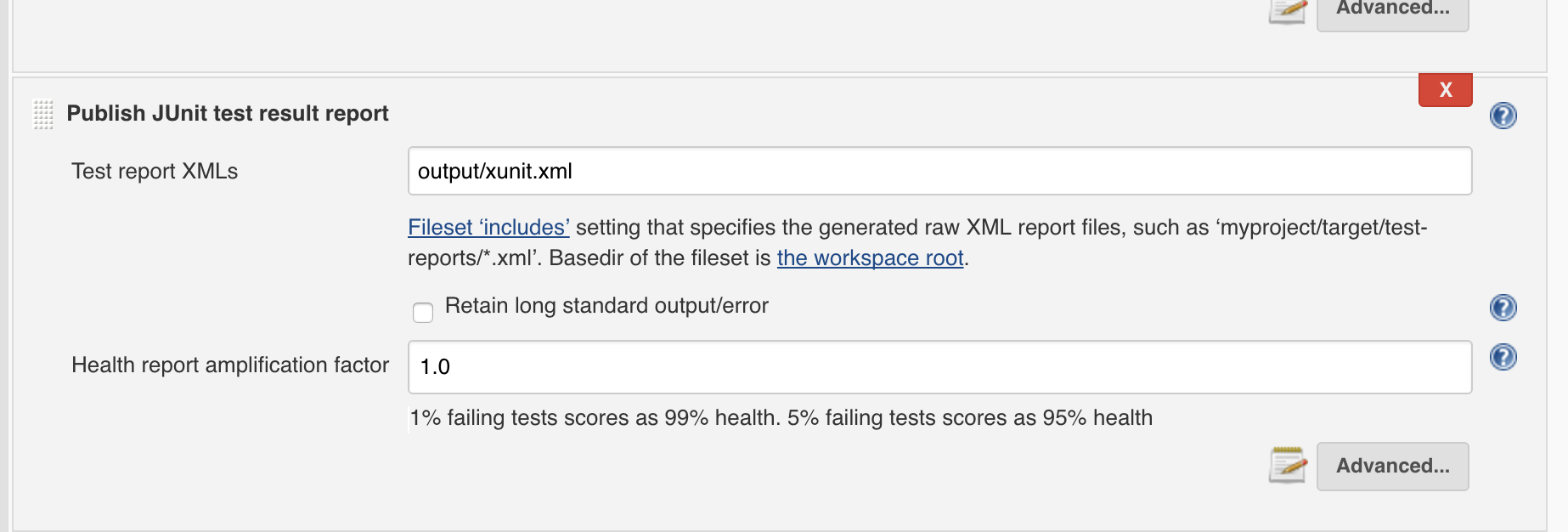
- 访问生成的报告并使用Jenkins的插件读取它们。
当我在本地尝试与码头,它是有效的。我创建了一个Dockerfile,它创建了一个带有所需库的坞映像以及其中的源代码,然后在创建容器并运行测试时调用一个脚本。我可以看到它正在工作,因为我使用了cat,并且能够在我的终端中看到生成的报告。
我在这里的问题是:如何访问Jenkins中容器中生成的报告,然后再用插件读取它们。
编辑:所以这里是我尝试做的一个例子,这样你就可以有一个更好的想法。
首先,我的Dockerfile示例:
# starting from debian image
FROM debian

# install pytest and coverage to execute my tests
RUN apt-get update && apt-get install -y \
    python-pytest \
    python-coverage

# add source files to the image
ADD . /HelloPython/

WORKDIR /HelloPython/

# execute shell script which run tests
CMD sh ./compil.sh
我的compil.sh包含我的测试执行
# Run unit tests and generate JUnit reports in the reports directory
py.test --junitxml reports/test-results.xml test*.py

# Generate reports of the test code coverage
python-coverage run -m unittest discover
python-coverage xml -o reports/test-coverage.xml
当我用Cloudbees插件运行它时,这里是我的jenkins日志:
Démarré par l'utilisateur chris
Building in workspace /var/lib/jenkins/workspace/HelloPythonCover
Build Docker image from ./Dockerfile ...
$ docker build --file /var/lib/jenkins/workspace/HelloPythonCover/Dockerfile /var/lib/jenkins/workspace/HelloPythonCover
Sending build context to Docker daemon 8.704 kB

Step 1 : FROM debian
 ---> 1b088884749b
Step 2 : RUN apt-get update && apt-get install -y   python-pytest   python-coverage
 ---> Using cache
 ---> a5883bbc27e4
Step 3 : ADD . /HelloPython/
 ---> c03ecb80040c
Removing intermediate container d2cc8ea14c11
Step 4 : WORKDIR /HelloPython/
 ---> Running in dc3b08c6fa02
 ---> 20f41970849c
Removing intermediate container dc3b08c6fa02
Step 5 : CMD sh ./compil.sh
 ---> Running in 14ceca0e5975
 ---> 853cb296b94f
Removing intermediate container 14ceca0e5975
Successfully built 853cb296b94f
Docker container faaedb777e032e38586278ad776e1561a9f1c5a92536c06bca7e3af12b74a355 started to host the build
$ docker exec --tty faaedb777e032e38586278ad776e1561a9f1c5a92536c06bca7e3af12b74a355 env
[HelloPythonCover] $ docker exec --tty --user 116:125 faaedb777e032e38586278ad776e1561a9f1c5a92536c06bca7e3af12b74a355 env BUILD_DISPLAY_NAME=#29 BUILD_ID=29 BUILD_NUMBER=29 BUILD_TAG=jenkins-HelloPythonCover-29 BUILD_URL=http://localhost:8080/job/HelloPythonCover/29/ CLASSPATH= EXECUTOR_NUMBER=0 HOME=/root HOSTNAME=faaedb777e03 HUDSON_HOME=/var/lib/jenkins HUDSON_SERVER_COOKIE=bd683ee6091ff880 HUDSON_URL=http://localhost:8080/ JENKINS_SERVER_COOKIE=bd683ee6091ff880 JENKINS_URL=http://localhost:8080/ JOB_NAME=HelloPythonCover JOB_URL=http://localhost:8080/job/HelloPythonCover/ NODE_LABELS=master NODE_NAME=master PATH=/usr/local/sbin:/usr/local/bin:/usr/sbin:/usr/bin:/sbin:/bin TERM=xterm WORKSPACE=/var/lib/jenkins/workspace/HelloPythonCover /bin/sh -xe /tmp/hudson6836918802627685893.sh
Stopping Docker container after build completion
Finished: SUCCESS因此,我在这里的主要目标是找到让jenkins访问生成的报告的方法。另外,有什么方法可以看到码头集装箱内正在进行的建设?例如,在本地尝试时,我试图在shell脚本中放置一个cat来查看报告,但在Jenkins中,我无法找到查看它的方法。
回答 2
Stack Overflow用户
发布于 2016-07-20 14:44:19
Stack Overflow用户
发布于 2017-03-28 10:10:41
Docker副本(docker cp)可以从容器文件系统复制文件。详情请参见此页。在构建完成后,您可以在Jenkins中使用这个命令从容器中检索覆盖率和单元测试结果。
https://stackoverflow.com/questions/38476811
复制相似问题
腾讯云开发者

Copyright © 2013 - 2026 Tencent Cloud. All Rights Reserved. 腾讯云 版权所有
深圳市腾讯计算机系统有限公司 ICP备案/许可证号:粤B2-20090059  粤公网安备44030502008569号
腾讯云计算(北京)有限责任公司 京ICP证150476号 | 京ICP备11018762号