
坐在背景后面的侧边栏上的自举式Modal Pup
坐在背景后面的侧边栏上的自举式Modal Pup
提问于 2016-07-19 04:33:14
Bootstrap的模式弹出已经出现在后台。尝试申请:
似乎不起作用了。我在想,也许是因为它在一个侧边栏里。页面其余部分的内容通过include()调用。这种模式似乎适用于include()层。
<div class="nav nav-sidebar">
<input type='button' value='SURVEY!' class='btn btn-md btn-primary' data-toggle='modal' data-target='#modal'>
<!--Your Modal Body Here -->
<div class='modal fade' id='modal' tabindex='-1' role='dialog' aria-labelledby='myModalLabel' aria-hidden='true'>
<div class='modal-dialog'>
<div class='modal-content'>
<div class='modal-header'>
<!--Your Modal Close Button-->
<button type='button' class='close' data-dismiss='modal' aria-label='Close'><span aria-hidden='true'>×</span></button>
<!--Your Modal Title-->
<h4 class='modal-title' id='myModalLabel'>Please Confirm Action</h4>
</div>
<div class='modal-body'>
<!--Your Modal content here-->
<p>Are you sure you want to proceed with your action ?</p>
</div>
<div class='modal-footer'>
<a href='home.php'><button type='button' class='btn btn-primary'>Yes I Do</button></a>
</div>
</div>
</div>
</div>
</div>
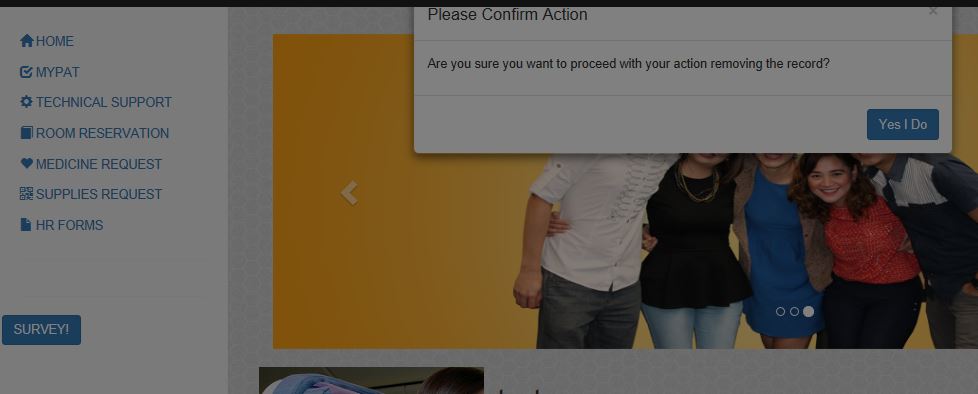
我希望它工作在最前面的一层,它应该是怎样的。有这方面的工作吗?
编辑边栏类
.sidebar {
  display: none;
}
@media (min-width: 768px) {
  .sidebar {
    position: fixed;
    top: 30px;
    bottom: 0;
    left: 0;
    z-index: 1000;
    display: block;
    padding: 22px;
    overflow-x: hidden;
    overflow-y: auto;
    background-color: #f5f5f5;
    border-right: 1px solid #eee;
  }
}回答 1
Stack Overflow用户
发布于 2016-07-19 05:43:01
@Dexter:在Bootstrap Modal sitting behind backdrop中已经提到“将整个模式移出代码的其余部分,移至最底层”。您试过以下代码吗?
<body>
<div class="nav nav-sidebar">
<input type='button' value='SURVEY!' class='btn btn-md btn-primary' data-toggle='modal' data-target='#modal'>
</div>
<!--Your Modal Body Here -->
<div class='modal fade' id='modal' tabindex='-1' role='dialog' aria-labelledby='myModalLabel' aria-hidden='true'>
<div class='modal-dialog'>
<div class='modal-content'>
<div class='modal-header'>
<!--Your Modal Close Button-->
<button type='button' class='close' data-dismiss='modal' aria-label='Close'><span aria-hidden='true'>×</span></button>
<!--Your Modal Title-->
<h4 class='modal-title' id='myModalLabel'>Please Confirm Action</h4>
</div>
<div class='modal-body'>
<!--Your Modal content here-->
<p>Are you sure you want to proceed with your action ?</p>
</div>
<div class='modal-footer'>
<a href='home.php'><button type='button' class='btn btn-primary'>Yes I Do</button></a>
</div>
</div>
</div>
</div>
</body>页面原文内容由Stack Overflow提供。腾讯云小微IT领域专用引擎提供翻译支持
原文链接:
https://stackoverflow.com/questions/38449640
复制相关文章
相似问题
腾讯云开发者

Copyright © 2013 - 2026 Tencent Cloud. All Rights Reserved. 腾讯云 版权所有
深圳市腾讯计算机系统有限公司 ICP备案/许可证号:粤B2-20090059  粤公网安备44030502008569号
腾讯云计算(北京)有限责任公司 京ICP证150476号 | 京ICP备11018762号