
包装分组ListBoxItems (堆栈面板问题)
包装分组ListBoxItems (堆栈面板问题)
提问于 2016-07-17 19:01:32
我正在尝试将分组列表框项包装到列表框中。我正在使用wrappanel中的堆栈面板来完成这一任务,但问题是在列表框中选择了堆栈面板,这会导致问题。下面是这个问题的一个例子:
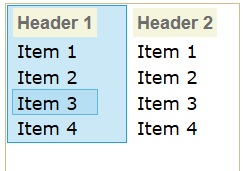
这里是我的代码,简化后的:
<ListBox>
    <ListBox.ItemsPanel>
        <ItemsPanelTemplate>
            <WrapPanel ItemWidth="120" Width="400" IsItemsHost="True" />
        </ItemsPanelTemplate>
    </ListBox.ItemsPanel>

    <StackPanel>
        <ListBoxItem Style="{StaticResource label}">Header 1</ListBoxItem>
        <ListBoxItem>Item 1</ListBoxItem>
        <ListBoxItem>Item 2</ListBoxItem>
        <ListBoxItem>Item 3</ListBoxItem>
        <ListBoxItem>Item 4</ListBoxItem>
    </StackPanel>
    <StackPanel>
        <ListBoxItem Style="{StaticResource label}">Header 2</ListBoxItem>
        <ListBoxItem>Item 1</ListBoxItem>
        <ListBoxItem>Item 2</ListBoxItem>
        <ListBoxItem>Item 3</ListBoxItem>
        <ListBoxItem>Item 4</ListBoxItem>
    </StackPanel>
</ListBox>
我能做些什么来解决这个问题?
谢谢!
回答 1
Stack Overflow用户
发布于 2016-07-18 05:34:49
如果我正确理解你的问题,我有一个可行的解决方案。
你设计的方式是不正确的。
请看看我的代码,如果这是你想要的,请告诉我。
   <ListBox SelectionMode="Multiple" x:Name="ListBox1" ItemsSource="{Binding ListToBind}" >
        <ListBox.ItemsPanel>
            <ItemsPanelTemplate>
                <WrapPanel ItemWidth="120" Width="400" IsItemsHost="True" />
            </ItemsPanelTemplate>
        </ListBox.ItemsPanel>

        <ListBox.ItemTemplate>
            <DataTemplate>
                <StackPanel Orientation="Vertical">
                    <TextBlock Text="{Binding Header}"></TextBlock>
                    <ListBox ItemsSource="{Binding Collection}">

                    </ListBox>
                </StackPanel>

            </DataTemplate>
        </ListBox.ItemTemplate>

    </ListBox>


This is my UI and here is connecting Data model. I set the datacontext in code behind and fill up a model.
后面的代码如下所示
       public MainWindow()
    {
        InitializeComponent();
        ListToBind = new ObservableCollection<DataModel>
        {
            new DataModel { Header = "header 1",
                Collection = new List<string>{"Item 1","Item 2", "Item 3"}},
            new DataModel { Header = "header 2",
                Collection = new List<string>{"Item 1","Item 2", "Item 3"}},
            new DataModel { Header = "header 3",
                Collection = new List<string>{"Item 1","Item 2", "Item 3"}},

        };
        this.DataContext = this;
        var para1 = new Form1();
        var check = ListBox1;
   }
这是数据模型
 public class DataModel
{


    public string Header { get; set; }

    public List<string> Collection { get; set; }


}
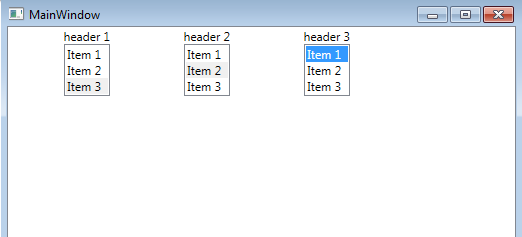
这就是运行后的样子
页面原文内容由Stack Overflow提供。腾讯云小微IT领域专用引擎提供翻译支持
原文链接:
https://stackoverflow.com/questions/38424886
复制相关文章
相似问题
腾讯云开发者

Copyright © 2013 - 2026 Tencent Cloud. All Rights Reserved. 腾讯云 版权所有
深圳市腾讯计算机系统有限公司 ICP备案/许可证号:粤B2-20090059  粤公网安备44030502008569号
腾讯云计算(北京)有限责任公司 京ICP证150476号 | 京ICP备11018762号