
如何在android的相对布局中安排两个线性布局?
如何在android的相对布局中安排两个线性布局?
提问于 2016-07-17 13:38:27
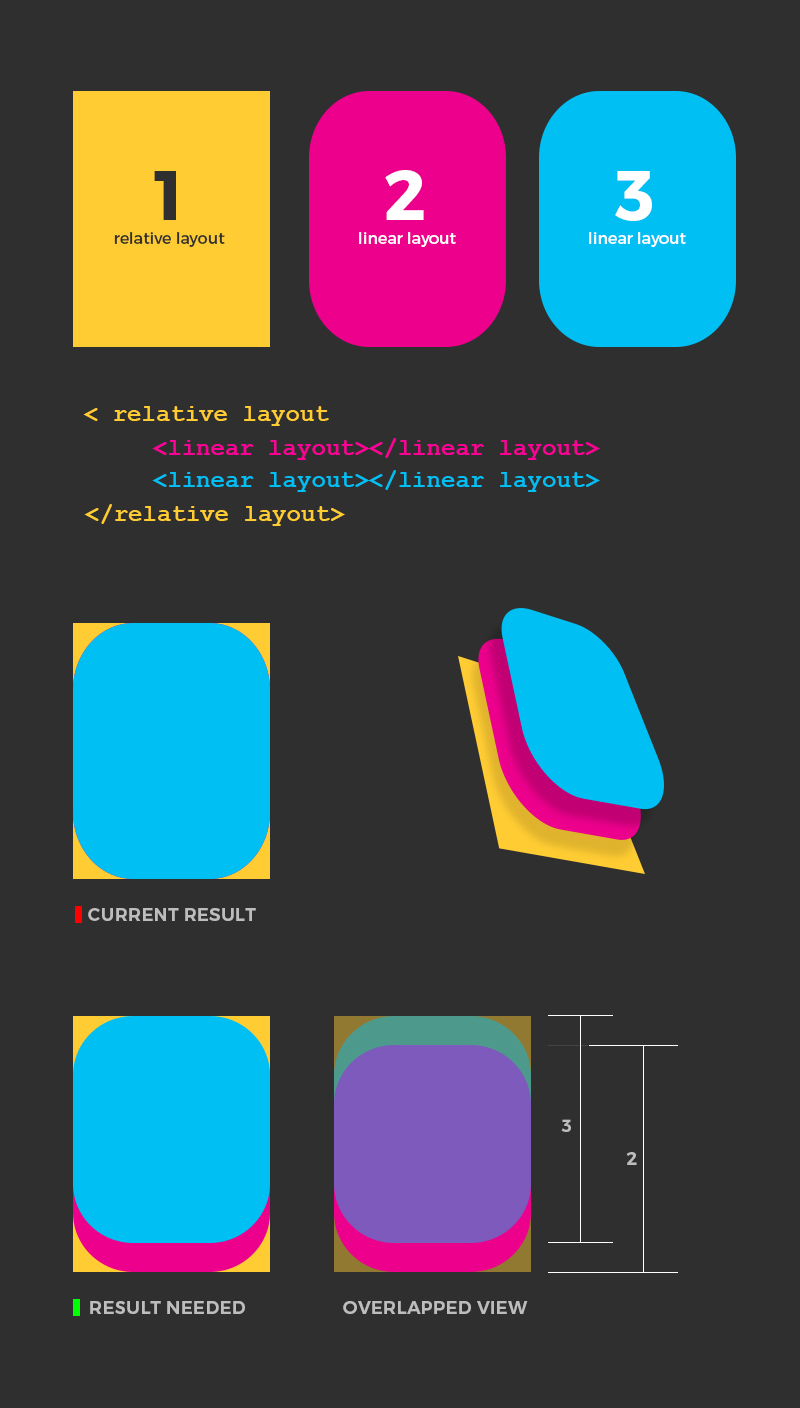
所附图像包含3布局
- 相对布局
- 线性布局
- 线性布局
两种线性布局都是相同大小和重叠的。
我只想知道如何在相对布局中安排这两个线性布局,这样线性布局1 &线性布局2将有90%的父级高度。另外,线性布局1必须对齐到相对布局的顶部,而线性布局2必须对相对布局的底部。
任何简单的工作解决方案都将不胜感激。(我是android工作室的新手)
回答 3
Stack Overflow用户
回答已采纳
发布于 2016-07-17 14:02:41
来自Android 文档
<android.support.percent.PercentRelativeLayout
         xmlns:android="http://schemas.android.com/apk/res/android"
         xmlns:app="http://schemas.android.com/apk/res-auto"
         android:layout_width="match_parent"
         android:layout_height="match_parent">
     <LinearLayout
         android:layout_width="match_parent"
         app:layout_heightPercent="90%"
         android:layout_alignParentTop="true"/>
     <LinearLayout
         android:layout_width="match_parent"
         app:layout_heightPercent="90%"
         android:layout_alignParentBottom="true"/>
 </android.support.percent.PercentRelativeLayout>
LinearLayouts重叠的顺序对应于定义它们的顺序。
Stack Overflow用户
发布于 2016-07-17 13:55:23
很好的问题,您可以使用PercentRelativeLayout而不是RelativeLayout来调整90%的高度,然后使用这个属性
android:layout_alignParentTop = true 为你的第一次LinearLayout和
android:layout_alignParentBottom = true 对于第二个RelativeLayout
它会将你的LinearLayouts贴在你想要的RelativeLayout里面。
有关如何使用PercentRelativeLayout 这里的问题,请参阅以下问题
如果你也想要层叠效果,就像你在图中看到的那样
android:elevation property on your both `LinearLayout`.代码摘自@Svit的另一个答案以进行完整解释
<android.support.percent.PercentRelativeLayout
         xmlns:android="http://schemas.android.com/apk/res/android"
         xmlns:app="http://schemas.android.com/apk/res-auto"
         android:layout_width="match_parent"
         android:layout_height="match_parent">
     <LinearLayout
         android:layout_width="match_parent"
         app:layout_heightPercent="90%"
         android:layout_alignParentTop="true"/>
     <LinearLayout
         android:layout_width="match_parent"
         app:layout_heightPercent="90%"
         android:layout_alignParentBottom="true"/>
</android.support.percent.PercentRelativeLayout>Stack Overflow用户
发布于 2016-07-17 14:01:24
这里有另一种方法
- 将线性布局高度设置到您想要的水平(固定)
- 为两个线性布局指定
android:gravity属性(第一个布局顶部和第二个布局底部)。
然后你就可以得到所需的结果。
页面原文内容由Stack Overflow提供。腾讯云小微IT领域专用引擎提供翻译支持
原文链接:
https://stackoverflow.com/questions/38421843
复制相关文章
相似问题
腾讯云开发者

Copyright © 2013 - 2026 Tencent Cloud. All Rights Reserved. 腾讯云 版权所有
深圳市腾讯计算机系统有限公司 ICP备案/许可证号:粤B2-20090059  粤公网安备44030502008569号
腾讯云计算(北京)有限责任公司 京ICP证150476号 | 京ICP备11018762号