
用C#禁用窗口的动画效果
我试图禁用窗口中的“褪色”动画,无论何时打开或最大化/最小化窗口都会发生这种情况。
当然,当最小化和最大化时,可以通过取消动画窗口的复选框来手动完成。
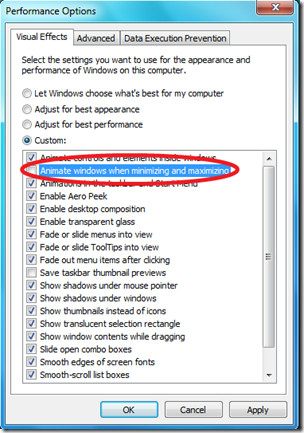
我试图通过SystemParametersInfo来做这件事--这是我的使命:
    [DllImport("user32.dll", SetLastError = true)]
    [return: MarshalAs(UnmanagedType.Bool)]
    static extern bool SystemParametersInfo(uint uiAction, uint uiParam, bool pvParam,uint fWinIni);

    private static UInt32 SPIF_SENDCHANGE = 0x02;
    private static UInt32 SPI_SETUIEFFECTS = 0x103F;
    public static void Main()
    {
      bool res=  SystemParametersInfo(SPI_SETUIEFFECTS, 0, false, SPIF_SENDCHANGE);
}True值始终是result值,因此我知道函数被成功调用。
但是,我看不到任何results...Windows仍然在动画任何我调整大小的窗口。
我将其编译为AnyCPU,在Windows 10上作为管理员运行。
对于@cody,这是代码(将ref关键字添加到ai参数并将Marshal.Sizeof(ai)转换为``uint]。
     [StructLayout(LayoutKind.Sequential)]
     public struct ANIMATIONINFO
     {
         public uint cbSize;
         public int iMinAnimate;
     };

     [DllImport("user32", SetLastError = true)]
     [return: MarshalAs(UnmanagedType.Bool)]
     public static extern bool SystemParametersInfo(uint uiAction,
                                                    uint uiParam,
                                                    ref ANIMATIONINFO pvParam,
                                                    uint fWinIni);

     public static uint SPIF_SENDCHANGE = 0x02;
     public static uint SPI_SETANIMATION = 0x0049;

     public static void Main()
     {
         ANIMATIONINFO ai=new ANIMATIONINFO();
         ai.cbSize = (uint)Marshal.SizeOf(ai);
         ai.iMinAnimate = 0;   // turn all animation off
         SystemParametersInfo(SPI_SETANIMATION, 0,  ref ai, SPIF_SENDCHANGE);
     }
最后一个问题--如果我想回到原来的状态--这意味着我想再次激活阴离子,应该改变什么参数才能做到这一点?
回答 1
Stack Overflow用户
发布于 2016-07-15 12:38:12
调用SystemParametersInfo时,没有设置正确的选项。控制最小化/最大化动画效果(在UI中标记为“最小化和最大化时的动画窗口”)的是SPI_SETANIMATION。
使用它要复杂一些,因为pvParam参数必须指向ANIMATIONINFO结构。这是毫无意义的,因为结构只有一个有意义的成员,但API就是这样设计的。据推测,几年前的意图是,这是一个切换所有的外壳动画效果,但由于任何原因,这最终没有发生,并分别使用了各自的SPI_*值。不幸的是你选错了。是一长串。
C#中的示例代码:
[StructLayout(LayoutKind.Sequential)]
public struct ANIMATIONINFO
{
    public uint cbSize;
    public int  iMinAnimate;
};

[DllImport("user32", SetLastError = true)]
[return: MarshalAs(UnmanagedType.Bool)]
public static extern bool SystemParametersInfo(uint uiAction,
                                               uint uiParam,
                                               ref ANIMATIONINFO pvParam,
                                               uint fWinIni);

public static uint SPIF_SENDCHANGE  = 0x02;
public static uint SPI_SETANIMATION = 0x0049;

public static void Main()
{
    ANIMATIONINFO ai;
    ai.cbSize      = Marshal.SizeOf(ai);
    ai.iMinAnimate = 0;   // turn all animation off
    SystemParametersInfo(SPI_SETANIMATION, 0, ai, SPIF_SENDCHANGE);
}请注意,这是一个全局设置,影响所有应用程序。很少有应用程序需要切换此开关,除非您正在制作桌面自定义实用程序。因此,您将需要管理特权来更改此设置。
还有一个DWMWA_TRANSITIONS_FORCEDISABLED标志,当一个窗口被隐藏或显示时,您可以与函数一起使用它来禁用转换。
它的优点是它是一个本地解决方案--您只能更改单个窗口的设置。但是,如果您不使用DWM (在旧版本的Windows上),那么它不会做任何事情,而且最小化/最大化转换可能仍然是可见的。我还没有全面测试这两个选项之间的交互作用。
Hans将您链接到他的答案之一,其中包含如何从C#调用DwmSetWindowAttribute的嵌入式示例。以下是相关的双边投资条约:
const int DWMWA_TRANSITIONS_FORCEDISABLED = 3;

[DllImport("dwmapi", PreserveSig = true))]
static extern int DwmSetWindowAttribute(IntPtr hWnd, int attr, ref int value, int attrLen);// in the form's constructor:
// (Note: in addition to checking the OS version for DWM support, you should also check
// that DWM composition is enabled---or at least gracefully handle the function's
// failure when it is not. Instead of S_OK, it will return DWM_E_COMPOSITIONDISABLED.)
if (Environment.OSVersion.Version.Major >= 6)
{
int value = 1; // TRUE to disable
DwmSetWindowAttribute(this.Handle,
DWMWA_TRANSITIONS_FORCEDISABLED,
ref value,
Marshal.SizeOf(value));
}https://stackoverflow.com/questions/38395882
复制相似问题
腾讯云开发者

Copyright © 2013 - 2026 Tencent Cloud. All Rights Reserved. 腾讯云 版权所有
深圳市腾讯计算机系统有限公司 ICP备案/许可证号:粤B2-20090059  粤公网安备44030502008569号
腾讯云计算(北京)有限责任公司 京ICP证150476号 | 京ICP备11018762号