
如何在UIPresentationController中更改视图的界限?
如何在UIPresentationController中更改视图的界限?
提问于 2016-07-13 08:51:02
我使用UIPresentationController的子类在屏幕上显示一些控制器。我就是这样准备的:
controller.transitioningDelegate = self
controller.modalPresentationStyle = .Custom
presentViewController(controller, animated: true, completion: nil)但是在控制器中有一个textField,我在那里添加了UIKeyboardDidShowNotification的观察者。键盘出现时是否可以更新视图的框架?
如下所示:
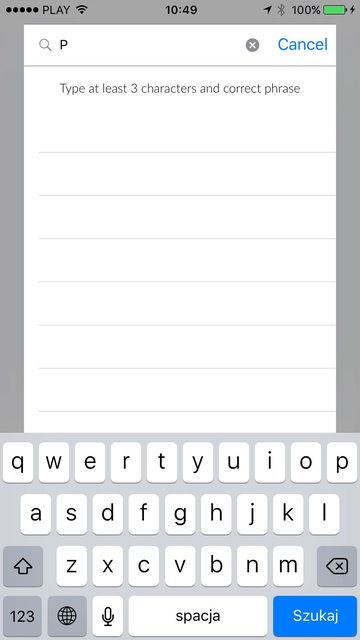
我需要改变这个视图的界限,因为键盘。
回答 2
Stack Overflow用户
发布于 2016-07-13 10:25:04
无论我更改什么,都需要调用containerView?.setNeedsLayout()。
Stack Overflow用户
发布于 2018-03-21 07:54:14
这相对容易。
首先,您需要观察演示器中的键盘更改情况。
听.UIKeyboardWillShow, .UIKeyboardDidShow, .UIKeyboardWillHide, .UIKeyboardDidHide的通知
我建议为此创建一个KeyboardObserver类,例如一个静态实例,并将键盘变量(帧、动画速度等)存储在其中,并在该类上添加一个委托,以通知您键盘更改的情况。
然后你就会有这样的结果
extension PresentationController: KeyboardManagerDelegate {
    internal func keyboardManager(_ manager: KeyboardManager, action: KeyboardManager.KeyBoardDisplayAction, info: KeyboardManager.Info) {
        guard let containerView = containerView else { return }

        UIView.animate(withDuration: info.animationDuration, delay: 0, options: info.animationOptions, animations: {
            containerView.setNeedsLayout()
            containerView.layoutIfNeeded()
        }, completion: nil)
    }
}接下来,您需要重写frameOfPresentedViewInContainerView。
示例:
override var frameOfPresentedViewInContainerView: CGRect {
    guard let containerView = containerView else {
        return .zero
    }

    let desiredSize = CGSize(width: 540, height: 620)

    let width = min(desiredSize.width, containerView.width)
    let x = round((containerView.width - width) / 2)

    if KeyboardManager.shared.isKeyboardVisible {
        let availableHeight = containerView.height - KeyboardManager.shared.keyboardFrame.height
        let height = availableHeight - 40

        return CGRect(x: x, y: 25, width: width, height: height)
    } else {
        let height = min(desiredSize.height, containerView.height)

        let y = round((containerView.height - height) / 2)

        return CGRect(x: x, y: y, width: width, height: height)
    }
}
最后还实现了一个更新视图的布局方法。
override func containerViewWillLayoutSubviews() {
    super.containerViewWillLayoutSubviews()

    presentedView?.frame = frameOfPresentedViewInContainerView
}页面原文内容由Stack Overflow提供。腾讯云小微IT领域专用引擎提供翻译支持
原文链接:
https://stackoverflow.com/questions/38346889
复制相关文章
相似问题
腾讯云开发者

Copyright © 2013 - 2026 Tencent Cloud. All Rights Reserved. 腾讯云 版权所有
深圳市腾讯计算机系统有限公司 ICP备案/许可证号:粤B2-20090059  粤公网安备44030502008569号
腾讯云计算(北京)有限责任公司 京ICP证150476号 | 京ICP备11018762号