
dotnet新项目无法恢复其依赖项
我想使用mvc6创建一个web应用程序,并在ASP.NET web应用程序(.Net框架)中搜索ASP.NET 5预览模板,我找不到它,我在谷歌中搜索了更多。大多数解决方案都是为了获得预览模板而安装ASP.NET核心,而我是通过安装ASP.NET核心来获得它的。我正在创建一个新项目,如下所示。
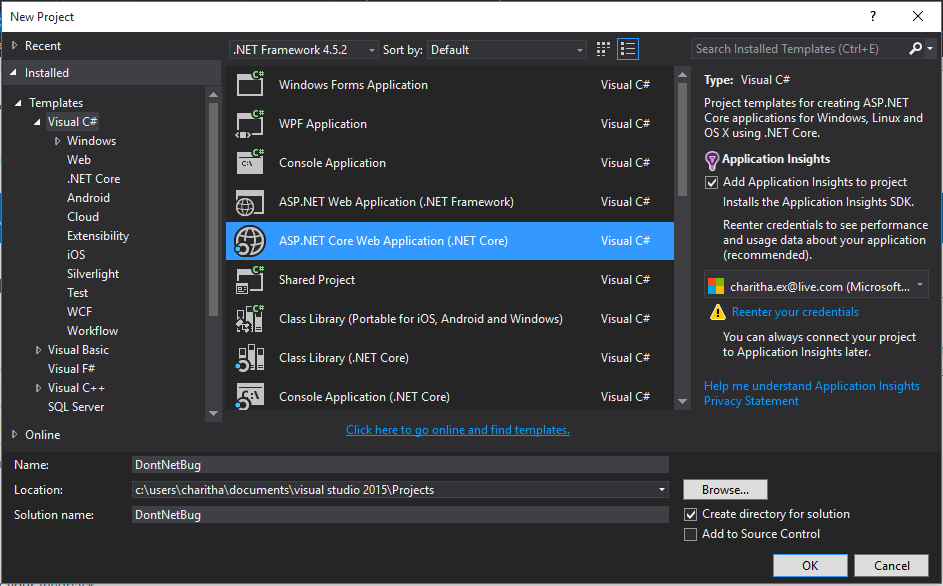
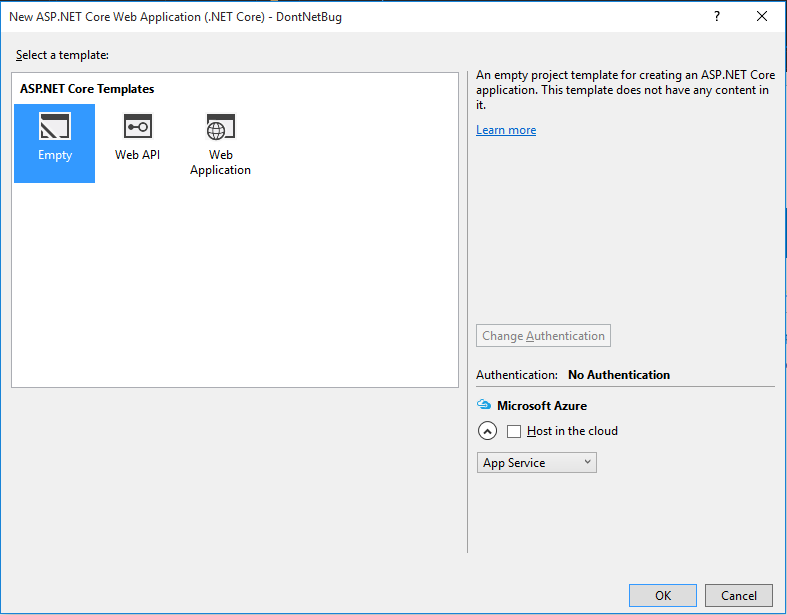
在这个步骤之后,它正在为我创建新的项目,但是这些事情正在发生在我的新项目上。
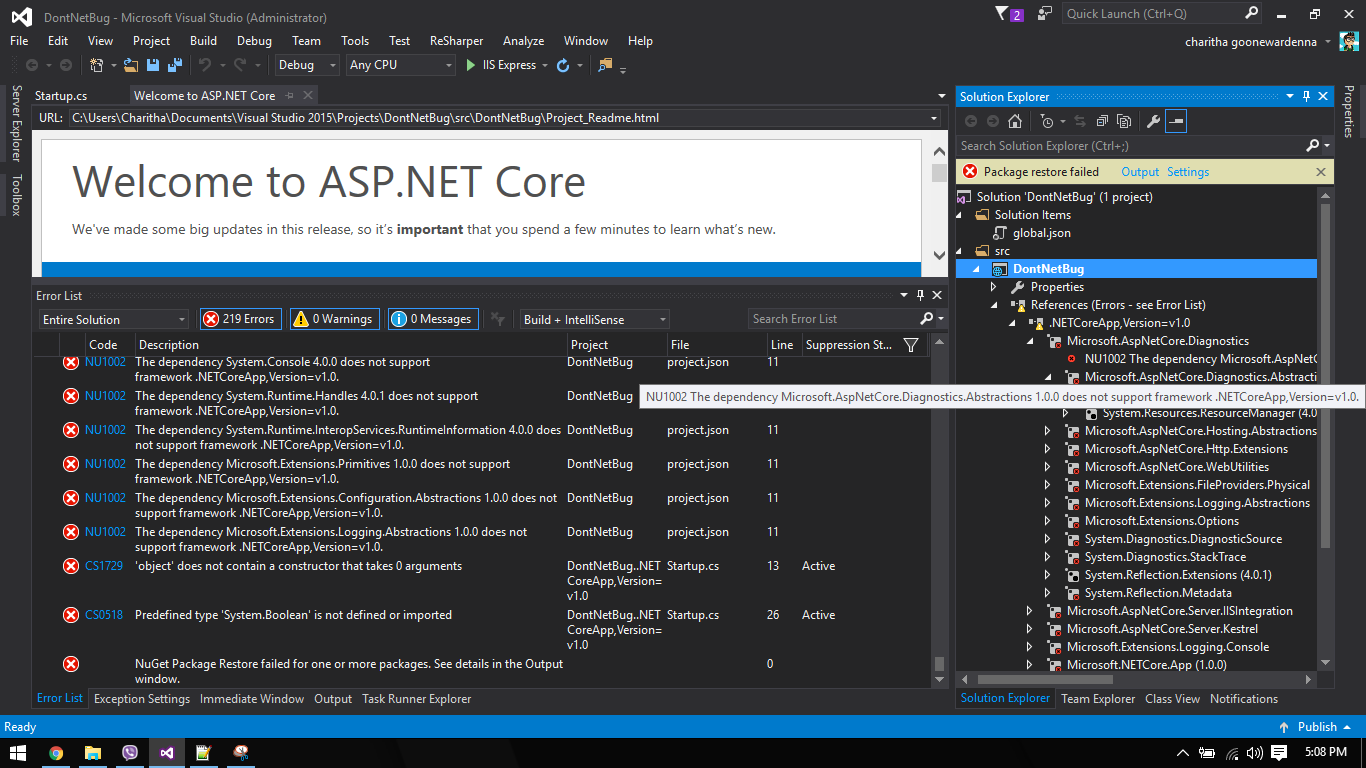
对于项目中的所有依赖项,都会得到类似的错误,如下所示:
NU1002 The dependency System.Runtime.Handles 4.0.1 does not supportframework .NETCoreApp,Version=v1.0.
这是我的project.json
project.json
{
  "dependencies": {
    "Microsoft.NETCore.App": {
      "version": "1.0.0",
      "type": "platform"
    },
    "Microsoft.AspNetCore.Diagnostics": "1.0.0",

    "Microsoft.AspNetCore.Server.IISIntegration": "1.0.0",
    "Microsoft.AspNetCore.Server.Kestrel": "1.0.0",
    "Microsoft.Extensions.Logging.Console": "1.0.0"
  },

  "tools": {
    "Microsoft.AspNetCore.Server.IISIntegration.Tools": "1.0.0-preview2-final"
  },

  "frameworks": {
    "netcoreapp1.0": {
      "imports": [
        "dotnet5.6",
        "portable-net45+win8"
      ]
    }
  },

  "buildOptions": {
    "emitEntryPoint": true,
    "preserveCompilationContext": true
  },

  "runtimeOptions": {
    "configProperties": {
      "System.GC.Server": true
    }
  },

  "publishOptions": {
    "include": [
      "wwwroot",
      "web.config"
    ]
  },

  "scripts": {
    "postpublish": [ "dotnet publish-iis --publish-folder %publish:OutputPath% --framework %publish:FullTargetFramework%" ]
  }
这是我的nuget.config(C:\Users\Charitha\AppData\Roaming\NuGet):
<configuration>
  <packageSources>
   <add key="dotnet.cli" value="https://dotnet.myget.org/F/dotnet-cli/api/v3/index.json" />
    <add key="dotnet.core" value="https://dotnet.myget.org/F/dotnet-core/api/v3/index.json" />
    <add key="RC2" value="https://www.myget.org/F/aspnetvnext/api/v3/index.json" />
    <add key="AspNetCI" value="https://www.myget.org/F/aspnetcirelease/api/v3/index.json" />
    <add key="nuget.org" value="https://api.nuget.org/v3/index.json" protocolVersion="3" />
    <add key="nuget.org" value="https://www.nuget.org/api/v2/" />
  </packageSources>
</configuration>
我已经安装好了
- 的.NET核心工具
- DotNetCore.1.0.0-VS2015Tools.Preview2
任何帮助都将不胜感激。谢谢
回答 2
Stack Overflow用户
发布于 2016-07-12 18:51:29
由于您所指向的是包的发布版本,所以您的NuGet.Config应该如下所示:
<?xml version="1.0" encoding="utf-8"?>
<configuration>
  <packageSources>
    <add key="nuget.org" value="https://api.nuget.org/v3/index.json" protocolVersion="3" />
  </packageSources>
</configuration>如果不希望全局更改Nuget.config文件内容,则可以创建应用程序的本地NuGet.Config文件,并确保将<clear />添加为<packageSources>节点下的第一个元素,以便丢弃任何继承的源。
Stack Overflow用户
发布于 2016-07-12 14:49:16
在挣扎了很多次之后,我找到了答案。嗯,不太确定这一点,但我所做的只是用下面的代码替换了project.json文件。
{
  "dependencies": {
    "Microsoft.AspNetCore.Mvc": "1.0.0-rc2-final",
    "Microsoft.AspNetCore.StaticFiles": "1.0.0-rc2-final",
    "Microsoft.AspNetCore.Server.IISIntegration": "1.0.0-rc2-final",
    "Microsoft.AspNetCore.Server.Kestrel": "1.0.0-rc2-final"
  },

"tools": {
"Microsoft.AspNetCore.Server.IISIntegration.Tools": {
"version": "1.0.0-preview1-final",
"imports": "portable-net45+win8+dnxcore50"
}
},

"frameworks": {

"netcoreapp1.0": {
  "dependencies": {
    "Microsoft.NETCore.App": {
      "version": "1.0.0-rc2-3002702",
      "type": "platform"
    }
  },
  "imports": [
    "dotnet5.6",
    "dnxcore50",
    "portable-net45+win8"
  ]
},
"net461": {
  "dependencies": {
  }
}
},

"buildOptions": {
"emitEntryPoint": true,
"preserveCompilationContext": true
},

"runtimeOptions": {
"gcServer": true
},

"publishOptions": {
  "include": [
    "wwwroot",
    "web.config"
  ]
},

"scripts": {
"prepublish": [ "npm install", "bower install", "gulp clean", "gulp min" ],
"postpublish": [ "dotnet publish-iis --publish-folder %publish:OutputPath% --framework %publish:FullTargetFramework%" ]
}
}
这可能对某人有帮助。
https://stackoverflow.com/questions/38328413
复制相似问题
腾讯云开发者

Copyright © 2013 - 2026 Tencent Cloud. All Rights Reserved. 腾讯云 版权所有
深圳市腾讯计算机系统有限公司 ICP备案/许可证号:粤B2-20090059  粤公网安备44030502008569号
腾讯云计算(北京)有限责任公司 京ICP证150476号 | 京ICP备11018762号