
使用Python从事件日志文件中提取所需变量
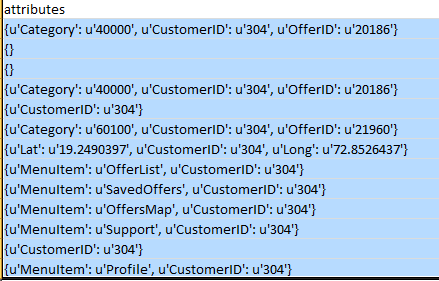
示例第一行事件日志文件,这里我成功地提取了除最后一个键值对(即属性)之外的所有内容。
{"event_type":"ActionClicked","event_timestamp":1451583172592,"arrival_timestamp":1451608731845,"event_version":"3.0",
  "application":{"app_id":"7ffa58dab3c646cea642e961ff8a8070","cognito_identity_pool_id":"us-east-1:
    4d9cf803-0487-44ec-be27-1e160d15df74","package_name":"com.think.vito","sdk":{"name":"aws-sdk-android","version":"2.2.2"}
    ,"title":"Vito","version_name":"1.0.2.1","version_code":"3"},"client":{"client_id":"438b152e-5b7c-4e99-9216-831fc15b0c07",
      "cognito_id":"us-east-1:448efb89-f382-4975-a1a1-dd8a79e1dd0c"},"device":{"locale":{"code":"en_GB","country":"GB",
        "language":"en"},"make":"samsung","model":"GT-S5312","platform":{"name":"ANDROID","version":"4.1.2"}},
  "session":{"session_id":"c15b0c07-20151231-173052586","start_timestamp":1451583052586},"attributes":{"OfferID":"20186",
"Category":"40000","CustomerID":"304"},"metrics":{}}大家好,我正试图从事件日志文件中提取内容,如附件中所示的图像.As所示,需要提取customer ID、offer id、category --这些都是我需要从该事件日志文件中提取的重要变量-- .this是csv格式的文件。我尝试使用正则表达式,但它不起作用,因为您可以观察到每一列的格式是不同的。正如您所看到的,第一行有category customer id offer id,第二行完全是空的--在这种情况下,正则表达式无法工作。我们必须考虑所有可能的条件,我们有14000个sample.in事件日志文件...#Jason #解析#Python #Pandas。
回答 2
Stack Overflow用户
发布于 2016-07-11 04:40:16
这可能不是将文本文件中嵌套的json记录(由行分隔)转换为DataFrame对象的最有效的方法,但它可以做一些工作。
import pandas as pd
import json
from pandas.io.json import json_normalize

with open('path_to_your_text_file.txt', 'rb') as f:
    data = f.readlines()

data = map(lambda x: eval(json_normalize(json.loads(x.rstrip())).to_json(orient="records")[1:-1]), data)
e = pd.DataFrame(data)
print e.head()Stack Overflow用户
发布于 2016-07-10 08:23:27
编辑
编辑后的数据现在看来是JSON数据。您仍然可以按下面的方式使用literal_eval,也可以使用json模块:
import json

with open('event.log') as events:
    for line in events:
        event = json.loads(line)
# process event dictionary要访问CustomerID、OfferID、Category等,您需要访问与event字典中的键'attributes'相关联的嵌套字典:
print(event['attributes']['CustomerID'])
print(event['attributes']['OfferID'])
print(event['attributes']['Category'])如果某些键可能丢失,则使用dict.get():
print(event['attributes'].get('CustomerID'))
print(event['attributes'].get('OfferID'))
print(event['attributes'].get('Category'))现在,如果缺少密钥,您将得到None。
您可以扩展此原则以访问字典中的其他项。
如果我理解您的问题,您还希望创建一个包含提取字段的CSV文件。在csv.DictWriter中使用提取的值,如下所示:
import csv

with open('event.log') as events, open('output.csv', 'w') as csv_file:
    fields = ['CustomerID', 'OfferID', 'Category']
    writer = csv.DictWriter(csv_file, fields)
    writer.writeheader()
    for line in events:
        event = json.loads(line)
writer.writerow(event['attributes'])当字典缺少键时,DictWriter只会将字段保留为空。
原始答案数据不是CSV格式,它似乎包含字典字符串。这些可以使用ast.literal_eval()解析到Python字典中。
from ast import literal_eval

with open('event.log') as events:
    for line in events:
        event = literal_eval(line)
# process event dictionaryhttps://stackoverflow.com/questions/38289890
复制相似问题
腾讯云开发者

Copyright © 2013 - 2026 Tencent Cloud. All Rights Reserved. 腾讯云 版权所有
深圳市腾讯计算机系统有限公司 ICP备案/许可证号:粤B2-20090059  粤公网安备44030502008569号
腾讯云计算(北京)有限责任公司 京ICP证150476号 | 京ICP备11018762号