
通过主题设置StatusBar颜色。?
我将通过styles.xml更改statusbar颜色,但无法设置statusbar颜色。我不想通过编码设置状态栏的颜色,我只想通过theme/style。
Activity.xml
<?xml version="1.0" encoding="utf-8"?>
<android.support.design.widget.CoordinatorLayout xmlns:android="http://schemas.android.com/apk/res/android"
    xmlns:app="http://schemas.android.com/apk/res-auto"
    xmlns:tools="http://schemas.android.com/tools"
    android:layout_width="match_parent"
    android:layout_height="match_parent"
    android:fitsSystemWindows="true"
    tools:context="eazitouk.eazitoclient.mainclasses.TestActivity">

    <android.support.design.widget.AppBarLayout
        android:layout_width="match_parent"
        android:layout_height="wrap_content"
        android:theme="@style/AppTheme.AppBarOverlay">

        <android.support.v7.widget.Toolbar
            android:id="@+id/toolbar"
            android:layout_width="match_parent"
            android:layout_height="?attr/actionBarSize"
            android:background="?attr/colorPrimary"
            app:theme="@style/ThemeOverlay.AppCompat.Dark.ActionBar"
            app:popupTheme="@style/ThemeOverlay.AppCompat.Light"/>

    </android.support.design.widget.AppBarLayout>

    <include layout="@layout/content_test" />

    <android.support.design.widget.FloatingActionButton
        android:id="@+id/fab"
        android:layout_width="wrap_content"
        android:layout_height="wrap_content"
        android:layout_gravity="bottom|end"
        android:layout_margin="@dimen/fab_margin"
        android:src="@android:drawable/ic_dialog_email" />

</android.support.design.widget.CoordinatorLayout>
Manifest.xml
<application
        android:name="eazitouk.eazitoclient.miscs.AppController"
        android:icon="@drawable/ic_launchicon"
        android:label="@string/app_name"
        android:theme="@style/AppTheme">
        <activity
            android:name=".TestActivity"
            android:label="@string/title_activity_test"
            android:theme="@style/AppTheme1">
            <intent-filter>
                <action android:name="android.intent.action.MAIN" />
                <category android:name="android.intent.category.LAUNCHER" />
            </intent-filter>
        </activity>
    </application>
color.xml
<?xml version="1.0" encoding="utf-8"?>
<resources>

    <color name="ColorPrimary">#df4a43</color>
    <color name="ColorPrimaryDark">#c8423c</color>

    <color name="ColorPrimary1">#FFCF3B</color>
    <color name="ColorPrimaryLight">#F3A2A0</color>
    <color name="ColorPrimaryLightShade">#e56e66</color>

</resources>
Style.xml
<resources>

    <!-- Application theme. -->
    <style name="AppTheme" parent="Theme.AppCompat.Light">
        <item name="colorPrimary">@color/ColorPrimary</item>
        <item name="colorPrimaryDark">@color/ColorPrimaryDark</item>
    </style>

    <style name="AppTheme1" parent="Theme.AppCompat.Light.NoActionBar">
        <item name="colorPrimary">@color/ColorPrimary</item>
        <item name="colorPrimaryDark">@color/ColorPrimaryDark</item>
        <item name="android:textColorSecondary">@color/accentcolor</item>-->
    </style>
</resources>
这是我的style.xml和AppTheme应用于应用程序,AppTheme1应用于我的活动,但不能设置statusbar颜色
回答 4
Stack Overflow用户
发布于 2016-07-09 07:36:02
我已经测试了你的代码。现在,更改为这个,您的style中有问题。所以,按照我的方式得到输出。
Android manifest.xml.
<application
        android:allowBackup="true"
        android:icon="@mipmap/ic_launcher"
        android:label="@string/app_name"
        android:largeHeap="true"
        android:screenOrientation="portrait"
        android:theme="@style/AppTheme">

        <activity
            android:name=".TestActivity"
            android:label="@string/title_activity_test"
            android:theme="@style/AppTheme">
            <intent-filter>
                <action android:name="android.intent.action.MAIN" />

                <category android:name="android.intent.category.LAUNCHER" />
            </intent-filter>
        </activity>
    </application>
colors.xml
<?xml version="1.0" encoding="utf-8"?>
<resources>

    <color name="primaryColor">#EF6C00</color>
    <color name="primaryColorDark">#E65100</color>
    <color name="accentcolor">#0072BA</color>

</resources>
styles.xml
<resources>

    <!-- Base application theme. -->
    <style name="AppTheme" parent="Theme.AppCompat.Light.DarkActionBar">
        <!-- Customize your theme here. -->
        <item name="colorPrimary">@color/primaryColor</item>
        <item name="colorPrimaryDark">@color/primaryColorDark</item>
        <item name="colorAccent">@color/accentcolor</item>
        <item name="windowActionBar">false</item>
        <item name="windowNoTitle">true</item>
    </style>

    <style name="AppTheme.NoActionBar">
        <item name="windowActionBar">false</item>
        <item name="windowNoTitle">true</item>
    </style>

    <style name="AppTheme.AppBarOverlay" parent="ThemeOverlay.AppCompat.Dark.ActionBar" />

    <style name="AppTheme.PopupOverlay" parent="ThemeOverlay.AppCompat.Light" />


</resources>
styles.xml(v21)
<?xml version="1.0" encoding="utf-8"?>
<resources>
    <style name="AppTheme.NoActionBar">
        <item name="windowActionBar">false</item>
        <item name="windowNoTitle">true</item>
        <item name="android:windowDrawsSystemBarBackgrounds">true</item>
        <item name="android:statusBarColor">@android:color/transparent</item>
    </style>

</resources>
最终输出:
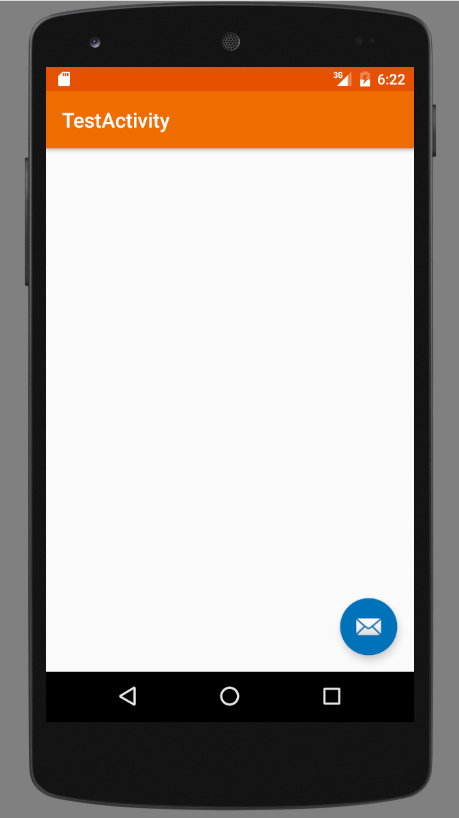
我更要记住的是你已经设置了targetSdkVersion 23。
Stack Overflow用户
发布于 2016-07-09 07:21:30
试着给出正己人密码的颜色。看来,ColorPrimaryDark文件中的颜色color.xml并不包含您想要的颜色。
尝试:
<style name="AppTheme1" parent="Theme.AppCompat.Light.NoActionBar">
    ...
    <item name="colorPrimaryDark">#fad</item>
    ...
</style>在#fad位置使用您的颜色代码
Stack Overflow用户
发布于 2016-07-09 07:07:50
ColorPrimaryDark是与状态栏颜色相对应的。
https://developer.android.com/training/material/theme.html
因此:
<item name="colorPrimaryDark">@color/ColorPrimaryDark</item>将您想要的颜色添加到colors.xml中,其名称为ColorPrimaryDark
https://stackoverflow.com/questions/38279276
复制相似问题
腾讯云开发者

Copyright © 2013 - 2026 Tencent Cloud. All Rights Reserved. 腾讯云 版权所有
深圳市腾讯计算机系统有限公司 ICP备案/许可证号:粤B2-20090059  粤公网安备44030502008569号
腾讯云计算(北京)有限责任公司 京ICP证150476号 | 京ICP备11018762号