
.NET核心project.json命令-设置ASPNETCORE_ENVIRONMENT
在命令行中,如果运行set ASPNETCORE_ENVIRONMENT=Development && dotnet watch run,则宿主环境设置为Development。
但是,如果我将与命令相同的行添加到我的project.json文件中,则监视程序的宿主环境始终是生成的:
"commands": {
  "watch": "set ASPNETCORE_ENVIRONMENT=Development && dotnet watch run"
},
是否有任何参数可以传递给dotnet运行以使宿主环境开发?我确实需要这个作为命令。
回答 2
Stack Overflow用户
发布于 2016-07-16 01:46:13
,我终于想出来了!
诀窍是右键单击Project,转到Properties,然后选择Debug选项卡。接下来,在Profile下,我选择了在我的projects.json中定义的命令的名称:"watch“。选中后,单击ASPNETCORE_ENVIRONMENT变量,并添加名称/值对ASPNETCORE_ENVIRONMENT和Development。
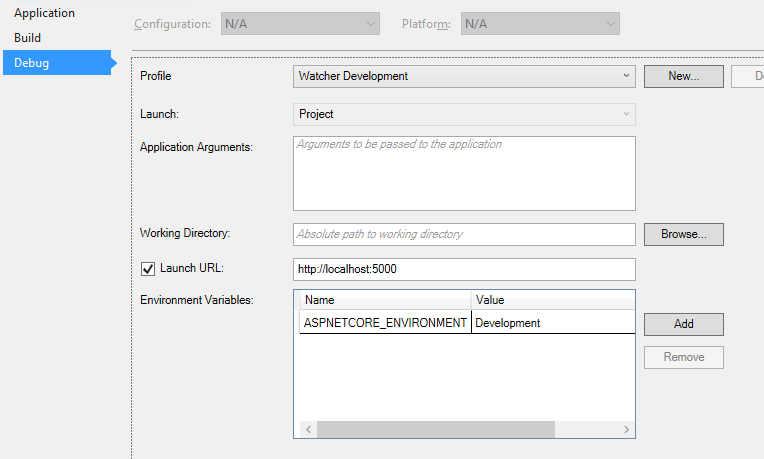
这实际上是在解决方案资源管理器中上传属性下的launchSettings.json文件。这个文件也可以手动编辑。输出如下所示:
{
  "iisSettings": {
    "windowsAuthentication": false,
    "anonymousAuthentication": true,
    "iisExpress": {
      "applicationUrl": "http://localhost:56846/",
      "sslPort": 0
    }
  },
  "profiles": {
    "IIS Express": {
      "commandName": "IISExpress",
      "launchBrowser": true,
      "environmentVariables": {
        "ASPNETCORE_ENVIRONMENT": "Development"
      }
    },
    "LendingTree.CreditCards.Web": {
      "commandName": "Project",
      "launchBrowser": true,
      "launchUrl": "http://localhost:5000",
      "environmentVariables": {
        "ASPNETCORE_ENVIRONMENT": "Development"
      }
    },
    "Watcher Development": {
      "commandName": "Watcher Development",
      "launchBrowser": true,
      "launchUrl": "http://localhost:5000",
      "environmentVariables": {
        "ASPNETCORE_ENVIRONMENT": "Development"
      }
    }
  }
}Stack Overflow用户
发布于 2016-07-08 19:16:44
您可以添加Microsoft.Extensions.Configuration.CommandLine包,它从命令行读取配置:
public class Program
{
    public static void Main(string[] args)
    {
        var config = new ConfigurationBuilder()
            .AddEnvironmentVariables()
            .AddCommandLine(args)
            .Build();

        var host = new WebHostBuilder()
            .UseEnvironment(config["ASPNETCORE_ENVIRONMENT"])
            .UseKestrel()
            .UseContentRoot(Directory.GetCurrentDirectory())
            .UseIISIntegration()
            .UseStartup<Startup>()
            .Build();

        host.Run();
    }
}使用dotnet run,您可以如下所示:
dotnet run --ASPNETCORE_ENVIRONMENT Development您也应该能够对dotnet watch run做类似的事情。
https://stackoverflow.com/questions/38273596
复制相似问题
腾讯云开发者

Copyright © 2013 - 2026 Tencent Cloud. All Rights Reserved. 腾讯云 版权所有
深圳市腾讯计算机系统有限公司 ICP备案/许可证号:粤B2-20090059  粤公网安备44030502008569号
腾讯云计算(北京)有限责任公司 京ICP证150476号 | 京ICP备11018762号