
网络部署错误ERROR_DESTINATION_NOT_REACHABLE
网络部署错误ERROR_DESTINATION_NOT_REACHABLE
提问于 2016-07-08 16:56:36
我正在尝试使用以下msdeploy命令部署我的应用程序:
MSDeploy.exe -source:contentPath="C:\Users\myUser\Documents\ui\dist" -dest:contentPath='c:/inetpub/wwwroot/dist',computerName="https://ec2-xx-xxx-xx-xx.ap-northeast-1.compute.amazonaws.com:8172/MSDeploy.axd?site=Default Web Site",username="administrator",password="XXXXXXXXX",authtype="Basic",includeAcls="False" -verb:sync -allowUntrusted获取以下错误:
Working...
    Info: Using ID '01657062-cece-4713-8dc6-585537b265fd' for connections to the rem
    ote server.
    >> Error Code: ERROR_DESTINATION_NOT_REACHABLE
    >> More Information: Could not connect to the remote computer ("ec2-52-207-222-6
    5.compute-1.amazonaws.com"). On the remote computer, make sure that Web Deploy i
    s installed and that the required process ("Web Management Service") is started.
      Learn more at: http://go.microsoft.com/fwlink/?LinkId=221672#ERROR_DESTINATION
    _NOT_REACHABLE.
    >> Error: Unable to connect to the remote server
    >> Error: A connection attempt failed because the connected party did not properly respond after a period of time, or established connection failed because connected host has failed to respond xx.xxx.xx.xx:8172
我在其他6台服务器上尝试了相同的命令,它运行得很好,但对配置相同的2台服务器却不起作用。
- 所有IIS可安装程序都已就位
- 端口8172 (TCP)的防火墙入站规则已经到位,其他防火墙规则没有问题,因为我已经关闭了防火墙。
- 安装了用于托管服务器的WebDeploy3.6和WebDeploy3.6
- 确保Web管理服务,Web部署代理服务已启动并设置为自动
我错过了什么?
回答 4
Stack Overflow用户
回答已采纳
发布于 2016-07-11 16:46:22
将该规则添加到端口8172的安全组中,它就开始工作了。但是我不知道为什么它以前在Visual中工作,而不是在命令提示符中工作。
Stack Overflow用户
发布于 2016-10-06 12:41:19
若要使用Web成功地将网站部署到windows服务器上,请确保以下内容已经到位。
- 站点名称必须在Visual和IIS服务器上完全匹配。
- 确保安装在same.net框架中的服务器作为您的可视化工作室(例如ASP、ASP.net 4.5…)
- 确保在服务器上打开端口8172 (8172用于web部署)
Stack Overflow用户
发布于 2021-06-16 12:25:49
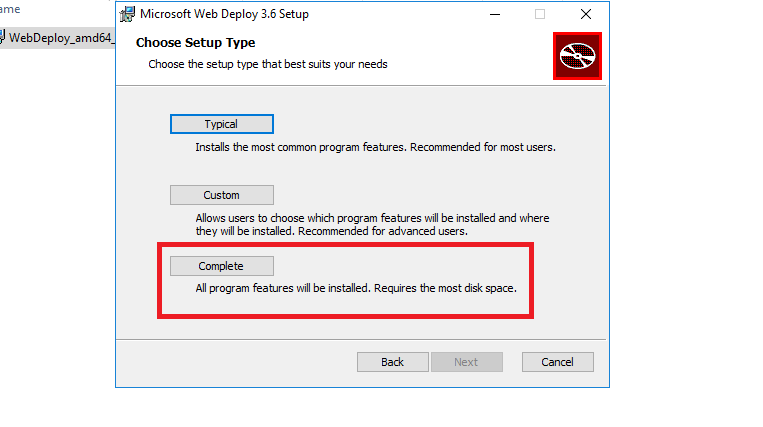
下面的步骤解决了我的问题。
在windows服务器上安装web部署时,请确保选择“完成”功能安装,而不是“典型”或“自定义”。安装完成后,您将能够从visual studio部署应用程序。
页面原文内容由Stack Overflow提供。腾讯云小微IT领域专用引擎提供翻译支持
原文链接:
https://stackoverflow.com/questions/38271966
复制相关文章
相似问题
腾讯云开发者

Copyright © 2013 - 2026 Tencent Cloud. All Rights Reserved. 腾讯云 版权所有
深圳市腾讯计算机系统有限公司 ICP备案/许可证号:粤B2-20090059  粤公网安备44030502008569号
腾讯云计算(北京)有限责任公司 京ICP证150476号 | 京ICP备11018762号