
无法运行bms-示例-cordova-hellopush-bms_samples_cordova_push-未找到Swift.h文件
无法运行bms-示例-cordova-hellopush-bms_samples_cordova_push-未找到Swift.h文件
提问于 2016-07-07 08:24:32
我正在尝试运行GitHub上可用的推送通知示例。不幸的是,这里概述的配置不起作用。
医生说:在你的AppDelegate.m顶部
#import "[your-project-name]-Swift.h"如果项目名称有空格或连字符,请在import语句中用下划线替换它们。
示例:
// Project name is "Test Project" or "Test-Project"
#import "Test_Project-Swift.h"
所以我做了样本:
#import "bms_samples_cordova_push-Swift.h"ObjC桥接标头设置为:
bms-samples-cordova-push/Plugins/ibm-mfp-core/Bridging-Header.h
Runpath设置为:
@executable_path/Frameworks
但是Xcode在上面抛出了错误。我做错什么了?
回答 1
Stack Overflow用户
回答已采纳
发布于 2016-07-07 20:12:26
我能够使用以下步骤让bms-samples-cordova-hellopush示例应用程序运行:
- 克隆样本:
git clone https://github.com/ibm-bluemix-mobile-services/bms-samples-cordova-hellopush - 在我的APPLICATION_ROUTE和APPLICATION_GUID中添加了我的
[your-directory]/www/js/index.js(在为Bluemix上的移动服务初学者应用程序配置推送通知之后) - 将iOS平台添加到我的应用程序中:
cordova platform add ios@3.9 - 添加了Cordova插件:
cordova plugin add ibm-mfp-push - 用Xcode打开我的
[your-app-name].xcodeproj目录中的[your-app-name]/platforms/ios文件(当我被提示:转换为最新的Swift语法时,我单击了Cancel) - 增加了桥接头。转到
Build settings > Swift Compiler - Code Generation > Objective-C Bridging Header并添加了以下路径:[your-project-name]/Plugins/ibm-mfp-core/Bridging-Header.h

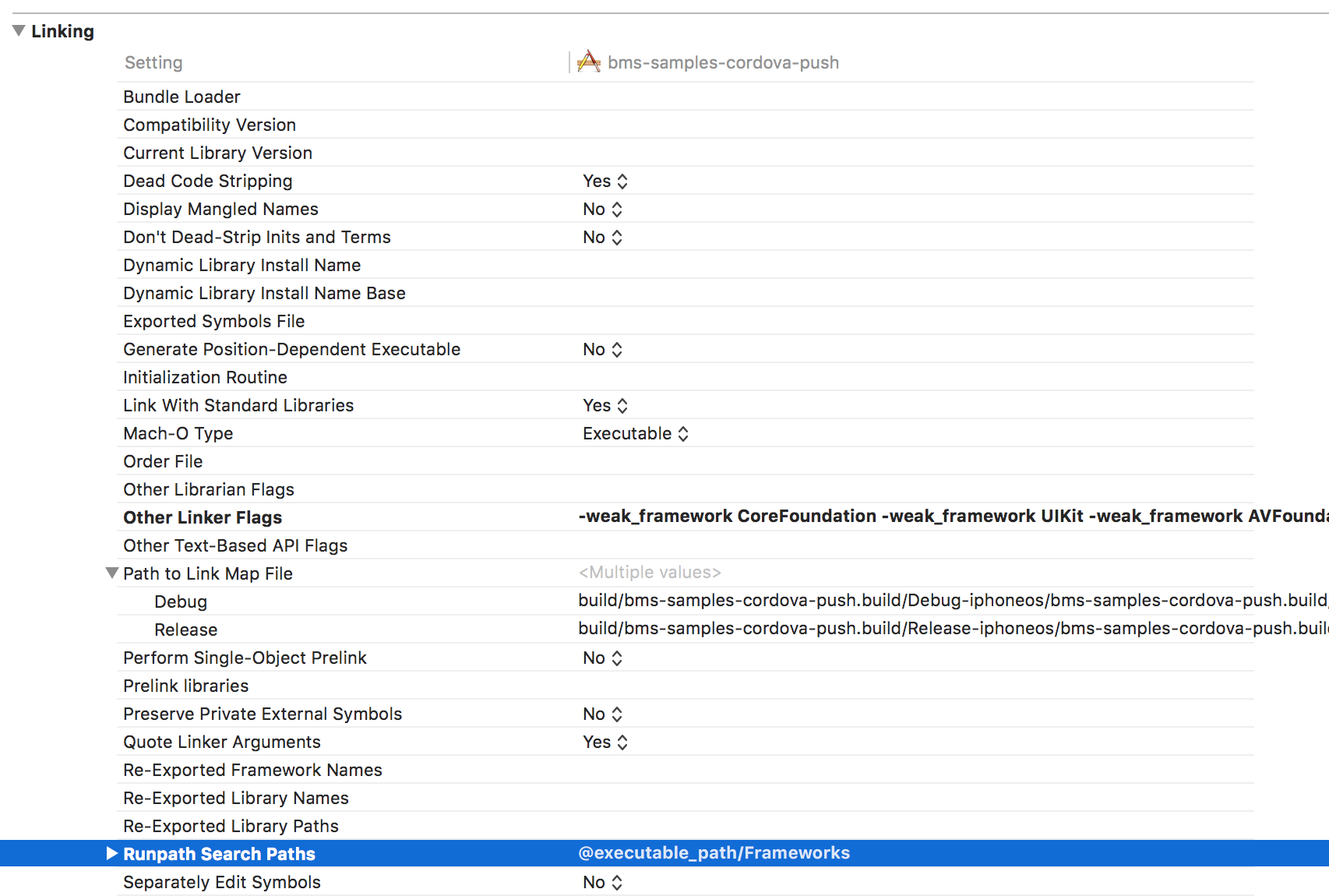
- 添加框架参数。转到
Build Settings > Linking > Runpath Search Paths并添加了以下参数:@executable_path/Frameworks
- 建设工程
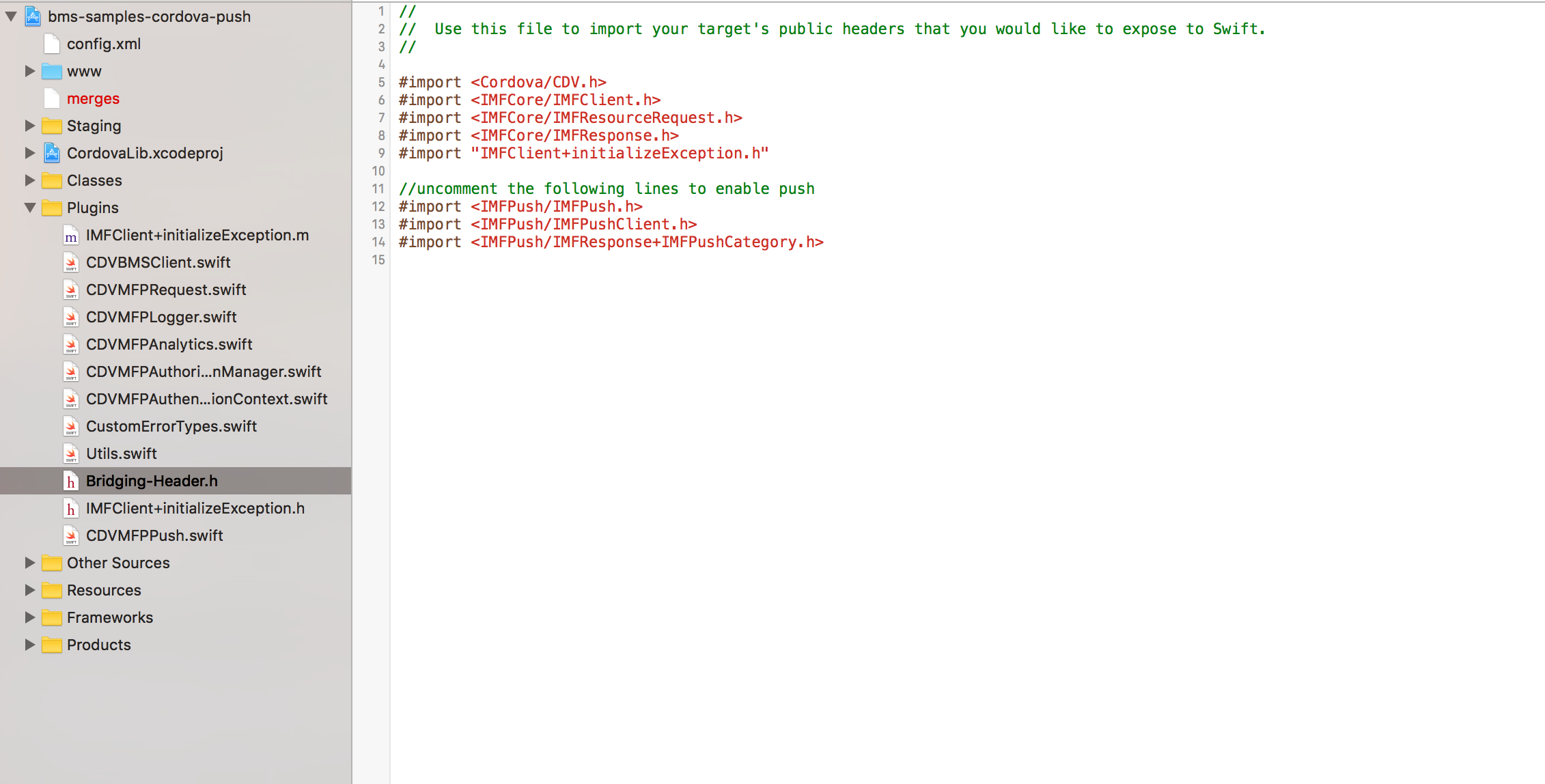
- 取消桥接标题中的以下Push导入语句的注释。去了
[your-project-name]/Plugins/ibm-mfp-core/Bridging-Header.h
- 更新我的客户端应用程序以使用Push SDK
这是我更新的AppDelegate.m
/*
 Licensed to the Apache Software Foundation (ASF) under one
 or more contributor license agreements.  See the NOTICE file
 distributed with this work for additional information
 regarding copyright ownership.  The ASF licenses this file
 to you under the Apache License, Version 2.0 (the
 "License"); you may not use this file except in compliance
 with the License.  You may obtain a copy of the License at

 http://www.apache.org/licenses/LICENSE-2.0

 Unless required by applicable law or agreed to in writing,
 software distributed under the License is distributed on an
 "AS IS" BASIS, WITHOUT WARRANTIES OR CONDITIONS OF ANY
 KIND, either express or implied.  See the License for the
 specific language governing permissions and limitations
 under the License.
 */

//
//  AppDelegate.m
//  bms-samples-cordova-push
//
//  Created by ___FULLUSERNAME___ on ___DATE___.
//  Copyright ___ORGANIZATIONNAME___ ___YEAR___. All rights reserved.
//

#import "AppDelegate.h"
#import "MainViewController.h"
#import "bms_samples_cordova_push-Swift.h"


#import <Cordova/CDVPlugin.h>

@implementation AppDelegate

@synthesize window, viewController;

- (id)init
{
    /** If you need to do any extra app-specific initialization, you can do it here
     *  -jm
     **/
    NSHTTPCookieStorage* cookieStorage = [NSHTTPCookieStorage sharedHTTPCookieStorage];

    [cookieStorage setCookieAcceptPolicy:NSHTTPCookieAcceptPolicyAlways];

    int cacheSizeMemory = 8 * 1024 * 1024; // 8MB
    int cacheSizeDisk = 32 * 1024 * 1024; // 32MB
#if __has_feature(objc_arc)
        NSURLCache* sharedCache = [[NSURLCache alloc] initWithMemoryCapacity:cacheSizeMemory diskCapacity:cacheSizeDisk diskPath:@"nsurlcache"];
#else
        NSURLCache* sharedCache = [[[NSURLCache alloc] initWithMemoryCapacity:cacheSizeMemory diskCapacity:cacheSizeDisk diskPath:@"nsurlcache"] autorelease];
#endif
    [NSURLCache setSharedURLCache:sharedCache];

    self = [super init];
    return self;
}

#pragma mark UIApplicationDelegate implementation

/**
 * This is main kick off after the app inits, the views and Settings are setup here. (preferred - iOS4 and up)
 */
- (BOOL)application:(UIApplication*)application didFinishLaunchingWithOptions:(NSDictionary*)launchOptions
{
    CGRect screenBounds = [[UIScreen mainScreen] bounds];

#if __has_feature(objc_arc)
        self.window = [[UIWindow alloc] initWithFrame:screenBounds];
#else
        self.window = [[[UIWindow alloc] initWithFrame:screenBounds] autorelease];
#endif
    self.window.autoresizesSubviews = YES;

#if __has_feature(objc_arc)
        self.viewController = [[MainViewController alloc] init];
#else
        self.viewController = [[[MainViewController alloc] init] autorelease];
#endif

    // Set your app's start page by setting the <content src='foo.html' /> tag in config.xml.
    // If necessary, uncomment the line below to override it.
    // self.viewController.startPage = @"index.html";

    // NOTE: To customize the view's frame size (which defaults to full screen), override
    // [self.viewController viewWillAppear:] in your view controller.

    [[CDVMFPPush sharedInstance] didReceiveRemoteNotificationOnLaunch:launchOptions];

    self.window.rootViewController = self.viewController;
    [self.window makeKeyAndVisible];

    return YES;
}

// this happens while we are running ( in the background, or from within our own app )
// only valid if bms-samples-cordova-push-Info.plist specifies a protocol to handle
- (BOOL)application:(UIApplication*)application openURL:(NSURL*)url sourceApplication:(NSString*)sourceApplication annotation:(id)annotation
{
    if (!url) {
        return NO;
    }

    // all plugins will get the notification, and their handlers will be called
    [[NSNotificationCenter defaultCenter] postNotification:[NSNotification notificationWithName:CDVPluginHandleOpenURLNotification object:url]];

    return YES;
}

// repost all remote and local notification using the default NSNotificationCenter so multiple plugins may respond
- (void)            application:(UIApplication*)application
    didReceiveLocalNotification:(UILocalNotification*)notification
{
    // re-post ( broadcast )
    [[NSNotificationCenter defaultCenter] postNotificationName:CDVLocalNotification object:notification];
}


#if __IPHONE_OS_VERSION_MAX_ALLOWED < 90000
- (NSUInteger)application:(UIApplication*)application supportedInterfaceOrientationsForWindow:(UIWindow*)window
#else
- (UIInterfaceOrientationMask)application:(UIApplication*)application supportedInterfaceOrientationsForWindow:(UIWindow*)window
#endif
{
    // iPhone doesn't support upside down by default, while the iPad does.  Override to allow all orientations always, and let the root view controller decide what's allowed (the supported orientations mask gets intersected).
    NSUInteger supportedInterfaceOrientations = (1 << UIInterfaceOrientationPortrait) | (1 << UIInterfaceOrientationLandscapeLeft) | (1 << UIInterfaceOrientationLandscapeRight) | (1 << UIInterfaceOrientationPortraitUpsideDown);

    return supportedInterfaceOrientations;
}

- (void)applicationDidReceiveMemoryWarning:(UIApplication*)application
{
    [[NSURLCache sharedURLCache] removeAllCachedResponses];
}

// Register device token with Bluemix Push Notification Service
- (void)application:(UIApplication *)application
didRegisterForRemoteNotificationsWithDeviceToken:(NSData *)deviceToken{

    [[CDVMFPPush sharedInstance] didRegisterForRemoteNotifications:deviceToken];
}

// Handle error when failed to register device token with APNs
- (void)application:(UIApplication*)application
didFailToRegisterForRemoteNotificationsWithError:(NSError*)error {

    [[CDVMFPPush sharedInstance] didFailToRegisterForRemoteNotifications:error];
}

// Handle receiving a remote notification
-(void)application:(UIApplication *)application
didReceiveRemoteNotification:(NSDictionary *)userInfo
fetchCompletionHandler:(void (^)(UIBackgroundFetchResult))completionHandler {

    [[CDVMFPPush sharedInstance] didReceiveRemoteNotification:userInfo];
}

@end- 在iOS设备上运行示例以实际注册和接收推送通知
希望我没有错过任何事情:0)
我已经与科多瓦团队联系并公开了一些问题,以提高这个样本的质量,使其更容易建立。
编辑:,正如下面Sebastian所指出的,您需要禁用bitcode。
页面原文内容由Stack Overflow提供。腾讯云小微IT领域专用引擎提供翻译支持
原文链接:
https://stackoverflow.com/questions/38240745
复制相关文章
相似问题
腾讯云开发者

Copyright © 2013 - 2026 Tencent Cloud. All Rights Reserved. 腾讯云 版权所有
深圳市腾讯计算机系统有限公司 ICP备案/许可证号:粤B2-20090059  粤公网安备44030502008569号
腾讯云计算(北京)有限责任公司 京ICP证150476号 | 京ICP备11018762号