
将ImageView椭圆地移动到RelativeView中的中心
将ImageView椭圆地移动到RelativeView中的中心
提问于 2016-07-05 20:47:17
我有一个设置,在中心周围有一些ImageViews,当用户单击按钮时,我希望视图以椭圆的方式围绕中心视图旋转。目前我所看到的是一个椭圆运动,但是视图是在一个奇怪的轴上旋转,而不是按要求在中心轴上旋转。
<RelativeLayout
xmlns:android="http://schemas.android.com/apk/res/android"
xmlns:tools="http://schemas.android.com/tools"
android:layout_width="match_parent"
android:layout_height="match_parent"
android:paddingBottom="@dimen/activity_vertical_margin"
android:paddingLeft="@dimen/activity_horizontal_margin"
android:paddingRight="@dimen/activity_horizontal_margin"
android:paddingTop="@dimen/activity_vertical_margin"
tools:context="com.didasko.calculus.maca.TelaAtomo"
>
<ImageButton
    android:layout_width="wrap_content"
    android:layout_height="wrap_content"
    android:id="@+id/tela_atomo_maca_central"
    android:layout_centerVertical="true"
    android:layout_centerHorizontal="true"
    android:src="@drawable/maca_cinza"
    android:background="@null"/>

<ImageButton
    android:layout_width="wrap_content"
    android:layout_height="wrap_content"
    android:id="@+id/tela_atomo_eletron_0"
    android:src="@drawable/eletron_nao_completado"
    android:background="@null"
    android:layout_marginRight="46dp"
    android:layout_toLeftOf="@+id/tela_atomo_maca_central"
    android:layout_marginBottom="78dp"
    android:layout_above="@+id/tela_atomo_maca_central"/>
</RelativeLayout>
tela_atomo_maca_central是中心元素,tela_atomo_eletron_0是我想要移动的椭圆视图。
final ImageButton eletron = (ImageButton) findViewById(R.id.tela_atomo_eletron_0);

    //Getting all points in the ellipse
    for(int i=0;i<360;i++) {
        double x = 46 * Math.cos(i);
        double y = 78 * Math.sin(i);
        Ponto p = new Ponto(x,y);
        pontos.add(p);
    }

    Runnable eletronRunnable = new Runnable() {
        @Override
        public void run() {
            if (contagem < 360) {
                Ponto p = pontos.get(contagem);
                contagem++;
                RelativeLayout.LayoutParams params = (RelativeLayout.LayoutParams) eletron.getLayoutParams();
                params.rightMargin = (int)p.getX();
                params.bottomMargin = (int)p.getY();
                eletron.setLayoutParams(params);

                eletron.postDelayed(this,100);
            }else {
                contagem = 0;
                eletron.postDelayed(this,100);
            }
        }
    };

    eletron.postDelayed(eletronRunnable,100);


}


private class Ponto {

    private double x,y;

    public Ponto(double x, double y) {
        this.x = x;
        this.y = y;
    }

    public double getX() {
        return x;
    }

    public double getY() {
        return y;
    }

}
我可能犯了逻辑上的错误,因为我可以使它椭圆地移动,只是不是我想要的地方。
如何使图像以椭圆的方式围绕中心移动?
回答 1
Stack Overflow用户
回答已采纳
发布于 2016-07-11 15:30:51
基于你现有的代码,我做了一个示例项目,下面是我所得到的-
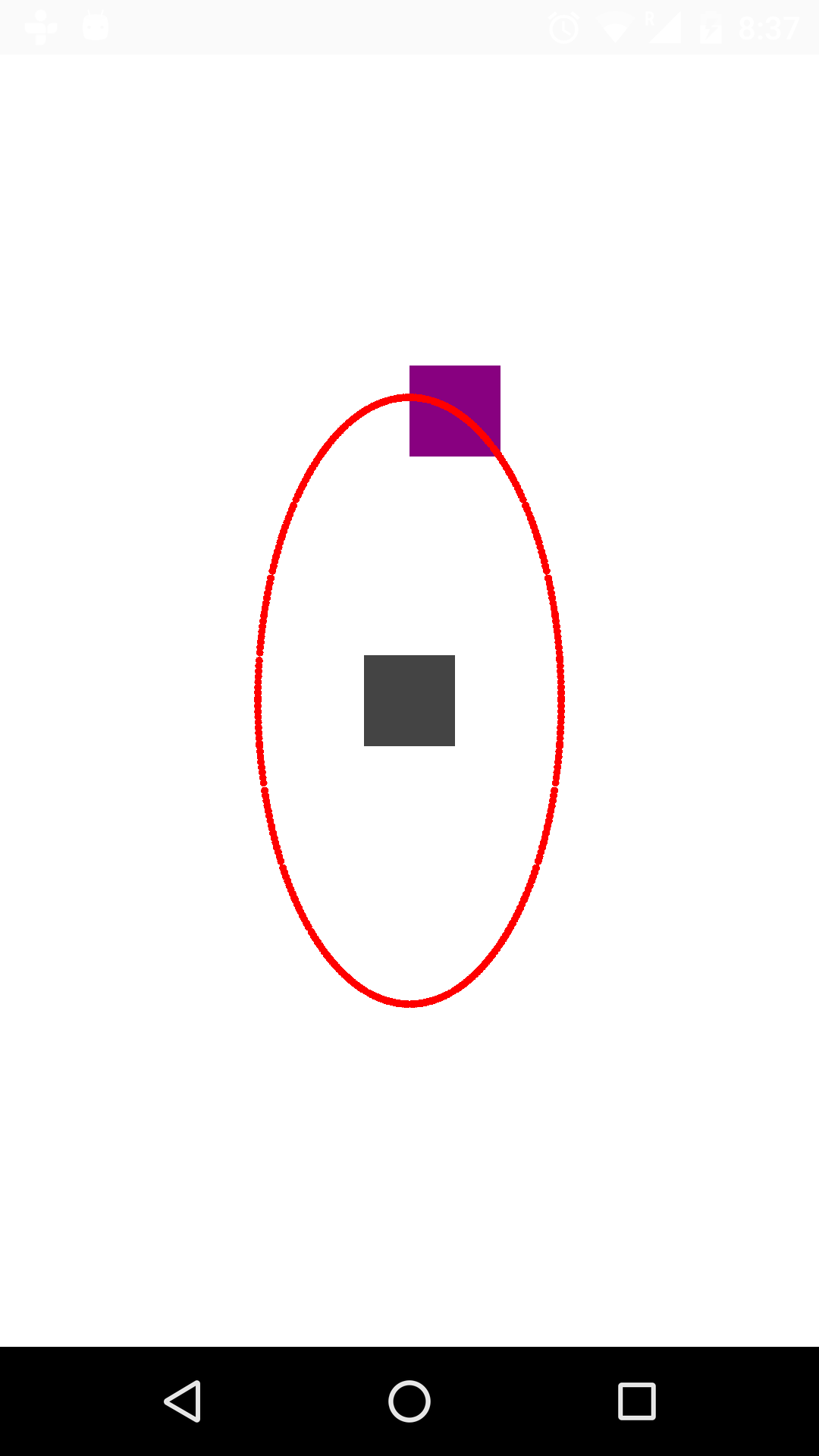
这是修改后的代码-
public class ActivityTest extends AppCompatActivity {
ImageButton eletron,center;
ArrayList<Ponto> pontos = new ArrayList<>();
int contagem = 0;
DemoRelativeLayout rel;
@Override
public void onCreate(Bundle savedInstanceState) {
    super.onCreate(savedInstanceState);
    setContentView(R.layout.so_demo);
    eletron = (ImageButton) findViewById(R.id.tela_atomo_eletron_0);
    center = (ImageButton) findViewById(R.id.tela_atomo_maca_central);
    rel = (DemoRelativeLayout)findViewById(R.id.demo);
    //Getting all points in the ellipse
    for(int i=0;i<360;i++) {
        double x = (200 * Math.cos(i));
        double y = (400 * Math.sin(i));

        Ponto p = new Ponto(x,y);
        pontos.add(p);
    }
    eletron.postDelayed(eletronRunnable,2000);
}

@Override
protected void onStart() {
    super.onStart();
    rel.drawCircle(pontos,center.getX() + center.getWidth()/2,center.getY() + center.getHeight()/2);
    rel.invalidate();
}

Runnable eletronRunnable = new Runnable() {
    @Override
    public void run() {
        if (contagem < 360) {
            Ponto p = pontos.get(contagem);
            contagem++;
            /*RelativeLayout.LayoutParams params = (RelativeLayout.LayoutParams) eletron.getLayoutParams();
            params.rightMargin = (int)p.getX();
            params.bottomMargin = (int)p.getY();
            eletron.setLayoutParams(params);*/
            eletron.setTranslationX((float) p.getX() + (eletron.getWidth()/2 + center.getWidth()/2));
            eletron.setTranslationY((float)p.getY() + (eletron.getHeight()/2 + center.getHeight()/2));
            eletron.postDelayed(this,100);
        }else {
            contagem = 0;
            eletron.postDelayed(this,100);
        }
    }
};

public class Ponto {

    private double x,y;

    public Ponto(double x, double y) {
        this.x = x;
        this.y = y;
    }

    public double getX() {
        return x;
    }

    public double getY() {
        return y;
    }

}
}
我还更改了xml文件-
<com.wandertails.stackovrflw.DemoRelativeLayout
xmlns:android="http://schemas.android.com/apk/res/android"
xmlns:tools="http://schemas.android.com/tools"
android:layout_width="match_parent"
android:layout_height="match_parent"
android:padding="10dp"
android:background="#ffffff"
android:id="@+id/demo"
>
<ImageButton
    android:layout_width="40dp"
    android:layout_height="40dp"
    android:id="@+id/tela_atomo_maca_central"
    android:layout_centerVertical="true"
    android:layout_centerHorizontal="true"
    android:src="#444444"
    android:background="@null"/>
<ImageButton
    android:layout_width="40dp"
    android:layout_height="40dp"
    android:id="@+id/tela_atomo_eletron_0"
    android:src="#880080"
    android:background="@null"
    android:layout_toLeftOf="@+id/tela_atomo_maca_central"
    android:layout_above="@+id/tela_atomo_maca_central"/>
</com.wandertails.stackovrflw.DemoRelativeLayout>
最后,如果您想要绘制椭圆路径,那么DemoRelativeLayout -
public class DemoRelativeLayout extends RelativeLayout
{
ArrayList<ActivityTest.Ponto> pontos;
float cntrX,cntrY;
public DemoRelativeLayout(Context context) {
    super(context);
}

public DemoRelativeLayout(Context context, AttributeSet attrs) {
    super(context, attrs);
}

public DemoRelativeLayout(Context context, AttributeSet attrs, intdefStyleAttr) {
    super(context, attrs, defStyleAttr);
}

@Override
protected void dispatchDraw(Canvas canvas) {
    super.dispatchDraw(canvas);
    if(pontos != null){
        Paint p = new Paint();
        p.setColor(Color.RED);
        for (ActivityTest.Ponto pt : pontos){
            float x = (float)pt.getX() + cntrX;
            float y = (float)pt.getY() + cntrY;
            canvas.drawCircle(x,y,5,p);
        }

    }

}

public void drawCircle(ArrayList<ActivityTest.Ponto> pp,float x,float y){
    cntrX = x;
    cntrY = y;
    pontos = pp;
}
}
我希望这是你想要的..。
页面原文内容由Stack Overflow提供。腾讯云小微IT领域专用引擎提供翻译支持
原文链接:
https://stackoverflow.com/questions/38212431
复制相关文章
相似问题
腾讯云开发者

Copyright © 2013 - 2026 Tencent Cloud. All Rights Reserved. 腾讯云 版权所有
深圳市腾讯计算机系统有限公司 ICP备案/许可证号:粤B2-20090059  粤公网安备44030502008569号
腾讯云计算(北京)有限责任公司 京ICP证150476号 | 京ICP备11018762号