
按下“删除”按钮时,如何在对话框中显示角色名称
我有一个指定角色和操作的表,如果我签入“角色”并按下“删除”按钮,则应该会得到一个对话框,指示该特定角色。
如果我单击“添加”按钮,将得到一个对话框或消息框,其中包含其他几个角色的列表;单击该角色时,应显示必须添加到相应表中的滚动名称。
我已经创建了sap.m.Table并绑定了JSON数据
随函附上UI的图像:

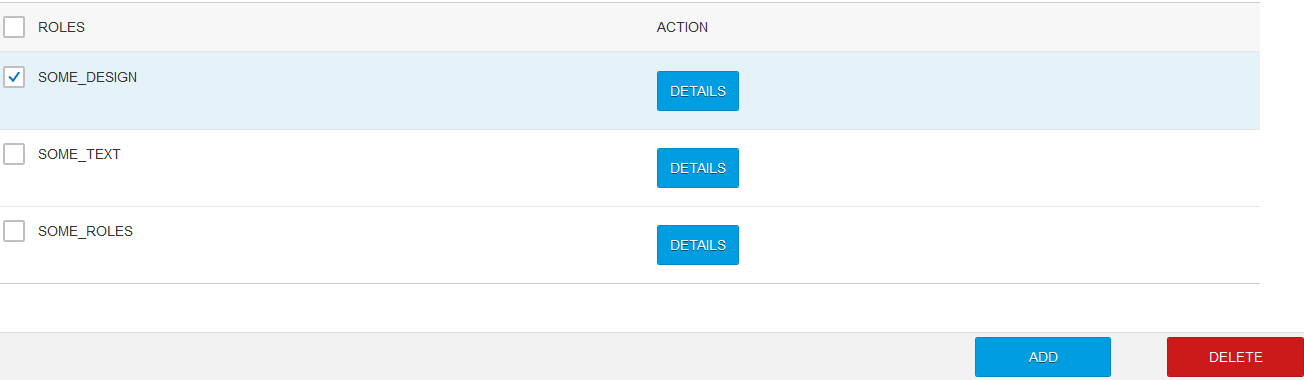
我尝试过各种方法,并附上了我的代码
这是密码。
我可以从表中删除该项,但我应该得到一个对话框/消息框,该对话框/消息框指示已删除表中标记的角色。
    <script>
    function delete1()
    {
        var v = false;
        $('input[type="checkbox"]:checked').each(function() {
            v = true;
            alert("Checked item in the table will be deleted from the table");
      });

      if (v == false)
      {
        alert("Please check the item to be deleted");
      }
      $('input[type="checkbox"]:checked').closest("tr").remove();
    }
    var oModel = new sap.ui.model.json.JSONModel("JSon/etc5.json");
        // Load JSON in model
        sap.ui.getCore().setModel(oModel,"model1");
        //create table
        //"cells"
        var oRoles = new sap.m.Text({text: "{model1>Role}"});
        var oAction = new sap.m.Button({text: "DETAILS",
                                         type : sap.m.ButtonType.Emphasized,

                        });
                         // corresponding columns

                        var oColAbbr = new sap.m.Column({header: new sap.m.Text({text:"ROLES"}) });
                        var oColAct = new sap.m.Column({header: new sap.m.Text({text:"ACTION"}) });
                        // row template
                        var oRow = new sap.m.ColumnListItem();
                        oRow.addCell(oRoles).addCell(oAction);

                     // instantiating the table
                        var oTab = new sap.m.Table("app",{
                            inset : true,
                            headerText : "SOME DATA",
                            headerDesign : sap.m.ListHeaderDesign.Standard,
                            includeItemInSelection : false,
                        });
                        oTab.addColumn(oColAbbr).addColumn(oColAct);
                        oTab.bindItems("model1>/emp", oRow); //binding data to the tables
                        oTab.setMode(sap.m.ListMode.MultiSelect);

                        var oButton = new sap.m.Toolbar({
                    content: [
                              new sap.m.ToolbarSpacer(),
                              new sap.m.Button({
                                text : "ADD",
                                textAlign : "Center",
                                width : "10%",
                                type: sap.m.ButtonType.Emphasized,
                                press: function() {
                        //              oCDialog2.open();
                                        },
                            }),
                            new sap.m.Label({text:""}),
                            new sap.m.Button({
                                    text : "DELETE",
                                    textAlign : "Center",
                                    width : "10%",
                                    type: sap.m.ButtonType.Reject,
                                    press: function() {
                            //          oCDialog1.open();
                                         delete1();
                                    }
                            }),
                        ]
                    });
                    //creating the icons
                     var iTab = new sap.m.IconTabBar({

                         items:[

                                 new sap.m.IconTabFilter({
                                    text: "HR",
                                    icon: "sap-icon://group",
                                    content:[oTab]
                                 }),
                            ]
                      });
                    var page = sap.m.Page({
        content: [iTab,oButton],
        showHeader : false,
        enableScrolling : true,
    });
    var app = sap.m.App();
    app.addPage(page);
    app.placeAt("content");
</script>回答 1
Stack Overflow用户
发布于 2016-07-05 17:32:42
使用复选框控件并将其值绑定到项目行来自的相同模型( model 1>/emp)可能是最简单的。在delete方法中,您可以轻松地遍历emp数组并测试表示复选框的值。
无论何时从数组中删除条目,UI5 5的MessageToast或MessageBox控件都会显示消息。在某些浏览器中,警报可能会被“检查此处以禁用此网站的警报”功能所阻止。
您还可能希望将$.each改为$.grep。除了一个例外,它以与$.each差不多的方式循环一个数组。如果从回调返回true,则保留元素。否则,它将从数组中删除。
您的代码应该如下所示:
items = this.getView().getModel("model1").getProperty("/emp");
items = $.grep(items, function (el, i) {
    if (el.propertyBoundToCheckbox) {
        MessageToast.show("Deleting entry: " + el.getName())
        return false;
    }
    return true; // keep the element in the array
});
注意:上面的代码从视图中提取模型,因为这是一个最佳实践。尽量不要将任何内容绑定到内核,因为在浏览器窗口中运行的所有应用程序(例如,在Fiori启动Pad场景中)共享核心。
https://stackoverflow.com/questions/38196431
复制相似问题
腾讯云开发者

Copyright © 2013 - 2026 Tencent Cloud. All Rights Reserved. 腾讯云 版权所有
深圳市腾讯计算机系统有限公司 ICP备案/许可证号:粤B2-20090059  粤公网安备44030502008569号
腾讯云计算(北京)有限责任公司 京ICP证150476号 | 京ICP备11018762号