
UWP VisualStates in UserControl
UWP VisualStates in UserControl
提问于 2016-07-04 00:55:53
我很难理解如何正确地使用UWP VisualStateManager。我已经定义了一个包含一些简单的可视化状态的UserControl,下面是XAML:
<UserControl
    x:Class="BingSearch.Views.UserControls.VerticalsTabHeader"
    xmlns="http://schemas.microsoft.com/winfx/2006/xaml/presentation"
    xmlns:x="http://schemas.microsoft.com/winfx/2006/xaml"
    xmlns:d="http://schemas.microsoft.com/expression/blend/2008"
    xmlns:mc="http://schemas.openxmlformats.org/markup-compatibility/2006"
    Margin="8 0 8 0"
    mc:Ignorable="d" IsTabStop="False">
    <UserControl.Resources>
        <VisualStateGroup x:Name="CommonStates">
            <VisualStateGroup.Transitions>
                <VisualTransition From="Normal" To="Minimal"
                          GeneratedDuration="0:0:0.2">
                </VisualTransition>
            </VisualStateGroup.Transitions>
            <VisualState x:Name="Normal">
            </VisualState>
            <VisualState x:Name="Minimal">
                <Storyboard>
                    <DoubleAnimation Storyboard.TargetName="BubbleGrid"
                    Storyboard.TargetProperty="Opacity" From="1" To="0" />
                </Storyboard>
            </VisualState>
        </VisualStateGroup>
    </UserControl.Resources>
    <StackPanel>
        <Grid x:Name="BubbleGrid">
            <Ellipse Width="60" Height="60" Fill="Black" Stroke="White" StrokeThickness="1" />
            <FontIcon
                HorizontalAlignment="Center"
                VerticalAlignment="Center"
                Glyph="{Binding Glyph}"
                Foreground="White"
                FontSize="26" />
        </Grid>
    </StackPanel>
</UserControl>在我后面的代码中,当我调用VisualStateManager.GoToState(this, "Minimal", true);或VisualStateManager.GoToState(this, "Normal", true);时,什么都不会发生。调用的返回值始终为false,而CommonStates.CurrentState始终为空。似乎我的视觉状态从来没有“连接”到UserControl。这不是为UserControls定义可视化状态的正确方法吗?
回答 1
Stack Overflow用户
回答已采纳
发布于 2016-07-04 04:38:54
如果要在VisualStateManager中正确使用UserControl,则需要执行以下两项操作:
首先,您需要将您的VisualStateGroup封装在
<VisualStateManager.VisualStateGroups>
...
</VisualStateManager.VisualStateGroups>
在此之后,您需要将VisualStateManager作为UserControl中根控件的直接子控件,如下所示:
<StackPanel>
    <VisualStateManager.VisualStateGroups>
        <VisualStateGroup x:Name="CommonStates">
            <VisualStateGroup.Transitions>
                <VisualTransition From="Normal" To="Minimal"
                      GeneratedDuration="0:0:0.2">
                </VisualTransition>
            </VisualStateGroup.Transitions>
            <VisualState x:Name="Normal">
            </VisualState>
            <VisualState x:Name="Minimal">
                <Storyboard>
                    <DoubleAnimation Storyboard.TargetName="BubbleGrid"
                Storyboard.TargetProperty="Opacity" From="1" To="0" />
                </Storyboard>
            </VisualState>
        </VisualStateGroup>
    </VisualStateManager.VisualStateGroups>
    <Grid x:Name="BubbleGrid">
        <Ellipse Width="60" Height="60" Fill="Black" Stroke="White" StrokeThickness="1" />
        <FontIcon
            HorizontalAlignment="Center"
            VerticalAlignment="Center"
            Glyph="{Binding Glyph}"
            Foreground="White"
            FontSize="26" />
    </Grid>
</StackPanel>
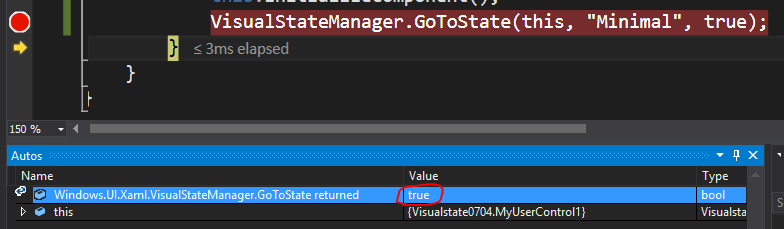
结果:
页面原文内容由Stack Overflow提供。腾讯云小微IT领域专用引擎提供翻译支持
原文链接:
https://stackoverflow.com/questions/38175647
复制相关文章
相似问题
腾讯云开发者

Copyright © 2013 - 2026 Tencent Cloud. All Rights Reserved. 腾讯云 版权所有
深圳市腾讯计算机系统有限公司 ICP备案/许可证号:粤B2-20090059  粤公网安备44030502008569号
腾讯云计算(北京)有限责任公司 京ICP证150476号 | 京ICP备11018762号