
将RichEditBox绑定到.rtf文件
这就是我要处理的问题:
class TopNews
{
    public string Id { get; set; }
    public string Title { get; set; }
    public string ImageURI { get; set; }
    public string BodyUri { get; set; }
}BodyURI将是一个具有地址的字符串,该地址包含一个包含.rtf文件的Azure,例如:https://richeditbox.blob.core.windows.net/testformat.rtf是一个可能位于BodyURI上的字符串。
到目前为止,这是我的XAML布局:
<ListView Grid.Row="1">
        <ListView.ItemTemplate>
           <DataTemplate>
                <StackPanel Orientation="Horizontal">
                    <Image />
                    <RichEditBox TextWrapping="WrapWholeWords"
                                 IsReadOnly="True"
                                 IsColorFontEnabled="True"/>
                </StackPanel>
            </DataTemplate>
        </ListView.ItemTemplate>
</ListView>它丢失了很多,但是我想要做的是将.rtf文件的内容绑定到我的RichEditBox布局中的RichEditBox控件。
现在,到目前为止,我在这方面所做的所有研究都向我表明,当然,两者之间一定有某种过程。
- 我必须为blob设置一个下载: Uri bloburi =新Uri(“https://richeditbox.blob.core.windows.net/testformat.rtf"”);CloudBlockBlob cBlob =新CloudBlockBlob(bloburi);
- 我还了解了如何将该.rtf文件的内容加载到RichTextBox上: richEditBox.Document.SetText(TextSetOptions.FormatRtf,等待cBlob.DownloadTextAsync();
我该怎么做?我在想,我可以创建一个新的类,就像这个:
class TopNewsProcessed
{
    public string Id { get; set; }
    public string ImageURI { get; set; }
    public string Title { get; set; }
    public RichEditBox Body { get; set; }
}这样我就可以运行.rtf文件的下载过程,然后在RichEditBox中设置它,但是我不知道如何将它绑定到XAML布局上的RichEditBox。这是个好主意吗如果是,那么我该如何绑定呢?我是否必须将Body从RichEditBox更改为其他东西?
回答 1
Stack Overflow用户
发布于 2016-07-06 11:12:29
这样我就可以运行.rtf文件的下载过程,然后在RichEditBox中设置它,但是我不知道如何将它绑定到XAML布局上的RichEditBox。
创建附加属性是正确的方向,基于BabaAndThePigman在该链接中提供的解决方案
我为您的场景修改了附加属性:
public class RtfText
{
    public static string GetRichText(DependencyObject obj)
    {
        return (string)obj.GetValue(RichTextProperty);
    }

    public static void SetRichText(DependencyObject obj, string value)
    {
        obj.SetValue(RichTextProperty, value);
    }

    // Using a DependencyProperty as the backing store for RichText.  This enables animation, styling, binding, etc...
    public static readonly DependencyProperty RichTextProperty =
        DependencyProperty.RegisterAttached("RichText", typeof(string), typeof(RtfText), new PropertyMetadata(string.Empty, callback));

    private static async void callback(DependencyObject d, DependencyPropertyChangedEventArgs e)
    {
        var reb = (RichEditBox)d;
        Uri bloburi = new Uri((string)e.NewValue);
        CloudBlockBlob cBlob = new CloudBlockBlob(bloburi);
        var blobstr = await cBlob.DownloadTextAsync();
        reb.Document.SetText(TextSetOptions.FormatRtf, blobstr);
    }
}
对于Model,您不需要更改,只需保留BodyUri字符串属性即可。
查看:
<ListView ItemsSource="{Binding Data}">
        <ListView.ItemTemplate>
            <DataTemplate>
                <StackPanel>
                    <TextBlock Text="{Binding Title}" />
                    <StackPanel Orientation="Horizontal">
                        <RichEditBox local:RtfText.RichText="{Binding BodyUri}"
                                     TextWrapping="WrapWholeWords"
                                     IsColorFontEnabled="True"/>
                    </StackPanel>
                </StackPanel>

            </DataTemplate>
        </ListView.ItemTemplate>
</ListView>请注意,在您看来,RichEditBox的IsReadOnly属性被设置为"true",这将导致“访问拒绝”异常出现在以下一行:RichEditBox.Document.SetText(...)
请在这里中查看我的完整样本
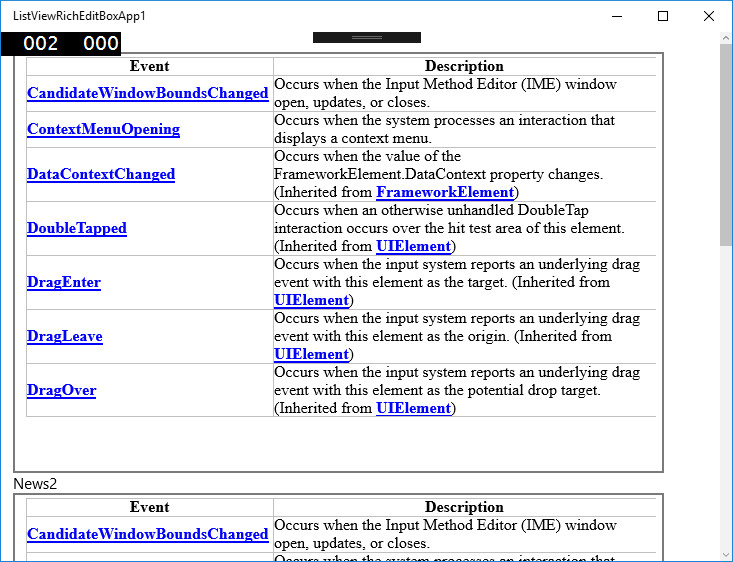
截图:
https://stackoverflow.com/questions/38167355
复制相似问题
腾讯云开发者

Copyright © 2013 - 2026 Tencent Cloud. All Rights Reserved. 腾讯云 版权所有
深圳市腾讯计算机系统有限公司 ICP备案/许可证号:粤B2-20090059  粤公网安备44030502008569号
腾讯云计算(北京)有限责任公司 京ICP证150476号 | 京ICP备11018762号