
Swift编译器混淆了版本2和3。
我在一个项目中安装了一个cocoapod,并在其上运行转换器将其转换为Swift 3。
问题是编译器认为我在使用Swift 2,并且在正确的Swift 3语法上抛出错误(高达129个错误)。例如:
internal enum Error: ErrorProtocol {
    case noCentralManagerSet
    case busy
    case interrupted
}抛出use of undeclared type 'ErrorProtocol'。
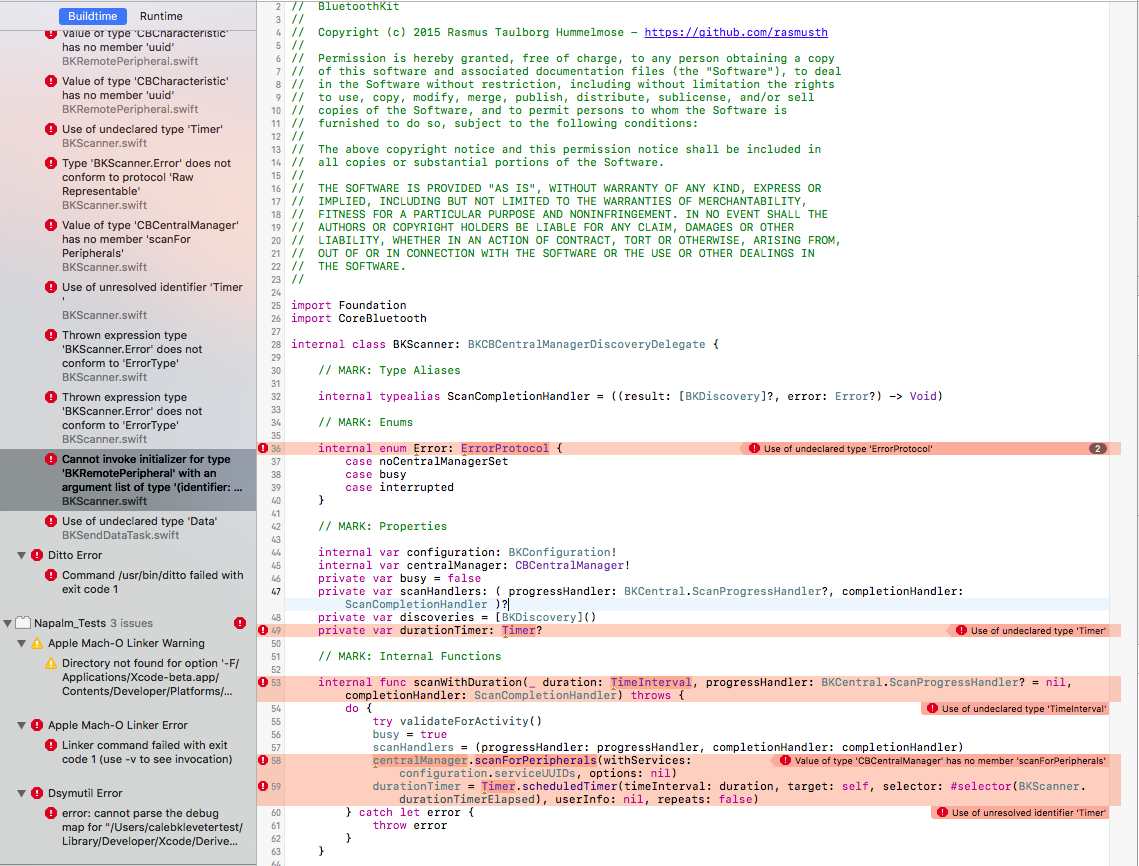
怎么啦?
我编写的Swift 3代码没有抛出编译器错误。
这是xcodebuild -showsdks的输出
2016-07-01 14:16:05.850 xcodebuild[30824:2848916] [MT] PluginLoading: Required plug-in compatibility UUID 1637F4D5-0B27-416B-A78D-498965D64877 for plug-in at path '~/Library/Application Support/Developer/Shared/Xcode/Plug-ins/WebDevSupport.xcplugin' not present in DVTPlugInCompatibilityUUIDs
2016-07-01 14:16:05.864 xcodebuild[30824:2848916] [MT] PluginLoading: Required plug-in compatibility UUID 1637F4D5-0B27-416B-A78D-498965D64877 for plug-in at path '~/Library/Application Support/Developer/Shared/Xcode/Plug-ins/WebDevelopment.xcplugin' not present in DVTPlugInCompatibilityUUIDs
2016-07-01 14:16:05.911 xcodebuild[30824:2848916] [MT] PluginLoading: Required plug-in compatibility UUID 1637F4D5-0B27-416B-A78D-498965D64877 for plug-in at path '~/Library/Application Support/Developer/Shared/Xcode/Plug-ins/WakaTime.xcplugin' not present in DVTPlugInCompatibilityUUIDs
2016-07-01 14:16:05.944 xcodebuild[30824:2848916] [MT] PluginLoading: Required plug-in compatibility UUID 1637F4D5-0B27-416B-A78D-498965D64877 for plug-in at path '~/Library/Application Support/Developer/Shared/Xcode/Plug-ins/Rayrolling.xcplugin' not present in DVTPlugInCompatibilityUUIDs
2016-07-01 14:16:05.967 xcodebuild[30824:2848916] [MT] PluginLoading: Required plug-in compatibility UUID 1637F4D5-0B27-416B-A78D-498965D64877 for plug-in at path '~/Library/Application Support/Developer/Shared/Xcode/Plug-ins/CocoaPods.xcplugin' not present in DVTPlugInCompatibilityUUIDs
2016-07-01 14:16:05.997 xcodebuild[30824:2848916] [MT] PluginLoading: Required plug-in compatibility UUID 1637F4D5-0B27-416B-A78D-498965D64877 for plug-in at path '~/Library/Application Support/Developer/Shared/Xcode/Plug-ins/Alcatraz.xcplugin' not present in DVTPlugInCompatibilityUUIDs
OS X SDKs:
    OS X 10.12                      -sdk macosx10.12

iOS SDKs:
    iOS 10.0                        -sdk iphoneos10.0

iOS Simulator SDKs:
    Simulator - iOS 10.0            -sdk iphonesimulator10.0

tvOS SDKs:
    tvOS 10.0                       -sdk appletvos10.0

tvOS Simulator SDKs:
    Simulator - tvOS 10.0           -sdk appletvsimulator10.0

watchOS SDKs:
    watchOS 3.0                     -sdk watchos3.0

watchOS Simulator SDKs:
Simulator - watchOS 3.0 -sdk watchsimulator3.0回答 3
Stack Overflow用户
发布于 2016-07-01 19:47:01
您可以为每个目标设置Swift版本:

您的项目可能设置为Yes。
SDK没有参与编译过程。
Stack Overflow用户
发布于 2016-07-01 17:24:26
我想我知道问题出在哪里了。您已经直接将所有文件从Swift2.0转换为Swift3。这样不行的。我建议您删除这些pods并克隆Swift3分支的这 (我相信您正在使用),并复制源目录到您的项目,因为它没有说明哪个版本的回购是可用的swift-3。它应该能解决你的问题。:)
Stack Overflow用户
发布于 2016-07-04 05:49:22
有两件事能帮我处理这样的案子。
因为Xcode自动打开以前从未关闭过的项目,如果您在Xcode 7中打开项目A,那么打开Xcode 8来启动一些新的项目,Xcode 8也会打开相同的项目A。因此,您实际上必须在Xcode 8中关闭项目A,否则您会收到大量错误,您可能会认为您在Xcode 7中工作,因为项目A是打开的。此时,项目A是在Xcode 7和Xcode 8中打开的。
另外,我将我的项目文件夹命名为projectName - Swift 2,然后复制它,并将其命名为“`projectName Swift 3”。
当然,我们有版本控制,但为了安全起见,我喜欢为Swift 2/3提供两个单独的文件夹,因为在两个版本的Xcode中打开同一个项目会让事情变得疯狂。
由于您还必须告诉终端使用单独的目录进行荚安装,这是安全的,因为没有重叠。
https://stackoverflow.com/questions/38150425
复制相似问题
腾讯云开发者

Copyright © 2013 - 2026 Tencent Cloud. All Rights Reserved. 腾讯云 版权所有
深圳市腾讯计算机系统有限公司 ICP备案/许可证号:粤B2-20090059  粤公网安备44030502008569号
腾讯云计算(北京)有限责任公司 京ICP证150476号 | 京ICP备11018762号