
有没有办法移除WinForms滚动条旁边的这一行白线?
我注意到,System.Windows.Forms.Panel上的滚动条似乎有一条白线沿着垂直滚动条的左边移动。

。

。
水平滚动条也有这一点(白线出现在它的上方):

。
当DevExpress.XtraEditors.XtraScrollableControl将UseWindowsXPTheme设置为true时,我也注意到了这一点,因此我猜想这可能是一个系统问题(因为这只是一个例子,我还没有用DevExpress标记标记这个问题)。
我注意到,在Visual 2015 Options屏幕中,它有一个滚动条的例子,其中有一条白线(左边的),而没有滚动条(右边的滚动条):
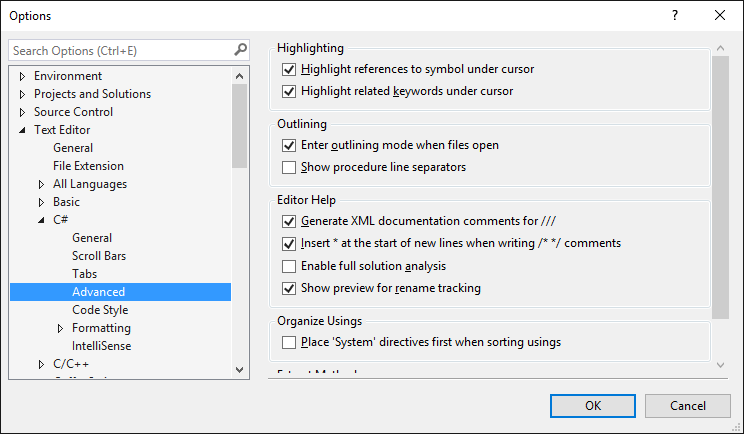
。
我的问题是:有没有办法从滚动条中删除这条白线?如果是这样的话,是怎么做的?我知道这听起来很小,但很明显,很烦人。
我把这个问题标记为VB.NET和C#,因为我很高兴接受这两种语言的答案。
回答 2
Stack Overflow用户
发布于 2016-07-01 13:18:44
嗯,在研究了诸如处理滚动条控件的画图事件这样的东西之后,我终于想出了一个更简单、更简单(但最终不舒服)的解决方案:用一个Label控件来覆盖它!
这将对Panel的垂直滚动条和水平滚动条执行任务。
Dim key As Microsoft.Win32.RegistryKey =  Microsoft.Win32.Registry.LocalMachine.OpenSubKey("SOFTWARE\Microsoft\Windows NT\CurrentVersion")
Dim operatingSystem As String = ""

If key IsNot Nothing
    operatingSystem = key.GetValue("ProductName")
End If

If operatingSystem.Contains("Windows 10")
    Dim verticalHiderLabel As New Label With {  .Location = New Point(Panel1.Right - SystemInformation.VerticalScrollBarWidth-1, Panel1.Top+1),
                                                .Size = New Size(1, Panel1.Height - SystemInformation.HorizontalScrollBarHeight-1)}

    Dim horizontalHiderLabel As New Label With {.Location = New Point(Panel1.Left+1, Panel1.Bottom - SystemInformation.HorizontalScrollBarHeight-1),
                                                .Size = New Size(Panel1.Width - SystemInformation.VerticalScrollBarWidth-1, 1)}

    Me.Controls.Add(verticalHiderLabel)
    Me.Controls.Add(horizontalHiderLabel)
    verticalHiderLabel.BringToFront()
    horizontalHiderLabel.BringToFront()
End If
由于我在任何其他操作系统上都没有看到这个问题,所以我添加了一个检查,以确保它只在Windows 10上启用,遗憾的是,Windows 10使用了注册表,因为我不确定在Windows 10上是否有可靠的检查方法。
显然,如果有人使用带有滚动条的可调整大小的Control,他们会希望相应地更新Label大小。
Stack Overflow用户
发布于 2016-06-30 09:33:56
除非使用自己的自定义控件来滚动,否则不能这样做。这只是滚动条上的3D高亮效果,而滚动条没有覆盖属性将其样式更改为平面。
但是这里有一些你可以使用的漂亮的自定义滚动条。
https://stackoverflow.com/questions/38094955
复制相似问题
腾讯云开发者

Copyright © 2013 - 2026 Tencent Cloud. All Rights Reserved. 腾讯云 版权所有
深圳市腾讯计算机系统有限公司 ICP备案/许可证号:粤B2-20090059  粤公网安备44030502008569号
腾讯云计算(北京)有限责任公司 京ICP证150476号 | 京ICP备11018762号