
绕摆旋转0.85缸高
我被一个我需要做的工作困住了,首先我需要建立一个摆,基本是两个球和一个圆柱体,两个球在上下两个球中,一个大一点,一个小一点,我需要做的是钟摆不应该围绕着他自己的中心,而是大约一个中心,这个中心是我的圆柱体高度的0.85,我的想法是创建一个枢轴点,但是由于我不知道枢轴点是如何工作的,所以我尝试把这个圆柱体添加到场景中,然后把球放到圆柱体上,然后,我创建了枢轴点,并将枢轴点添加到圆柱中,在动画函数中,我尝试在x轴上旋转枢轴点,但没有发生任何事情:/
,这是我的代码,伙计们希望有人能帮我,
var scene, camera, renderer;
var caixaGrande, caixaPequena1, caixaPequena2,cylinder,Cylinder2,esferaGrande;
var pivotPoint1, pivotPoint2;

const RAIOCILINDRO = 2.5;
const ALTURACILINDRO = 100;
const RAIOESFERAGRANDE = 15;
const RAIOESFERAPEQUENA = 5;
var rotacao = Math.PI/180;


window.onload = function init() {

  scene = new THREE.Scene();

  camera = new THREE.PerspectiveCamera( 60, window.innerWidth / window.innerHeight, 1, 10000 );
  camera.up=new THREE.Vector3(0,1,0);
  camera.position.set(150,50,50);
  camera.lookAt(new THREE.Vector3(0, 0, 0));

  // Add a directional light to show off the object
  var light = new THREE.DirectionalLight( 0xffffff, 1.5);
  // Position the light out from the scene, pointing at the origin
  light.position.set(1.5, 1.5, 1);
  scene.add( light );

  var textureCylindro = new THREE.TextureLoader().load("CylinderTexture.png");
  var textureSphere = new THREE.TextureLoader().load("SphereTexture.png");

  geometry = new THREE.CylinderGeometry(RAIOCILINDRO,RAIOCILINDRO,ALTURACILINDRO);
  material = new THREE.MeshPhongMaterial( {color: 0xffffff , map:textureCylindro} );
  cylinder = new THREE.Mesh(geometry,material);
  scene.add(cylinder);


  pivotPoint1 = new THREE.Object3D();
  pivotPoint1.position.y=ALTURACILINDRO*0.15;
  cylinder.add(pivotPoint1);

  var geometry = new THREE.SphereGeometry(RAIOESFERAGRANDE);
  var material = new THREE.MeshPhongMaterial( {color: 0xffffff,map:textureSphere} );
  esferaGrande = new THREE.Mesh( geometry, material );
  esferaGrande.position.y = -ALTURACILINDRO/2;
  cylinder.add( esferaGrande );

  var geometry = new THREE.SphereGeometry(RAIOESFERAPEQUENA);
  var material = new THREE.MeshPhongMaterial( {color: 0xffffff,map:textureSphere} );
  var esferaPequena = new THREE.Mesh( geometry, material );
  esferaPequena.position.y = ALTURACILINDRO/2;
  cylinder.add( esferaPequena );

  Cylinder2 = cylinder.clone();
  Cylinder2.position.z = 3 * RAIOESFERAGRANDE;
  scene.add(Cylinder2);


  renderer = new THREE.WebGLRenderer();
  renderer.setSize( window.innerWidth, window.innerHeight );

  document.body.appendChild( renderer.domElement );
  animate();
}

function animate() {

  pivotPoint1.rotation.x += 10;

  requestAnimationFrame( animate );

  renderer.render( scene, camera );

}回答 1
Stack Overflow用户
发布于 2016-06-27 14:25:35
您应该做的是创建一个Object3D,将其他3个元素添加到其中,然后将该Object3D添加到场景中。然后,当你想要旋转整个东西,你旋转你的Object3D。
例如:
var axis = new Object3D();
sphere1.position.y = -.15 * pendulumLength;
sphere2.position.y = .85 * pendulumLength;
cylinder.position.y = .35 * pendulumLength;
//assuming the cylinder is pendulumLength long, this^ puts it right between the two balls
axis.add(sphere1);
axis.add(sphere2);
axis.add(cylinder);
scene.add(axis);
然后,在动画()函数中,只需旋转Axis:
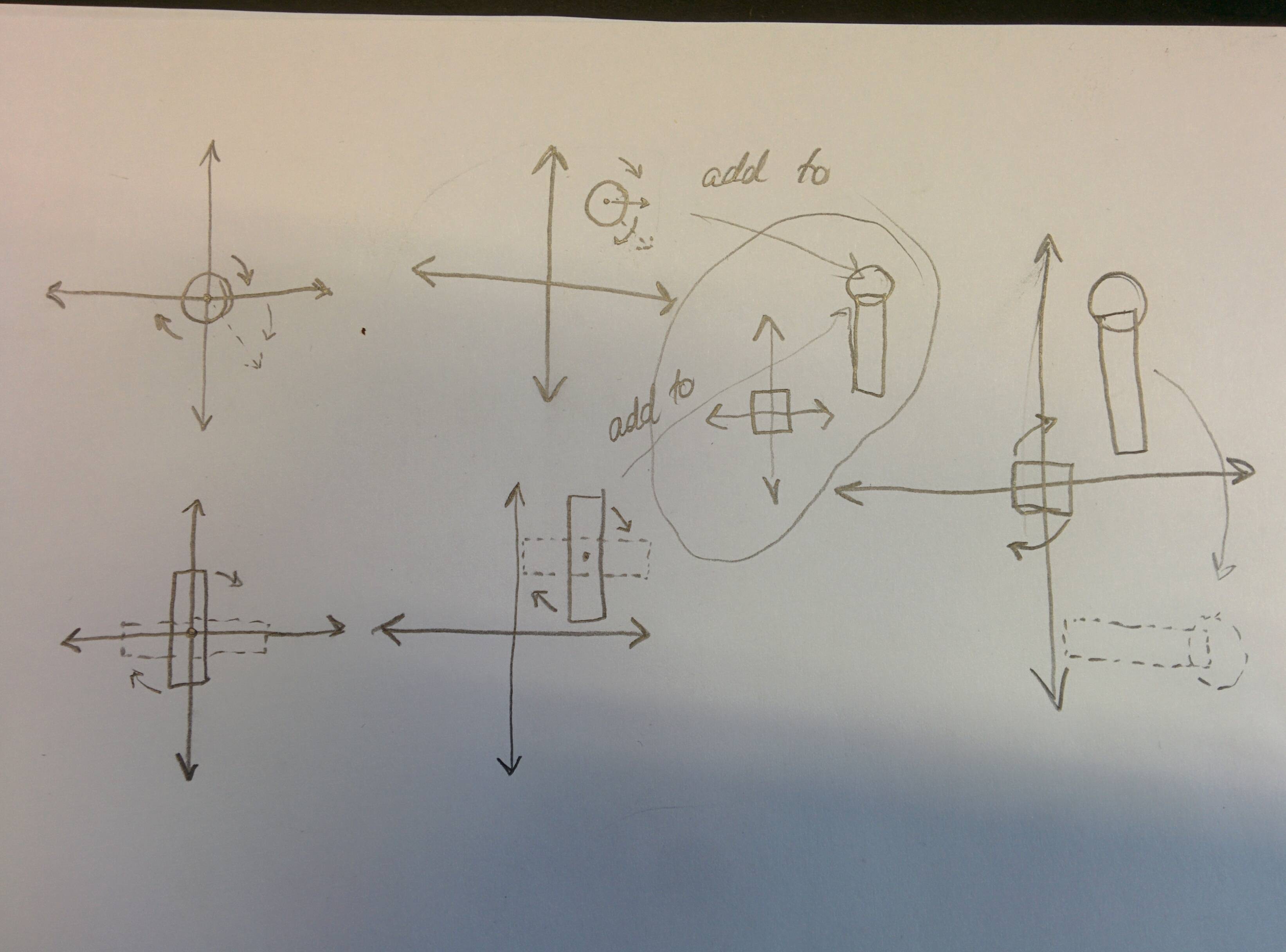
axis.rotation.z += .01;编辑:下面是我对发生的事情的糟糕描述。如果你看这里,圆圈在0,0旋转时,绕轴旋转。再一次,当你把它移动到1,1,它围绕着它的中心点旋转,因为旋转相对于圆的中心点。
同样,汽缸也是如此。在0,0,它围绕着中心旋转。在.5,.5也围绕着中心旋转。它不关心它在哪里,它会围绕着它的位置点旋转。
因此,如果我们想把这两个人作为一个相对于其他点的群体旋转,我们需要让他们成为另一个对象的子对象,因为当我们移动父母时,孩子们保持着他们与父母的关系,尽管他们的位置仍然分别是1,1和.5,.5。
它们以右边的方式旋转的原因是,它们与父对象的关系是1,1和.5,.5相对于旋转为0的父对象。当我们用一定数量的弧度旋转父对象时,它们需要移动以保持它们原来的关系。
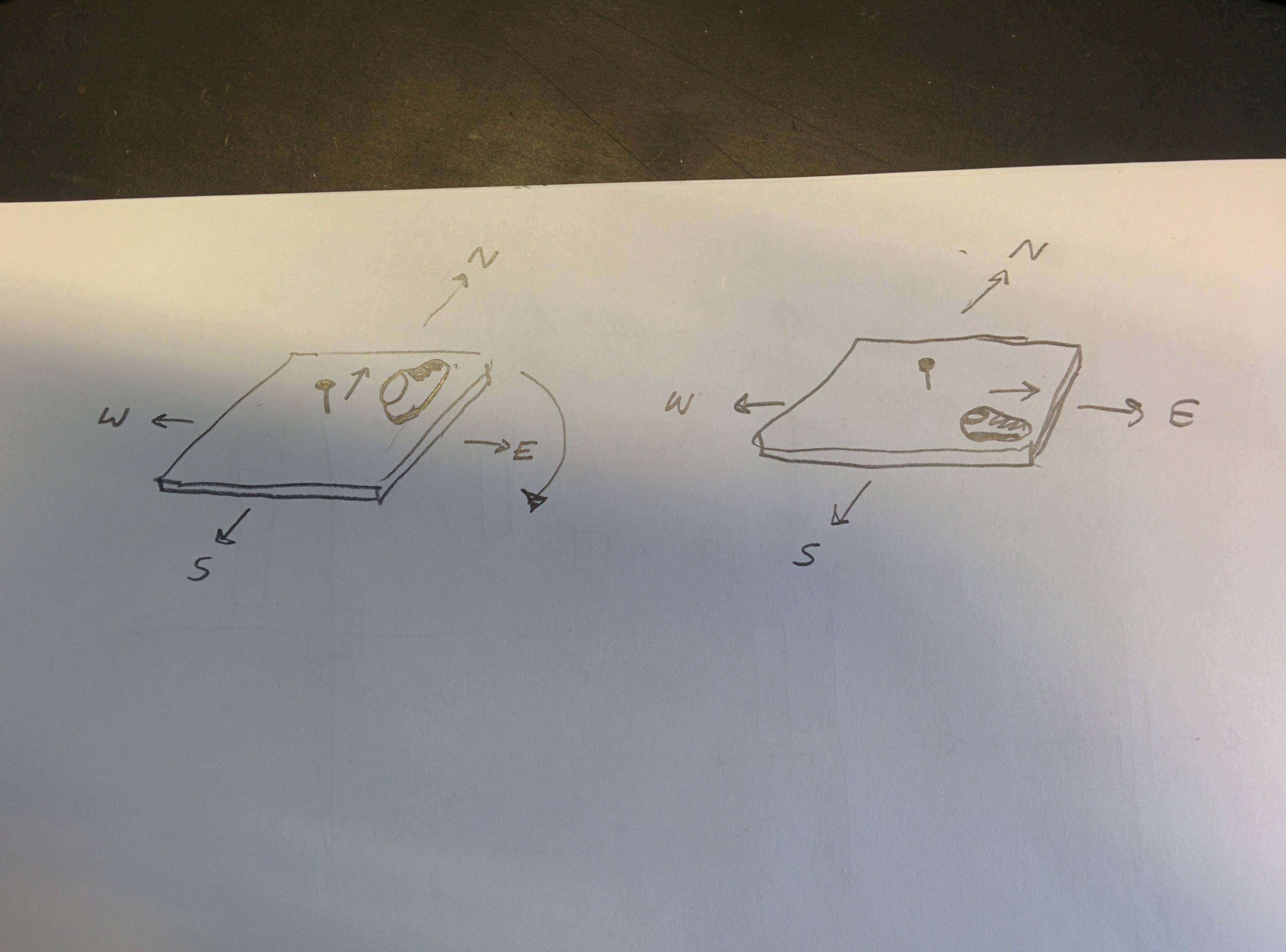
另一种想法是:你有一块木板,中间有一根钉子,还有一只鞋。你把鞋放在板的右上角,脚趾指向你。如果你旋转木板Math.PI/2弧度,鞋将不会停留在右上角(相对于你),即使这是你放置它的地方,因为鞋已经添加到董事会,你已经移动了板。现在,鞋应该在右下角,并将面向您的右边。Object3D.add()就像把鞋子放在板子上的过程。
https://stackoverflow.com/questions/38043215
复制相似问题
腾讯云开发者

Copyright © 2013 - 2026 Tencent Cloud. All Rights Reserved. 腾讯云 版权所有
深圳市腾讯计算机系统有限公司 ICP备案/许可证号:粤B2-20090059  粤公网安备44030502008569号
腾讯云计算(北京)有限责任公司 京ICP证150476号 | 京ICP备11018762号