
如何优化webpack/es6的开销?
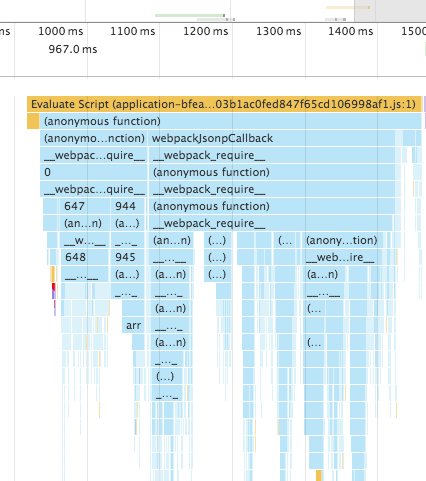
我一直在优化我的应用程序的加载时间,在对代码进行了一些快速优化之后,我注意到似乎有一个长达500 my的初始化阶段,所有的require语句似乎都被解析了,或者什么的。
这能被优化吗?如何优化?
我正在使用webpack,反应和几十个npm包。结果文件是2.8M解压缩和大约900 k拉链。应用程序本身并没有太多的代码,主要是npm软件包。
我想知道我是否能以不同的方式编译这个程序,以避免所有的需求和什么不是实时的。
更新:我正在使用生产建设与dedupe插件目前。
回答 3
Stack Overflow用户
发布于 2016-06-22 08:23:14
正如一些评论已经指出的,我们必须区分构建和运行时。webpack博士的参考指南是关于构建性能的。
虽然不使用像源代码映射和精简代码这样的devtools会影响执行速度,但我认为最重要的是块/延迟加载(正如埃斯特斯已经指出的那样)。
您应该决定在初始呈现中不需要应用程序的哪些部分。这些部分应该被移动到另一个块中,并通过require.ensure()懒散地加载。
通常,您的路由器是异步加载内容的典型位置:
<Router>
    <Route
        path="/dashboard"
        getComponent={loadPage("Dashboard")}
    />
</Router>

function loadPage(page) {
    return (location, cb) => pages[page](cb);
}

const pages = {
    Dashboard(cb) {
        require.ensure(
            ["./Dashboard.js"],
            require => cb(null, require("./Dashboard.js").default)
            // .default is required in case you are using ES2015 modules
        );
    }
};现在,所有只需要在Dashboard上使用的模块都将被移动到一个单独的块中。
详细的require.ensure部件甚至可以通过将所有顶级组件(在这里称为pages )移动到像pages这样的专用文件夹中进行优化。然后,您可以将webpack配置为始终使用装载机异步加载这些内容。
// webpack.config.js
...
{
    test: /\.jsx$/,
    include: [
        path.resolve("path", "to", "pages"),
    ],
    loaders: [
        "bundle-loader?" + JSON.stringify({
            lazy: true
        })
    ]
},
那么您的路由器看起来是:
// This does not actually import the Dashboard,
// but a function which loads the dashboard.
import Dashboard from "path/to/pages/Dashboard";

function loadPage(page) {
    return (location, cb) => pages[page](module => {
        cb(null, module.default);
    });
}

const pages = {
    Dashboard
};如果您非常懒惰,并且只想引用相同的文件名而不手动创建pages-Object,则还可以使用需要上下文。
function loadPage(page) {
    return (location, cb) =>
        require("./path/to/pages/" + page + ".jsx")(
            module => cb(null, module.default)
        );
}Stack Overflow用户
发布于 2016-06-20 10:20:47
您可以做的一件事是使用devTool配置并改变生成源地图的方式。这应该会以牺牲调试的易用性为代价而加快速度。
Webpack在这里实际上有一个很好的关于如何优化性能的指南,http://webpack.github.io/docs/build-performance.html。
基本上,它可以归结为您觉得需要多少调试信息。
通过设置
{
  devtool: "#source-map"
}
保留原始代码,这显然是最容易调试的代码,但这是以牺牲文件大小/构建时间为代价的。
更新:如下所示,这是另一个向导
Stack Overflow用户
发布于 2016-06-20 21:49:09
我不认为您的时间线来自于小型化代码(比较一下地图文件中的__webpack_require__和小型化代码中的f )。
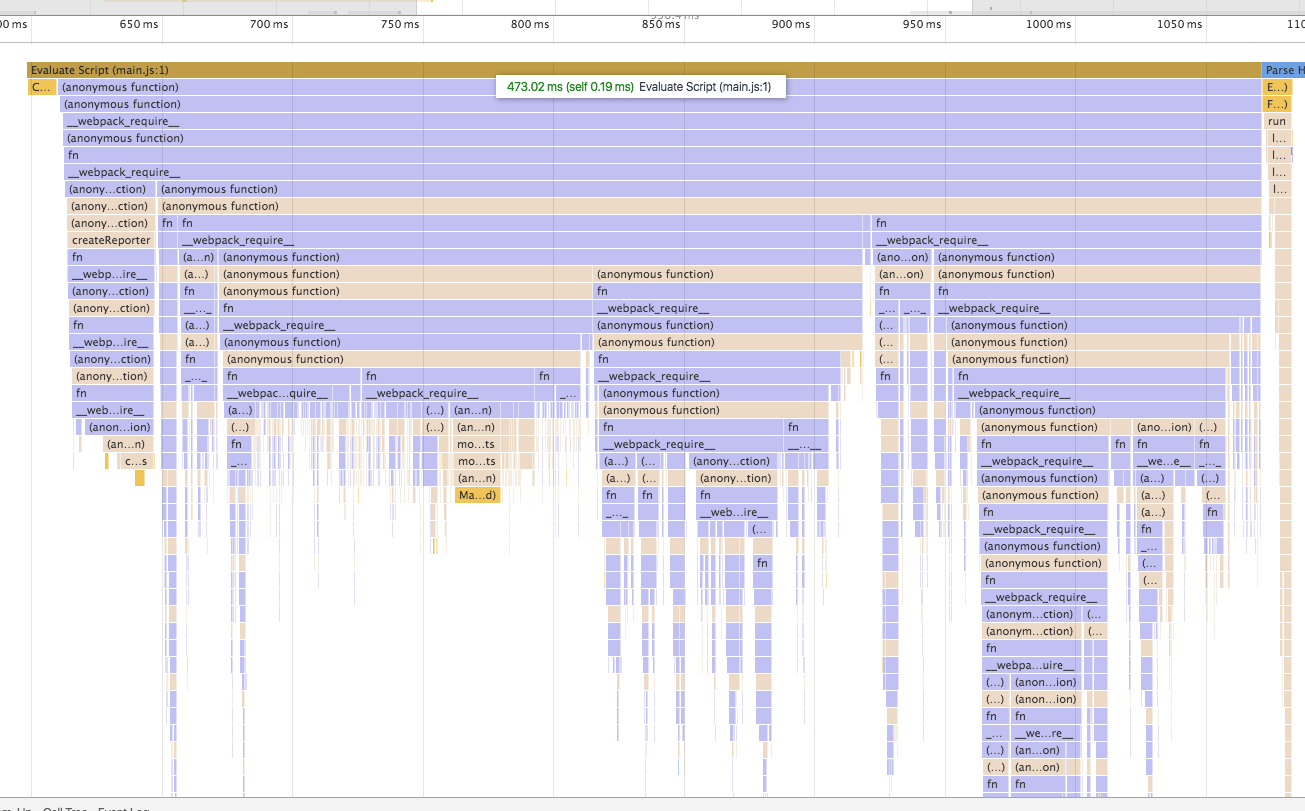
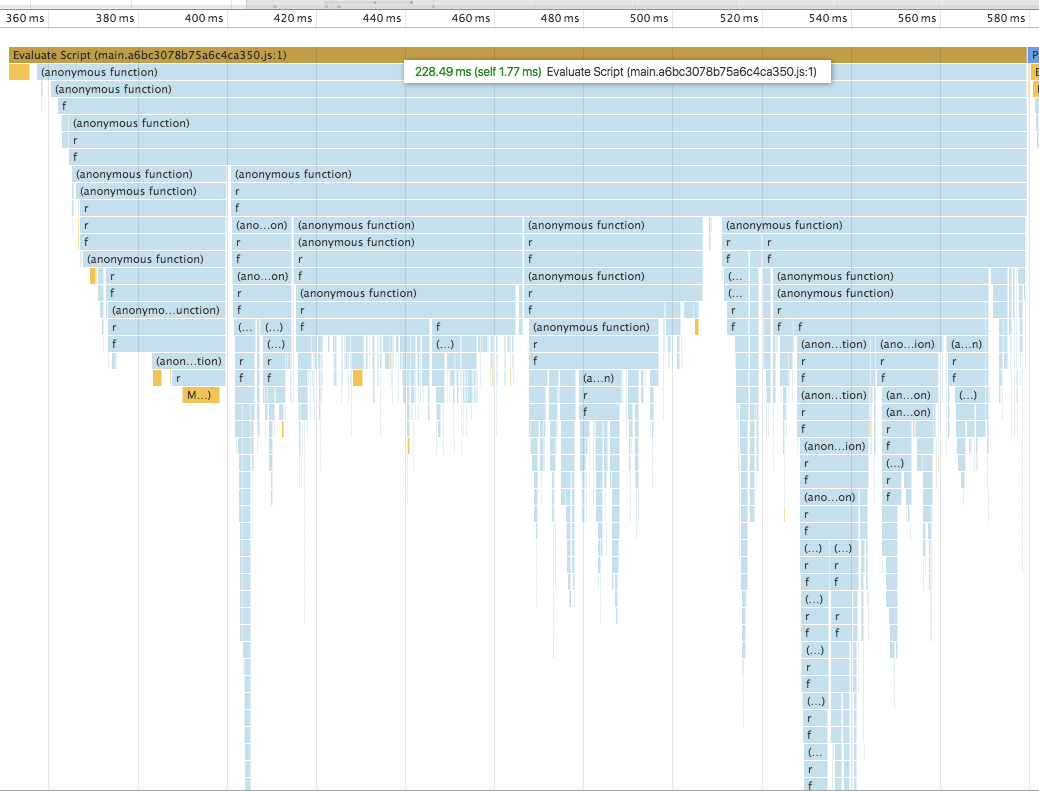
我将展示minify和一些插件可以减少该脚本的两次运行时间。在webpack的吐露中,我只会展示给配置之间的主要区别。
发展模式
webpack.config.js
devtool: 'cheap-module-eval-source-map',
cache: true,
debug: true,
Timeline 473 ms
生产模式
webpack.config.js
plugins: [
    'transform-react-remove-prop-types',
    'transform-react-constant-elements',
    'transform-react-inline-elements'
],
cache: false,
debug: false,
plugins: [
    // Search for equal or similar files and deduplicate them in the output
    // https://webpack.github.io/docs/list-of-plugins.html#dedupeplugin
    new webpack.optimize.DedupePlugin(),

    // Minimize all JavaScript output of chunks
    // https://github.com/mishoo/UglifyJS2#compressor-options
    new webpack.optimize.UglifyJsPlugin({
        compress: {
            screw_ie8: true,
            warnings: false,
        },
    }),

    // A plugin for a more aggressive chunk merging strategy
    // https://webpack.github.io/docs/list-of-   plugins.html#aggressivemergingplugin
    new webpack.optimize.AggressiveMergingPlugin(),
]
Timeline 228 ms
如果您想从这个解释中深入分析webpack.config.js,您可以查看反应启动器-工具包的源代码。
https://stackoverflow.com/questions/37919905
复制相似问题
腾讯云开发者

Copyright © 2013 - 2026 Tencent Cloud. All Rights Reserved. 腾讯云 版权所有
深圳市腾讯计算机系统有限公司 ICP备案/许可证号:粤B2-20090059  粤公网安备44030502008569号
腾讯云计算(北京)有限责任公司 京ICP证150476号 | 京ICP备11018762号