
它不能正常工作手机屏幕大小
它不能正常工作手机屏幕大小
提问于 2016-06-17 08:16:27
我在我的项目中使用了可引脚插件。
但是,它在手机屏幕上的工作并不是很正常。首先,我改变屏幕大小从铬开发工具,它的工作很好,像这样,
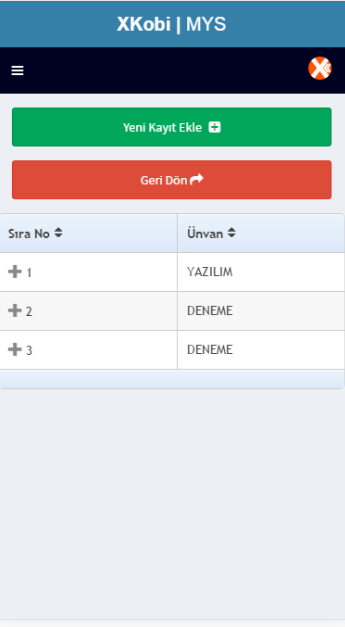
但是当我的代码像这样在电话screen.so上重新工作时,它就不起作用了
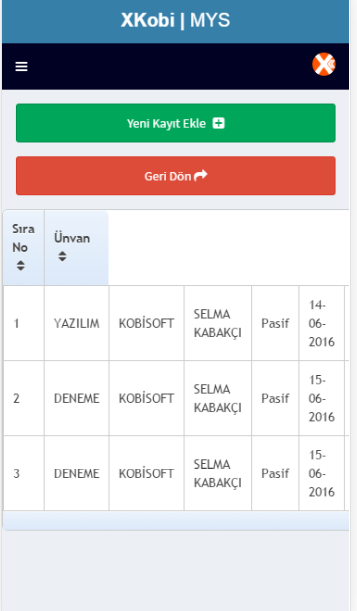
我的html代码;
       <div id="tablelistDiv">
       <div class="row">
       <table id="tbl_search" class="footable" data-page-size="20">
        <thead>
            <tr>
                <th data-toggle="true" data-sort-ignore="false">Sıra No</th>
                <th data-sort-ignore="false">Ünvan</th>
                <th data-hide="phone" data-sort-ignore="false">Şube</th>
                <th data-hide="phone" data-sort-ignore="false">Broker</th>
                <th data-hide="phone" data-sort-ignore="false">Durum</th>
                <th data-hide="phone" data-sort-ignore="false">Kayıt Tar.</th>
                <th data-hide="phone" data-sort-ignore="true"><i class="fa fa-search"></i></th>
            </tr>
          </thead>
          <tbody>
          </tbody>
          <tfoot>
          <tr>
           <td colspan="7">
             <div class="pagination pagination-centered hide-if-no-paging"></div>
           </td>
          </tr>
         </tfoot>
     </table>
    </div>
    </div>
我的Js密码是,
function detayKayitlar(jsondata, status) {
                    obj = JSON.parse(jsondata);
                    var tableHtml = "";
                    for (var i = 0; i < obj.length; i++) {
                        tableHtml = tableHtml
                            + "<tr>"
                            + "<td>" + obj[i].ID + "</td>"
                            + "<td>" + obj[i].UNVAN + "</td>"
                            + "<td>" + obj[i].SUBE + "</td>"
                            + "<td>" + obj[i].BROKER + "</td>"
                            + "<td>" + obj[i].USERLASMA + "</td>"
                            + "<td>" + obj[i].KAYITTAR + "</td>"
                            + "<td><button onclick='detayKayit(" + obj[i].ID + ",2);' class='btn btn-block btn-danger'  type='button'><i class='fa fa-search'></button></td>"
                            + "</tr>";

                    }

                    $("#tbl_search tbody").append(tableHtml);
                    jQuery(function () {
                        jQuery('#tbl_search').footable();
                    });

                    pWaitHide();
                    hideDiv('search');
                    showDiv('list');
}回答 2
Stack Overflow用户
回答已采纳
发布于 2016-06-30 10:56:40
返工是什么意思?如果动态地执行某些操作,则可以运行$('#tbl_search').trigger('footable_redraw');
第一行注释中的@Almis。谢谢
Stack Overflow用户
发布于 2016-06-17 08:30:54
因为你的铬是在桌面上,它的工作很好。请检查您是否在标题标签中添加了下面一行。此视图端口将检测屏幕大小。
<meta charset="UTF-8">
<meta name="viewport" content="width=device-width, initial-scale=1, maximum-scale=1, user-scalable=no">页面原文内容由Stack Overflow提供。腾讯云小微IT领域专用引擎提供翻译支持
原文链接:
https://stackoverflow.com/questions/37876461
复制相关文章
相似问题
腾讯云开发者

Copyright © 2013 - 2026 Tencent Cloud. All Rights Reserved. 腾讯云 版权所有
深圳市腾讯计算机系统有限公司 ICP备案/许可证号:粤B2-20090059  粤公网安备44030502008569号
腾讯云计算(北京)有限责任公司 京ICP证150476号 | 京ICP备11018762号