
如何在ios推送通知中显示图像?
iOS 10引入了推送通知框架更新,
UserNotificationsUI.framework
正如在苹果文档上所写的那样,当本地和远程通知出现在用户的设备上时,我们可以定制它们的外观。
因此,如果有人知道如何显示图像在推送通知时,锁定屏幕。和安道尔的推送通知一样。
谢谢,
回答 3
Stack Overflow用户
发布于 2016-06-28 03:30:08
如果要自定义本地和远程通知的外观,请执行以下步骤:
- 创建一个
UNNotificationCategory并添加到UNUserNotificationCenter类别中: 设newCategory =UNNotificationCategory(标识符:"newCategory",操作: action,minimalActions: action,intentIdentifiers:[],选项:[])让中心= UNUserNotificationCenter.current() center.setNotificationCategories(newCategory) - 创建一个UNNotificationContentExtension:
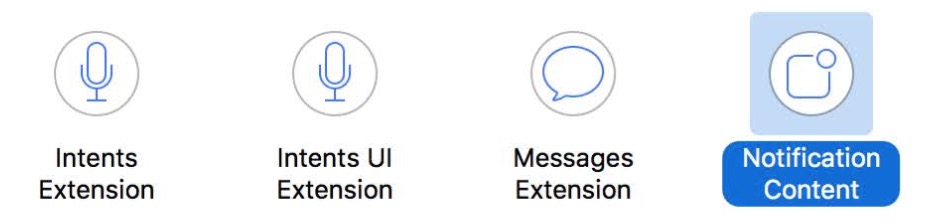
然后使用代码或故事板定制您的UIViewController。
- 将类别添加到
UNNotificationContentExtension的plist中:

4.推送通知
本地通知
创建一个UNMutableNotificationContent并将categoryIdentifier设置为"newCategory“,其中包括UNUserNotificationCenter的分类和UNNotificationContentExtension的plist:
let content = UNMutableNotificationContent()
content.title = ...
content.body = ...
content.categoryIdentifier = "newCategory"

let request = UNNotificationRequest.init(identifier: "newNotificationRequest", content: content, trigger: nil)

let center = UNUserNotificationCenter.current()
center.add(request)
远程通知
设置"mutable-content : 1"和"category : newCategory"。请注意,类别值设置为"newCategory“,这与您以前添加到UNUserNotificationCenter和UNNotificationContentExtension的plist中的内容相匹配。
示例:
 {
    "aps" : {
        "alert" : {
        "title" : "title",
        "body" : "Your message Here"
        },
        "mutable-content" : "1",
        "category" : "newCategory"
    },
    "otherCustomURL" : "http://www.xxx.jpg"
}- 注意:您需要一个支持3 3DTouch的设备或模拟器,否则无法显示自定义的
UNNotificationContentExtension视图控制器。(在iOS10 Beta1中,它不能工作。但是现在这个工作没有3d触摸)
还有..。如果您只想在显示在锁定屏幕上的推送通知上显示图像,则需要添加UNNotificationAttachment。
let content = UNMutableNotificationContent()
content.title = ...
content.body = ...
content.categoryIdentifier = "newCategory"

let fileURL: URL = ... //  your disk file url, support image, audio, movie

let attachement = try? UNNotificationAttachment(identifier: "attachment", url: fileURL, options: nil)
content.attachments = [attachement!]

let request = UNNotificationRequest.init(identifier: "newNotificationRequest", content: content, trigger: nil)

let center = UNUserNotificationCenter.current()
center.add(request)
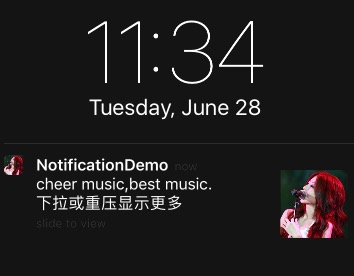
有关更详细的特性,请参阅演示
Stack Overflow用户
发布于 2016-06-16 21:57:35
您必须在创建推送通知方面做一些工作,在处理时也要做一些工作。
- 创建有效负载时,需要添加额外的属性附件,如下所示: { aps:{警报:{ },可变内容:1}my-附件= "url to resource“}
- 当收到通知系统将调用服务扩展的
didReceive方法时,重写通知扩展didReceive方法,如下所示 public func didReceive(_ contentHandler:UNNotificationRequest,withContentHandler contentHandler:(UNNotificatinContent) -> -> Void) { let fileUrl =/ let ->=UNNotificationAttachment(标识符:“图像”,url: fileUrl,选项:0)让内容= request.content.mutableCopy as!UNMutableNotificationContent content.attachment =附件contentHandler(内容)}
这里是WWDC关于这个话题的视频演讲。
Stack Overflow用户
发布于 2016-06-15 15:43:27
使用符合UIViewController的UNNotificationContentExtension实现通知的自定义视图。
请参阅https://developer.apple.com/reference/usernotificationsui/unnotificationcontentextension
https://stackoverflow.com/questions/37839171
复制相似问题
腾讯云开发者

Copyright © 2013 - 2026 Tencent Cloud. All Rights Reserved. 腾讯云 版权所有
深圳市腾讯计算机系统有限公司 ICP备案/许可证号:粤B2-20090059  粤公网安备44030502008569号
腾讯云计算(北京)有限责任公司 京ICP证150476号 | 京ICP备11018762号