
以编程方式获取Windows OS版本
我正试图在我的Windows 10机器上用C#获取Windows版本。
我总是得到那些值(使用C#\C++):
主修:6 未成年人:2
这是Windows8OS,accordingly to MSDN
C#代码:
var major = OperatingSystem.Version.Major
var minor  = OperatingSystem.Version.Minor
C++代码
void print_os_info()
{
    //http://stackoverflow.com/questions/1963992/check-windows-version
    OSVERSIONINFOW info;
    ZeroMemory(&info, sizeof(OSVERSIONINFOW));
    info.dwOSVersionInfoSize = sizeof(OSVERSIONINFOW);

    LPOSVERSIONINFOW lp_info = &info;
    GetVersionEx(lp_info);

    printf("Windows version: %u.%u\n", info.dwMajorVersion, info.dwMinorVersion);
}
Windows 10应该与以下内容一起使用:
主修: 10 未成年人: 0*
- (当我从运行过程中获取转储文件时,我可以看到该文件的OS版本设置为10.0)
由: 10.0.10586.0 (Th2_Relase.151029-1700)建造
我在这里错过了什么?
回答 6
Stack Overflow用户
发布于 2018-02-12 15:20:42
由于接受的答案只适用于C#,下面是C++的解决方案。
它使用ntdll.dll中的ntdll.dll,它使用与GetVersionEx相同的结构(名称不同,但元素相同),并给出正确的版本。由于此函数通常用于驱动程序开发,因此函数在DDK中声明,而不是在SDK中声明。所以我使用了一个动态的解决方案来调用这个函数。请注意,ntdll.dll是在每个调用中加载和释放的。因此,如果您经常需要该函数,请继续加载该库。
pOSversion所指向的结构必须初始化为GetVersionEx。
BOOL GetTrueWindowsVersion(OSVERSIONINFOEX* pOSversion)
{
   // Function pointer to driver function
   NTSTATUS (WINAPI *pRtlGetVersion)(
      PRTL_OSVERSIONINFOW lpVersionInformation) = NULL;

   // load the System-DLL
   HINSTANCE hNTdllDll = LoadLibrary("ntdll.dll");

   // successfully loaded?
   if (hNTdllDll != NULL)
   {
      // get the function pointer to RtlGetVersion
      pRtlGetVersion = (NTSTATUS (WINAPI *)(PRTL_OSVERSIONINFOW))
            GetProcAddress (hNTdllDll, "RtlGetVersion");

      // if successfull then read the function
      if (pRtlGetVersion != NULL)
         pRtlGetVersion((PRTL_OSVERSIONINFOW)pOSversion);

      // free the library
      FreeLibrary(hNTdllDll);
   } // if (hNTdllDll != NULL)

   // if function failed, use fallback to old version
   if (pRtlGetVersion == NULL)
      GetVersionEx((OSVERSIONINFO*)pOSversion);

   // always true ...
   return (TRUE);
} // GetTrueWindowsVersionStack Overflow用户
发布于 2016-06-09 03:55:54
在我的场景中,我需要我的应用程序为可能的bug报告和统计数据捕获计算机信息。
--我没有找到应用程序清单必须添加的解决方案,很不幸,谷歌搜索时发现的大多数建议都说明了这一点。
问题是,当使用清单时,每个OS版本必须手动添加到其中,以便该特定OS版本能够在运行时报告自己。
换句话说,这就变成了一种竞争状态:我的应用程序的用户很可能正在使用我的应用程序的一个版本,该版本比使用中的操作系统早。当微软推出新的操作系统版本时,我将不得不立即升级应用程序。我还必须迫使用户在升级操作系统的同时升级应用程序。
换句话说,不太可行.
在浏览了这些选项之后,我发现了一些引用(与应用清单相比,引用少得令人惊讶),它们建议使用注册表查找。
我的(被砍掉的) ComputerInfo类只有WinMajorVersion、WinMinorVersion和IsServer属性,如下所示:
using Microsoft.Win32;

namespace Inspection
{
    /// <summary>
    /// Static class that adds convenient methods for getting information on the running computers basic hardware and os setup.
    /// </summary>
    public static class ComputerInfo
    {
        /// <summary>
        ///     Returns the Windows major version number for this computer.
        /// </summary>
        public static uint WinMajorVersion
        {
            get
            {
                dynamic major;
                // The 'CurrentMajorVersionNumber' string value in the CurrentVersion key is new for Windows 10,
                // and will most likely (hopefully) be there for some time before MS decides to change this - again...
                if (TryGetRegistryKey(@"SOFTWARE\Microsoft\Windows NT\CurrentVersion", "CurrentMajorVersionNumber", out major))
                {
                    return (uint) major;
                }

                // When the 'CurrentMajorVersionNumber' value is not present we fallback to reading the previous key used for this: 'CurrentVersion'
                dynamic version;
                if (!TryGetRegistryKey(@"SOFTWARE\Microsoft\Windows NT\CurrentVersion", "CurrentVersion", out version))
                    return 0;

                var versionParts = ((string) version).Split('.');
                if (versionParts.Length != 2) return 0;
                uint majorAsUInt;
                return uint.TryParse(versionParts[0], out majorAsUInt) ? majorAsUInt : 0;
            }
        }

        /// <summary>
        ///     Returns the Windows minor version number for this computer.
        /// </summary>
        public static uint WinMinorVersion
        {
            get
            {
                dynamic minor;
                // The 'CurrentMinorVersionNumber' string value in the CurrentVersion key is new for Windows 10,
                // and will most likely (hopefully) be there for some time before MS decides to change this - again...
                if (TryGetRegistryKey(@"SOFTWARE\Microsoft\Windows NT\CurrentVersion", "CurrentMinorVersionNumber",
                    out minor))
                {
                    return (uint) minor;
                }

                // When the 'CurrentMinorVersionNumber' value is not present we fallback to reading the previous key used for this: 'CurrentVersion'
                dynamic version;
                if (!TryGetRegistryKey(@"SOFTWARE\Microsoft\Windows NT\CurrentVersion", "CurrentVersion", out version))
                    return 0;

                var versionParts = ((string) version).Split('.');
                if (versionParts.Length != 2) return 0;
                uint minorAsUInt;
                return uint.TryParse(versionParts[1], out minorAsUInt) ? minorAsUInt : 0;
            }
        }

        /// <summary>
        ///     Returns whether or not the current computer is a server or not.
        /// </summary>
        public static uint IsServer
        {
            get
            {
                dynamic installationType;
                if (TryGetRegistryKey(@"SOFTWARE\Microsoft\Windows NT\CurrentVersion", "InstallationType",
                    out installationType))
                {
                    return (uint) (installationType.Equals("Client") ? 0 : 1);
                }

                return 0;
            }
        }

        private static bool TryGetRegistryKey(string path, string key, out dynamic value)
        {
            value = null;
            try
            {
                using(var rk = Registry.LocalMachine.OpenSubKey(path))
                {
                    if (rk == null) return false;
                    value = rk.GetValue(key);
                    return value != null;
                }
            }
            catch
            {
                return false;
            }
        }
    }
}Stack Overflow用户
发布于 2016-06-08 11:06:44
您需要向应用程序添加一个app.manifest:
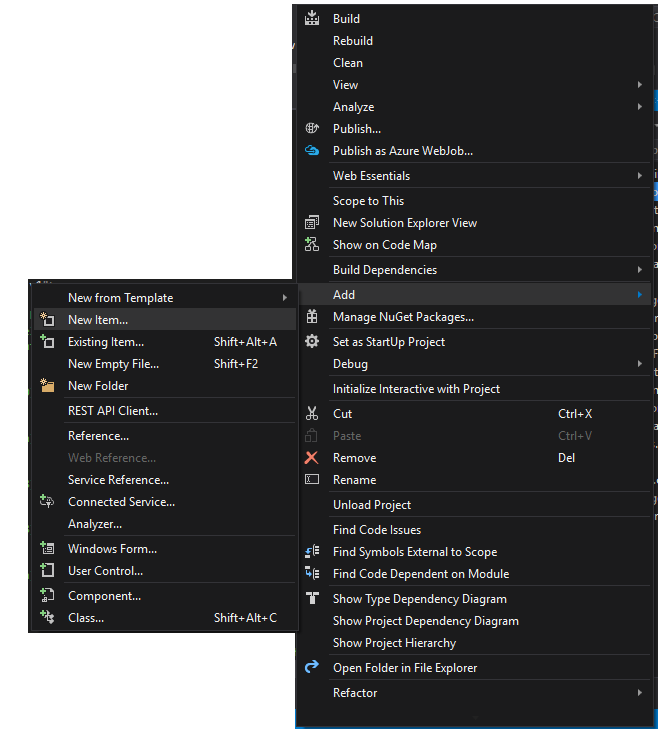
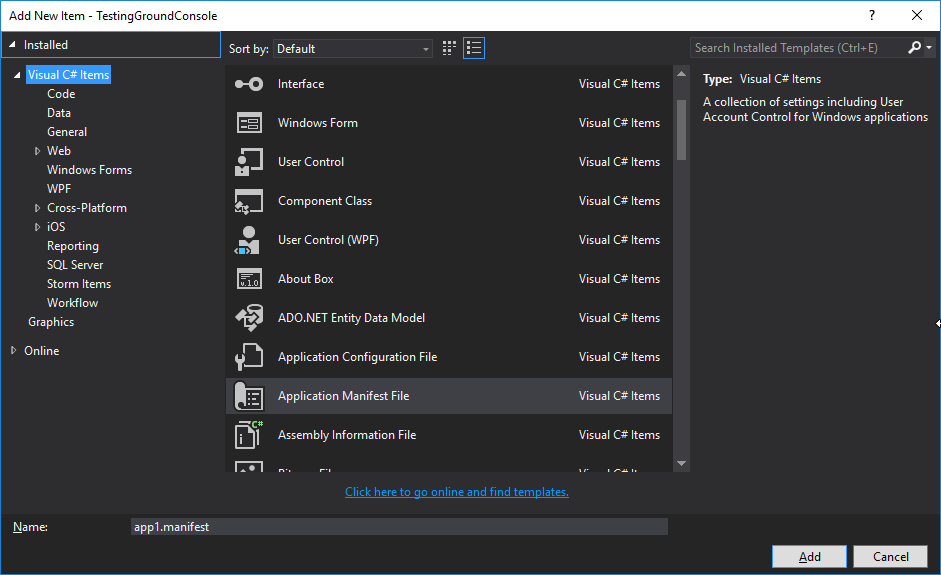
然后取消对以下行的注释:
<!-- Windows 10 -->
<supportedOS Id="{8e0f7a12-bfb3-4fe8-b9a5-48fd50a15a9a}" />https://stackoverflow.com/questions/37700605
复制相似问题
腾讯云开发者

Copyright © 2013 - 2026 Tencent Cloud. All Rights Reserved. 腾讯云 版权所有
深圳市腾讯计算机系统有限公司 ICP备案/许可证号:粤B2-20090059  粤公网安备44030502008569号
腾讯云计算(北京)有限责任公司 京ICP证150476号 | 京ICP备11018762号