
如何为CKComponent (ComponentKit Facebook)画线?
如何为CKComponent (ComponentKit Facebook)画线?
提问于 2016-06-08 09:10:40
如何为CKComponent (ComponentKit Facebook)画线?
我可以使用基于UIView的类和drawrect方法来实现它。
 [CKStackLayoutComponent newWithView:{ [ViewWithDrawrectMethod class],
                                    {
                                    { CKComponentViewAttribute::LayerAttribute(@selector(setCornerRadius:)), @4.0 },
                                    { CKComponentViewAttribute::LayerAttribute(@selector(setBorderColor:)), (id)[[UIColor lightGrayColor] CGColor]},
                                    { CKComponentViewAttribute::LayerAttribute(@selector(setBorderWidth:)), @0.5},
                                    { @selector(setClipsToBounds:), @YES },
                                    { @selector(setBackgroundColor:),  [UIColor whiteColor]},
                                   }
}@interface ViewWithDrawrectMethod : UIView
@end
@implementation ViewWithDrawrectMethod
-(void) drawRect: (CGRect) rect
{
[super drawRect:rect];
CGContextRef context = UIGraphicsGetCurrentContext();
CGFloat dash[] = {2.0, 3.0};
CGContextSetLineDash(context, 0, dash, 1);
CGRect paperRect = self.bounds;
CGPoint startPoint = CGPointMake(paperRect.origin.x,50);
CGPoint endPoint = CGPointMake(paperRect.origin.x + paperRect.size.width, 50);
CGContextSetLineCap(context, kCGLineCapSquare);
CGContextSetStrokeColorWithColor(context, [UIColor grayColor].CGColor);
CGContextSetLineWidth(context, 0.5);
CGContextMoveToPoint(context, startPoint.x , startPoint.y);
CGContextAddLineToPoint(context, endPoint.x, endPoint.y );
CGContextStrokePath(context);
}但我怀疑是否有权像CKStackLayoutComponent的子类一样使用基于UIViev的组件?也许还有更好的方法?
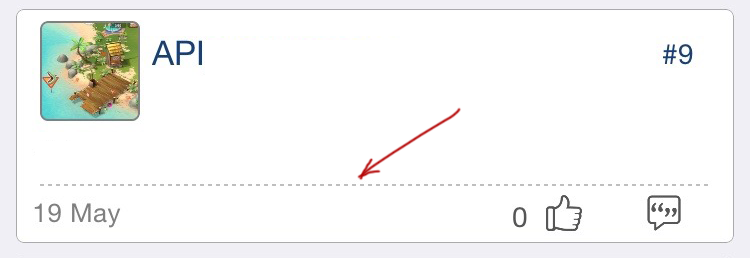
谢谢你提前的回复。
回答 1
Stack Overflow用户
发布于 2016-11-12 04:06:05
+ (instancetype)newLineWithColor: (UIColor *)color {
    return [super newWithComponent:[CKComponent
                                newWithView:{
                                    UIView.class,
                                    {{@selector(setBackgroundColor:), color}}
                                }
                                size:{
                                    .height = 0.5
                                }]];
}
或者:
您可以使用背景图像作为可伸缩的图像,并在其上画线。
页面原文内容由Stack Overflow提供。腾讯云小微IT领域专用引擎提供翻译支持
原文链接:
https://stackoverflow.com/questions/37698098
复制相关文章
相似问题
腾讯云开发者

Copyright © 2013 - 2026 Tencent Cloud. All Rights Reserved. 腾讯云 版权所有
深圳市腾讯计算机系统有限公司 ICP备案/许可证号:粤B2-20090059  粤公网安备44030502008569号
腾讯云计算(北京)有限责任公司 京ICP证150476号 | 京ICP备11018762号