
如何将图像视图准确地放置在uiview中,iOS迅速地
如何将图像视图准确地放置在uiview中,iOS迅速地
提问于 2016-06-07 15:44:03
我有一个问题,我正在以编程的方式创建一个imageView,然后将它添加到一个中心视图中,这有点工作。但问题是,不是在中央视图中占据整个空间,而是在uiview中看起来是这样,但并不是所有的空间都有一点向下。有什么帮助吗?
守则:
//let backgroundImage = UIImageView(frame: centerView.frame)
            let backgroundImage: UIImageView = UIImageView(frame: CGRect(x: 0, y: 0, width: self.centerView.bounds.size.width, height: self.centerView.bounds.size.height))
            print("backgorundImage coordinates: \(backgroundImage.frame)")
            backgroundImage.image = drawOverImage
            backgroundImage.sizeThatFits(CGSizeMake(centerView.bounds.width, self.centerView.bounds.height))
            //check this the image is being drawn bottom because is the fame for the previous 0.0
            //backgroundImage.autoPinEdgeToSuperviewMargin(ALEdge.Top, relation: NSLayoutRelation.Equal)
            //backgroundImage.contentMode =  UIViewContentMode.ScaleAspectFill //too big
            //backgroundImage.contentMode = UIViewContentMode.ScaleAspectFit     //sama
            backgroundImage.contentMode = UIViewContentMode.ScaleAspectFill
            backgroundImage.clipsToBounds = true
            //imageView.image = background
            backgroundImage.center = view.center

            let coordinatesForImage: CGRect = self.view.convertRect(backgroundImage.frame, toView: centerView)
            let pointOfImage: CGPoint = backgroundImage.convertPoint(self.centerView.frame.origin, toView: backgroundImage)

            print("coordinates test: \(coordinatesForImage)")
            print("point x: \(pointOfImage.x)")
            print("point y: \(pointOfImage.y)")

            //backgroundImage.contentMode = UIViewContentMode.ScaleToFill
            self.centerView.insertSubview(backgroundImage, atIndex: 0)


            let pointOfImageToSuperView: CGPoint = (backgroundImage.superview?.convertPoint(backgroundImage.center, toView: self.centerView))!

            print("superview imagepoint: \(pointOfImageToSuperView)")
这些评论都是我想做的。
编辑:这就是正在发生的事情。
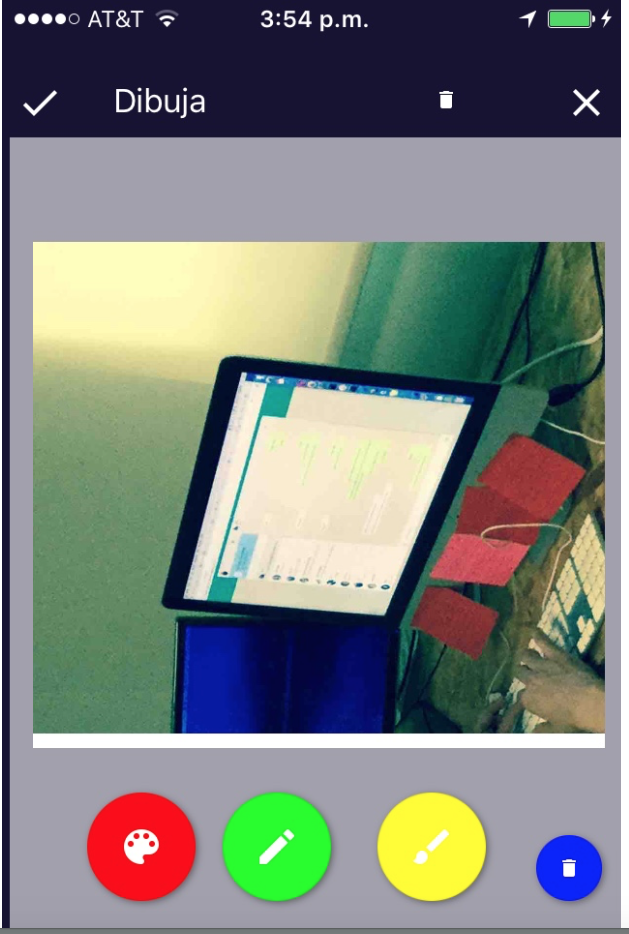
我从底部漏了一点点,现在我不知道图像的大小或者什么,我能改变uiview的大小来匹配图像吗?
回答 1
Stack Overflow用户
回答已采纳
发布于 2016-06-07 15:49:14
只需尝试:
let backgroundImage: UIImageView = UIImageView(frame: self.centerView.bounds)
backgroundImage.clipsToBounds = true
backgroundImage.contentMode = .ScaleAspectFill
self.centerView.addSubview(backgroundImage)页面原文内容由Stack Overflow提供。腾讯云小微IT领域专用引擎提供翻译支持
原文链接:
https://stackoverflow.com/questions/37683820
复制相关文章
相似问题
腾讯云开发者

Copyright © 2013 - 2026 Tencent Cloud. All Rights Reserved. 腾讯云 版权所有
深圳市腾讯计算机系统有限公司 ICP备案/许可证号:粤B2-20090059  粤公网安备44030502008569号
腾讯云计算(北京)有限责任公司 京ICP证150476号 | 京ICP备11018762号