
在我的DataGridView中添加新行时出现异常
在我的DataGridView中添加新行时出现异常
提问于 2016-06-07 10:11:26
我有这个问题。一开始是这样的:
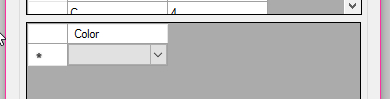
我可以双击下拉箭头并选择一个颜色OK:
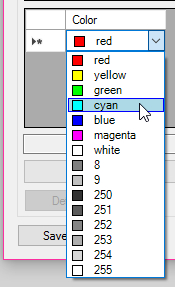
此时,我可以再次单击下拉列表,并正确地选择它:
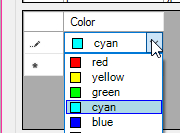
问题是当我想要添加新行时。即使我只需单击新行单元格:
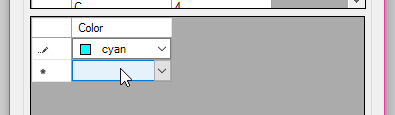
然后,我将数据错误异常数据:
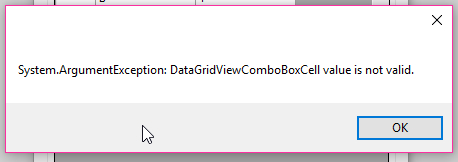
此后,以前的单元格绘制错误:
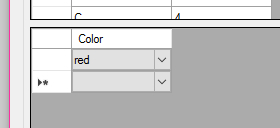
我想不出怎么解决这个问题。
我的代码:
using System;
using System.Collections.Generic;
using System.ComponentModel;
using System.Data;
using System.Drawing;
using System.IO;
using System.Linq;
using System.Text;
using System.Threading.Tasks;
using System.Windows.Forms;
using System.Xml.Linq;
using Teigha.Core;
using Teigha.TD;

namespace Viewer
{
    public partial class Editor : Form
    {
        uint[] _CurPalette = Teigha.Core.AllPalettes.getDarkPalette();

        public Editor()
        {
            InitializeComponent();
        }

        private void Editor_Load(object sender, EventArgs e)
        {
            DataGridViewComboBoxColumn cboColumn = new DataGridViewComboBoxColumn();
            cboColumn.Name = "Color";

            List<ushort> listColors = new List<ushort>();
            listColors.Add(1);
            listColors.Add(2);
            listColors.Add(3);
            listColors.Add(4);
            listColors.Add(5);
            listColors.Add(6);
            listColors.Add(7);
            listColors.Add(8);
            listColors.Add(9);
            listColors.Add(250);
            listColors.Add(251);
            listColors.Add(252);
            listColors.Add(253);
            listColors.Add(254);
            listColors.Add(255);

            foreach (ushort iColorIndex in listColors)
            {
                using (OdCmColor oColor = new OdCmColor())
                {
                    oColor.setColorIndex(iColorIndex);
                    ComboboxColorItem oColorItem = new ComboboxColorItem(
                        oColor.colorNameForDisplay(),
                        iColorIndex,
                        Color.FromArgb(oColor.red(), oColor.green(), oColor.blue()));
                    cboColumn.Items.Add(oColorItem);
                }
            }

            this.DataGridView1.Columns.Add(cboColumn);
        }

        private void DataGridView1_EditingControlShowing(object sender, DataGridViewEditingControlShowingEventArgs e)
        {
            if (e.Control is ComboBox)
            {
                ComboBox theCB = (ComboBox)e.Control;
                theCB.DrawMode = DrawMode.OwnerDrawFixed;
                try
                {
                    theCB.DrawItem -= new DrawItemEventHandler(this.combobox1_DrawItem);
                }
                catch { }
                theCB.DrawItem += new DrawItemEventHandler(this.combobox1_DrawItem);
            }
        }

        private void combobox1_DrawItem(object sender, DrawItemEventArgs e)
        {
            Graphics g = e.Graphics;
            Color c = Color.Empty;
            string s = "";
            Brush br = SystemBrushes.WindowText;
            Brush brBack;
            Rectangle rDraw;
            bool bSelected = Convert.ToBoolean(e.State & DrawItemState.Selected);
            bool bValue = Convert.ToBoolean(e.State & DrawItemState.ComboBoxEdit);

            rDraw = e.Bounds;
            rDraw.Inflate(-1, -1);

            if (bSelected & !bValue)
            {
                brBack = Brushes.LightBlue;
                g.FillRectangle(Brushes.LightBlue, rDraw);
                g.DrawRectangle(Pens.Blue, rDraw);
            }
            else
            {
                brBack = Brushes.White;
                g.FillRectangle(brBack, e.Bounds);
            }

            try
            {
                //s = ((ComboBox)sender).Items[e.Index].ToString();
                ComboboxColorItem oColorItem = (ComboboxColorItem)((ComboBox)sender).Items[e.Index];
                s = oColorItem.ToString();
                c = oColorItem.Value;
            }
            catch
            {
                s = "red";
                c = Color.Red;
            }

            SolidBrush b = new SolidBrush(c);
            Rectangle r = new Rectangle(e.Bounds.Left + 5, e.Bounds.Top + 3, 10, 10);
            g.FillRectangle(b, r);
            g.DrawRectangle(Pens.Black, r);
            g.DrawString(s, Form.DefaultFont, Brushes.Black, e.Bounds.Left + 25, e.Bounds.Top + 1);

            b.Dispose();
            g.Dispose();
        }

        private void DataGridView1_DataError(object sender, DataGridViewDataErrorEventArgs e)
        {
            MessageBox.Show(e.Exception.ToString());
        }
    }

    public class ComboboxColorItem
    {
        public string Name { get; }
        public ushort Index { get; }
        public Color Value { get; }

        public ComboboxColorItem(string Name, ushort Index, Color Value)
        {
            this.Name = Name;
            this.Index = Index;
            this.Value = Value;
        }
        public override string ToString()
        {
            return Name;
        }
    }
}
更新:
如果我将这些代码放入表单加载事件中:
this.DataGridView1.Rows.Add(new ComboboxColorItem("red", 1, Color.Red));然后我马上就得到了例外。
我尝试添加一个次要的默认构造函数,它没有什么区别:
public class ComboboxColorItem
{
    public string Name { get; set; }
    public ushort Index { get; set; }
    public Color Value { get; set; }

    public ComboboxColorItem()
    {
        this.Name = "red";
        this.Index = 1;
        this.Value = Color.Red;
    }
    public ComboboxColorItem(string Name, ushort Index, Color Value)
    {
        this.Name = Name;
        this.Index = Index;
        this.Value = Value;
    }
    public override string ToString()
    {
        return Name;
    }
}
我还尝试将其添加到load事件中:
cboColumn.ValueType = typeof(ComboboxColorItem);并没有什么不同。
更新:
我已经使用了CellParsing的答案,我似乎不再给出崩溃:
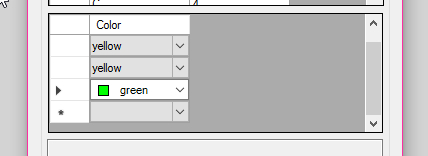
我现在唯一的评论是,我希望那块颜色能在细胞里继续可见。但我只看到当我点击下降箭头的颜色块。这是另一个问题吗?
回答 2
Stack Overflow用户
回答已采纳
发布于 2016-06-07 11:34:12
DataGridView在解析所选颜色项时遇到困难。我建议您将自定义解析逻辑应用于该列:
DataGridView1.CellParsing += ColorCellParsing;

private void ColorCellParsing(object sender, DataGridViewCellParsingEventArgs e)
{
    var grid = (DataGridView)sender;
    var column = grid.Columns[e.ColumnIndex] as DataGridViewComboBoxColumn;
    if (column == null || column.Name != "Color")
        return;
    foreach (ComboboxColorItem item in column.Items)
    {
        if (item.Name == (string) e.Value)
        {
            e.Value = item;
            e.ParsingApplied = true;
            break;
        }
    }
}Stack Overflow用户
发布于 2016-06-07 10:22:01
当您想获得字符串以外的内容时,请将列的ValueType设置为typeof(<data type>)
例如,如果是int,则为
this.gridViewSettings.Columns("columnName").ValueType= typeof(Int32);或
this.ComboboxCellcolumnName.ValueType = typeof(int);页面原文内容由Stack Overflow提供。腾讯云小微IT领域专用引擎提供翻译支持
原文链接:
https://stackoverflow.com/questions/37676438
复制相关文章
相似问题
腾讯云开发者

Copyright © 2013 - 2026 Tencent Cloud. All Rights Reserved. 腾讯云 版权所有
深圳市腾讯计算机系统有限公司 ICP备案/许可证号:粤B2-20090059  粤公网安备44030502008569号
腾讯云计算(北京)有限责任公司 京ICP证150476号 | 京ICP备11018762号