
Eclipse构建“找不到tools.jar”
我搜索了一整天,并尝试了几乎所有建议的解决方案,没有一个在我的eclipse工作,完全不知道哪里出了问题,当我试图通过Gradle构建时,它一直说“找不到tools.jar”。
我所做的:
1)在系统环境变量中添加Java (指向我的JDK)。
2)在tools.jar系统环境变量中添加路径(其中包含Path )。
3)在项目文件夹中创建一个dependencies.gradle文件,指示Gradle查找tools.jar (compile files("${System.properties['java.home']}/../lib/tools.jar"))
4)直接将compile files("${System.properties['java.home']}/../lib/tools.jar")放在build.gradle dependencies中。
5)在项目首选项中,go Java -> Build Path -> Classpath变量,添加JAVA_HOME变量。
6)将项目构建路径指向JDK而不是JRE。
这些都没用!我还能尝试什么?
PS: Eclipse版本Mars 4.5.2,Gradle版本1.12
build.gradle内容(此构建脚本由eclipse自动生成):
apply plugin: 'java'
apply plugin: 'eclipse'

sourceCompatibility = 1.5
version = '1.0'
jar {
    manifest {
        attributes 'Implementation-Title': 'Gradle Quickstart',
                   'Implementation-Version': version
    }
}

repositories {
    mavenCentral()
}

dependencies {
    compile group: 'commons-collections', name: 'commons-collections', version: '3.2'
    testCompile group: 'junit', name: 'junit', version: '4.+'
}

test {
    systemProperties 'property': 'value'
}

uploadArchives {
    repositories {
       flatDir {
           dirs 'repos'
       }
    }
}
Java主页内容:
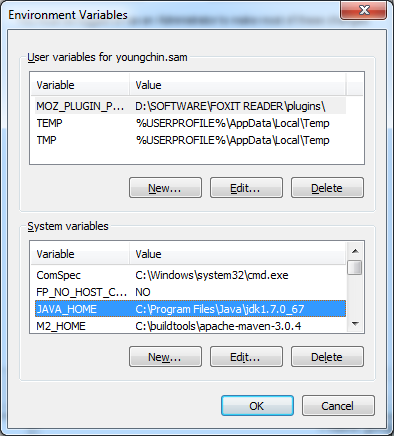
路径环境变量:
C:\Program Files\Java\jdk1.7.0_67\lib
显示在eclipse控制台中的错误:
:compileJava FAILED

FAILURE: Build failed with an exception.

* What went wrong:
Execution failed for task ':compileJava'.
> Could not find tools.jar

* Try:
Run with --stacktrace option to get the stack trace. Run with --info or --debug option to get more log output.

BUILD FAILED

Total time: 0.152 secs
[sts] Build failed
org.gradle.tooling.BuildException: Could not execute build using Gradle
installation 'C:\buildtools\gradle-2.12'.
Caused by: java.lang.IllegalStateException: Could not find tools.jar
(堆栈太长了,我把它缩短了。)
回答 9
Stack Overflow用户
发布于 2016-06-08 05:52:56
好吧,我终于解决了我的问题。这很容易,我重新安装了JDK。不知怎么的,愚蠢的Eclipse (或者Gradle插件,我仍然不知道哪里出了问题)就是认不出我以前的JDK路径。
在我重新安装JDK之后(借此机会,我也升级了JDK 7到8),我甚至不需要Java_home环境变量,它可以工作。
Stack Overflow用户
发布于 2017-03-03 14:49:21
我也有同样的问题。我相信是由JRE引起的,gradle被配置为使用这个JRE,而不是eclipse/STS JRE。在我的机器上,gradle默认使用错误的JRE。在安装gradle (甚至通过构建)时,它会将一个.gradle目录放在Windows上的主目录(C:/Users/username)中。您可以在gradle.properties中创建.gradle文件,并指定您希望gradle使用的JRE/JDK,如本例所示:
org.gradle.java.home=C:/Program Files/Java/jdk1.8.0这可能会通过使用robyjwilkins推荐的命令行方法来揭示。它应该避免重新安装JDK的需要。
有关更多信息,请参见environment.html
Stack Overflow用户
发布于 2017-01-06 17:52:41
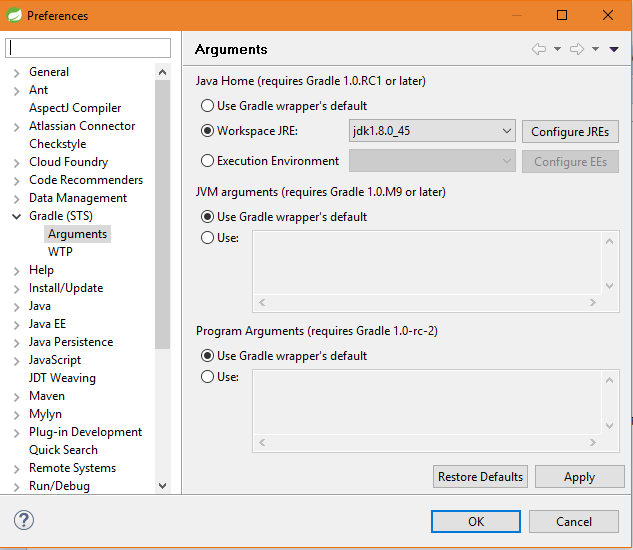
步骤1:打开eclipse。
步骤2:打开窗口-> Preferences
步骤3:转到Gradle (STS) ->参数
步骤4:为Java 选项选择合适的JDK版本。(见下图)
https://stackoverflow.com/questions/37669664
复制相似问题
腾讯云开发者

Copyright © 2013 - 2026 Tencent Cloud. All Rights Reserved. 腾讯云 版权所有
深圳市腾讯计算机系统有限公司 ICP备案/许可证号:粤B2-20090059  粤公网安备44030502008569号
腾讯云计算(北京)有限责任公司 京ICP证150476号 | 京ICP备11018762号