
无法在窗体设计器中查看我的窗体
无法在窗体设计器中查看我的窗体
提问于 2016-06-05 18:45:13
我在我的C#项目中添加了一个新类。非常简单,根据我发现的许多例子:
using System;
using System.Collections.Generic;
using System.Linq;
using System.Text;
using System.Threading.Tasks;
using System.Windows.Forms;

namespace GENIO_Viewer
{
    class DBTableLayoutPanel : TableLayoutPanel
    {
        public DBTableLayoutPanel() : base()
        {
            DoubleBuffered = true;
        }
    }
}
然后,我编辑了designer类文件以使用修改后的对象(代码被削减):
private void InitializeComponent()
{
    this.tableLayoutPanel = new DBTableLayoutPanel();
    // tableLayoutPanel
    //
    this.tableLayoutPanel.AutoSize = true;
    this.tableLayoutPanel.BackColor = System.Drawing.Color.Black;
    this.tableLayoutPanel.ColumnCount = 1;
    this.tableLayoutPanel.ColumnStyles.Add(new System.Windows.Forms.ColumnStyle(System.Windows.Forms.SizeType.Percent, 50F));
    this.tableLayoutPanel.Cursor = System.Windows.Forms.Cursors.Cross;
    this.tableLayoutPanel.Dock = System.Windows.Forms.DockStyle.Fill;
    this.tableLayoutPanel.Location = new System.Drawing.Point(0, 24);
    this.tableLayoutPanel.Name = "tableLayoutPanel";
    this.tableLayoutPanel.RowCount = 1;
    this.tableLayoutPanel.RowStyles.Add(new System.Windows.Forms.RowStyle(System.Windows.Forms.SizeType.Percent, 50F));
    this.tableLayoutPanel.Size = new System.Drawing.Size(555, 359);
    this.tableLayoutPanel.TabIndex = 4;
}
它可以编译。但是当我在编辑器中显示表单时,我遇到了一个问题:
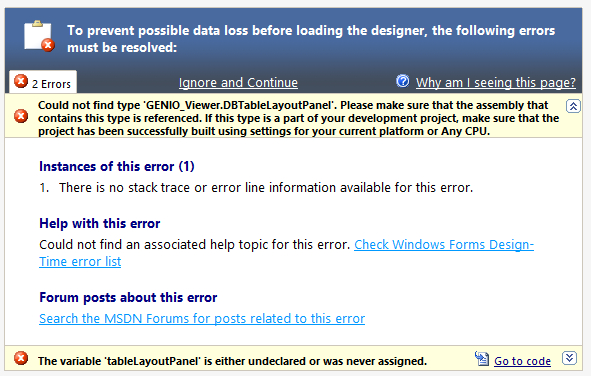
为什么会这样呢?我想不出我该怎么做才能修好它。
更新:
这是设计器文件的完整表单定义。只有当我注释掉DBTableLayoutPanel行并将其替换为注释掉的行时,它才能工作。迷惑了。:
using System;

namespace GENIO_Viewer
{
    partial class GENIO_Viewer_Form
    {
        /// <summary>
        /// Required designer variable.
        /// </summary>
        private System.ComponentModel.IContainer components = null;

        /// <summary>
        /// Clean up any resources being used.
        /// </summary>
        /// <param name="disposing">true if managed resources should be disposed; otherwise, false.</param>
        protected override void Dispose(bool disposing)
        {
            if (disposing && (components != null))
            {
                components.Dispose();

                m_moduleTD_Tb.Dispose();
                m_hostApp.Dispose();
                m_sysSrv.Dispose();

                GC.Collect();
                GC.WaitForPendingFinalizers();
                Teigha.Core.Globals.odgsUninitialize();
                Teigha.Core.Globals.odrxUninitialize();
            }
            base.Dispose(disposing);
        }

        #region Windows Form Designer generated code

        /// <summary>
        /// Required method for Designer support - do not modify
        /// the contents of this method with the code editor.
        /// </summary>
        private void InitializeComponent()
        {
            System.ComponentModel.ComponentResourceManager resources = new System.ComponentModel.ComponentResourceManager(typeof(GENIO_Viewer_Form));
            this.toolStripButton1 = new System.Windows.Forms.ToolStripButton();
            this.statusStrip1 = new System.Windows.Forms.StatusStrip();
            this.toolStripCoordinate = new System.Windows.Forms.ToolStripStatusLabel();
            this.toolStripProgressBar = new System.Windows.Forms.ToolStripProgressBar();
            this.toolStripStatusLabel = new System.Windows.Forms.ToolStripStatusLabel();
            this.toolStripCoordinates = new System.Windows.Forms.ToolStripStatusLabel();
            //this.tableLayoutPanel = new System.Windows.Forms.TableLayoutPanel();
            this.tableLayoutPanel = new GENIO_Viewer.DBTableLayoutPanel();
            this.menuStrip1 = new System.Windows.Forms.MenuStrip();
            this.menuFile = new System.Windows.Forms.ToolStripMenuItem();
            this.menuFile_LoadGenio = new System.Windows.Forms.ToolStripMenuItem();
            this.menuFile_SaveAutoCAD = new System.Windows.Forms.ToolStripMenuItem();
            this.toolStripSeparator1 = new System.Windows.Forms.ToolStripSeparator();
            this.menuFile_RecentFile = new System.Windows.Forms.ToolStripMenuItem();
            this.toolStripSeparator2 = new System.Windows.Forms.ToolStripSeparator();
            this.menuFile_Exit = new System.Windows.Forms.ToolStripMenuItem();
            this.menuView = new System.Windows.Forms.ToolStripMenuItem();
            this.menuViewCodeEditor = new System.Windows.Forms.ToolStripMenuItem();
            this.toolStripSeparator3 = new System.Windows.Forms.ToolStripSeparator();
            this.menuView_ZoomExtents = new System.Windows.Forms.ToolStripMenuItem();
            this.menuView_ZoomWindow = new System.Windows.Forms.ToolStripMenuItem();
            this.toolStrip = new System.Windows.Forms.ToolStrip();
            this.toolStripButton_ZoomWindow = new System.Windows.Forms.ToolStripButton();
            this.toolStripButton_ZoomExtents = new System.Windows.Forms.ToolStripButton();
            this.statusStrip1.SuspendLayout();
            this.menuStrip1.SuspendLayout();
            this.toolStrip.SuspendLayout();
            this.SuspendLayout();
            //
            // toolStripButton1
            //
            this.toolStripButton1.Name = "toolStripButton1";
            this.toolStripButton1.Size = new System.Drawing.Size(23, 23);
            //
            // statusStrip1
            //
            this.statusStrip1.Items.AddRange(new System.Windows.Forms.ToolStripItem[] {
            this.toolStripCoordinate,
            this.toolStripProgressBar,
            this.toolStripStatusLabel,
            this.toolStripCoordinates});
            this.statusStrip1.Location = new System.Drawing.Point(0, 383);
            this.statusStrip1.Name = "statusStrip1";
            this.statusStrip1.Size = new System.Drawing.Size(555, 22);
            this.statusStrip1.TabIndex = 3;
            this.statusStrip1.Text = "statusStrip";
            //
            // toolStripCoordinate
            //
            this.toolStripCoordinate.AutoSize = false;
            this.toolStripCoordinate.Name = "toolStripCoordinate";
            this.toolStripCoordinate.Size = new System.Drawing.Size(200, 17);
            //
            // toolStripProgressBar
            //
            this.toolStripProgressBar.AutoSize = false;
            this.toolStripProgressBar.Name = "toolStripProgressBar";
            this.toolStripProgressBar.Size = new System.Drawing.Size(100, 16);
            //
            // toolStripStatusLabel
            //
            this.toolStripStatusLabel.AutoSize = false;
            this.toolStripStatusLabel.Name = "toolStripStatusLabel";
            this.toolStripStatusLabel.Size = new System.Drawing.Size(257, 17);
            this.toolStripStatusLabel.Spring = true;
            this.toolStripStatusLabel.TextAlign = System.Drawing.ContentAlignment.MiddleLeft;
            //
            // toolStripCoordinates
            //
            this.toolStripCoordinates.Name = "toolStripCoordinates";
            this.toolStripCoordinates.Size = new System.Drawing.Size(0, 0);
            //
            // tableLayoutPanel
            //
            this.tableLayoutPanel.AutoSize = true;
            this.tableLayoutPanel.BackColor = System.Drawing.Color.LightGray;
            this.tableLayoutPanel.ColumnCount = 1;
            this.tableLayoutPanel.ColumnStyles.Add(new System.Windows.Forms.ColumnStyle(System.Windows.Forms.SizeType.Percent, 50F));
            this.tableLayoutPanel.Cursor = System.Windows.Forms.Cursors.Cross;
            this.tableLayoutPanel.Dock = System.Windows.Forms.DockStyle.Fill;
            this.tableLayoutPanel.Location = new System.Drawing.Point(0, 24);
            this.tableLayoutPanel.Name = "tableLayoutPanel";
            this.tableLayoutPanel.RowCount = 1;
            this.tableLayoutPanel.RowStyles.Add(new System.Windows.Forms.RowStyle(System.Windows.Forms.SizeType.Percent, 50F));
            this.tableLayoutPanel.Size = new System.Drawing.Size(555, 359);
            this.tableLayoutPanel.TabIndex = 4;
            //
            // menuStrip1
            //
            this.menuStrip1.Items.AddRange(new System.Windows.Forms.ToolStripItem[] {
            this.menuFile,
            this.menuView});
            this.menuStrip1.Location = new System.Drawing.Point(0, 0);
            this.menuStrip1.Name = "menuStrip1";
            this.menuStrip1.Size = new System.Drawing.Size(555, 24);
            this.menuStrip1.TabIndex = 5;
            this.menuStrip1.Text = "menuStrip1";
            //
            // menuFile
            //
            this.menuFile.DropDownItems.AddRange(new System.Windows.Forms.ToolStripItem[] {
            this.menuFile_LoadGenio,
            this.menuFile_SaveAutoCAD,
            this.toolStripSeparator1,
            this.menuFile_RecentFile,
            this.toolStripSeparator2,
            this.menuFile_Exit});
            this.menuFile.Name = "menuFile";
            this.menuFile.Size = new System.Drawing.Size(37, 20);
            this.menuFile.Text = "&File";
            this.menuFile.DropDownOpening += new System.EventHandler(this.menuFile_DropDownOpening);
            //
            // menuFile_LoadGenio
            //
            this.menuFile_LoadGenio.Name = "menuFile_LoadGenio";
            this.menuFile_LoadGenio.Size = new System.Drawing.Size(172, 22);
            this.menuFile_LoadGenio.Text = "Load GENIO File";
            this.menuFile_LoadGenio.Click += new System.EventHandler(this.menuFile_LoadGenio_Click);
            //
            // menuFile_SaveAutoCAD
            //
            this.menuFile_SaveAutoCAD.Name = "menuFile_SaveAutoCAD";
            this.menuFile_SaveAutoCAD.Size = new System.Drawing.Size(172, 22);
            this.menuFile_SaveAutoCAD.Text = "Save AutoCAD File";
            this.menuFile_SaveAutoCAD.Click += new System.EventHandler(this.menuFile_SaveAutoCAD_Click);
            //
            // toolStripSeparator1
            //
            this.toolStripSeparator1.Name = "toolStripSeparator1";
            this.toolStripSeparator1.Size = new System.Drawing.Size(169, 6);
            //
            // menuFile_RecentFile
            //
            this.menuFile_RecentFile.Name = "menuFile_RecentFile";
            this.menuFile_RecentFile.Size = new System.Drawing.Size(172, 22);
            this.menuFile_RecentFile.Text = "Recent File";
            //
            // toolStripSeparator2
            //
            this.toolStripSeparator2.Name = "toolStripSeparator2";
            this.toolStripSeparator2.Size = new System.Drawing.Size(169, 6);
            //
            // menuFile_Exit
            //
            this.menuFile_Exit.Name = "menuFile_Exit";
            this.menuFile_Exit.Size = new System.Drawing.Size(172, 22);
            this.menuFile_Exit.Text = "E&xit";
            this.menuFile_Exit.Click += new System.EventHandler(this.menuFile_Exit_Click);
            //
            // menuView
            //
            this.menuView.DropDownItems.AddRange(new System.Windows.Forms.ToolStripItem[] {
            this.menuViewCodeEditor,
            this.toolStripSeparator3,
            this.menuView_ZoomExtents,
            this.menuView_ZoomWindow});
            this.menuView.Name = "menuView";
            this.menuView.Size = new System.Drawing.Size(44, 20);
            this.menuView.Text = "&View";
            this.menuView.DropDownOpening += new System.EventHandler(this.menuView_DropDownOpening);
            //
            // menuViewCodeEditor
            //
            this.menuViewCodeEditor.Name = "menuViewCodeEditor";
            this.menuViewCodeEditor.Size = new System.Drawing.Size(153, 22);
            this.menuViewCodeEditor.Text = "Code Editor";
            this.menuViewCodeEditor.Click += new System.EventHandler(this.menuViewCodeEditor_Click);
            //
            // toolStripSeparator3
            //
            this.toolStripSeparator3.Name = "toolStripSeparator3";
            this.toolStripSeparator3.Size = new System.Drawing.Size(150, 6);
            //
            // menuView_ZoomExtents
            //
            this.menuView_ZoomExtents.Name = "menuView_ZoomExtents";
            this.menuView_ZoomExtents.Size = new System.Drawing.Size(153, 22);
            this.menuView_ZoomExtents.Text = "Zoom &Extents";
            this.menuView_ZoomExtents.Click += new System.EventHandler(this.menuView_ZoomExtents_Click);
            //
            // menuView_ZoomWindow
            //
            this.menuView_ZoomWindow.Name = "menuView_ZoomWindow";
            this.menuView_ZoomWindow.Size = new System.Drawing.Size(153, 22);
            this.menuView_ZoomWindow.Text = "Zoom &Window";
            this.menuView_ZoomWindow.Click += new System.EventHandler(this.menuView_ZoomWindow_Click);
            //
            // toolStrip
            //
            this.toolStrip.Items.AddRange(new System.Windows.Forms.ToolStripItem[] {
            this.toolStripButton_ZoomWindow,
            this.toolStripButton_ZoomExtents});
            this.toolStrip.Location = new System.Drawing.Point(0, 24);
            this.toolStrip.Name = "toolStrip";
            this.toolStrip.Size = new System.Drawing.Size(555, 25);
            this.toolStrip.TabIndex = 6;
            this.toolStrip.Text = "toolStrip";
            //
            // toolStripButton_ZoomWindow
            //
            this.toolStripButton_ZoomWindow.DisplayStyle = System.Windows.Forms.ToolStripItemDisplayStyle.Image;
            this.toolStripButton_ZoomWindow.Image = ((System.Drawing.Image)(resources.GetObject("toolStripButton_ZoomWindow.Image")));
            this.toolStripButton_ZoomWindow.ImageTransparentColor = System.Drawing.Color.Magenta;
            this.toolStripButton_ZoomWindow.Name = "toolStripButton_ZoomWindow";
            this.toolStripButton_ZoomWindow.Size = new System.Drawing.Size(23, 22);
            this.toolStripButton_ZoomWindow.Text = "Zoom Window";
            this.toolStripButton_ZoomWindow.Click += new System.EventHandler(this.toolStripButton_ZoomWindow_Click);
            //
            // toolStripButton_ZoomExtents
            //
            this.toolStripButton_ZoomExtents.DisplayStyle = System.Windows.Forms.ToolStripItemDisplayStyle.Image;
            this.toolStripButton_ZoomExtents.Image = ((System.Drawing.Image)(resources.GetObject("toolStripButton_ZoomExtents.Image")));
            this.toolStripButton_ZoomExtents.ImageTransparentColor = System.Drawing.Color.Magenta;
            this.toolStripButton_ZoomExtents.Name = "toolStripButton_ZoomExtents";
            this.toolStripButton_ZoomExtents.Size = new System.Drawing.Size(23, 22);
            this.toolStripButton_ZoomExtents.Text = "Zoom Extents";
            this.toolStripButton_ZoomExtents.Click += new System.EventHandler(this.toolStripButton_ZoomExtents_Click);
            //
            // GENIO_Viewer_Form
            //
            this.AutoScaleDimensions = new System.Drawing.SizeF(6F, 13F);
            this.AutoScaleMode = System.Windows.Forms.AutoScaleMode.Font;
            this.ClientSize = new System.Drawing.Size(555, 405);
            this.Controls.Add(this.toolStrip);
            this.Controls.Add(this.tableLayoutPanel);
            this.Controls.Add(this.statusStrip1);
            this.Controls.Add(this.menuStrip1);
            this.Cursor = System.Windows.Forms.Cursors.Default;
            this.DoubleBuffered = true;
            this.MainMenuStrip = this.menuStrip1;
            this.Name = "GENIO_Viewer_Form";
            this.Text = "GENIO Viewer";
            this.WindowState = System.Windows.Forms.FormWindowState.Maximized;
            this.FormClosing += new System.Windows.Forms.FormClosingEventHandler(this.GENIO_Viewer_Form_FormClosing);
            this.Load += new System.EventHandler(this.GENIO_Viewer_Form_Load);
            this.statusStrip1.ResumeLayout(false);
            this.statusStrip1.PerformLayout();
            this.menuStrip1.ResumeLayout(false);
            this.menuStrip1.PerformLayout();
            this.toolStrip.ResumeLayout(false);
            this.toolStrip.PerformLayout();
            this.ResumeLayout(false);
            this.PerformLayout();

        }

        #endregion

        private System.Windows.Forms.ToolStripButton toolStripButton1;
        private System.Windows.Forms.StatusStrip statusStrip1;
        private System.Windows.Forms.ToolStripStatusLabel toolStripStatusLabel;
        private System.Windows.Forms.ToolStripProgressBar toolStripProgressBar;
        //private System.Windows.Forms.TableLayoutPanel tableLayoutPanel;
        private GENIO_Viewer.DBTableLayoutPanel tableLayoutPanel;
        private System.Windows.Forms.MenuStrip menuStrip1;
        private System.Windows.Forms.ToolStripMenuItem menuFile;
        private System.Windows.Forms.ToolStripMenuItem menuView;
        private System.Windows.Forms.ToolStripMenuItem menuView_ZoomExtents;
        private System.Windows.Forms.ToolStripMenuItem menuView_ZoomWindow;
        private System.Windows.Forms.ToolStripMenuItem menuFile_LoadGenio;
        private System.Windows.Forms.ToolStripMenuItem menuFile_SaveAutoCAD;
        private System.Windows.Forms.ToolStrip toolStrip;
        private System.Windows.Forms.ToolStripButton toolStripButton_ZoomWindow;
        private System.Windows.Forms.ToolStripButton toolStripButton_ZoomExtents;
        private System.Windows.Forms.ToolStripStatusLabel toolStripCoordinates;
        private System.Windows.Forms.ToolStripStatusLabel toolStripCoordinate;
        private System.Windows.Forms.ToolStripSeparator toolStripSeparator1;
        private System.Windows.Forms.ToolStripMenuItem menuFile_RecentFile;
        private System.Windows.Forms.ToolStripSeparator toolStripSeparator2;
        private System.Windows.Forms.ToolStripMenuItem menuFile_Exit;
        private System.Windows.Forms.ToolStripMenuItem menuViewCodeEditor;
        private System.Windows.Forms.ToolStripSeparator toolStripSeparator3;
    }
}更新:当我继承DataGridView并设置DoubleBuffered时,也会发生这种情况。呈现无法操作的编辑器。
回答 1
Stack Overflow用户
回答已采纳
发布于 2016-06-12 12:48:12
我遇到了一个问题:
Cannot Place User Control on Form
在其中一个答案中,它谈到了更改构建模式。由于我的应用程序所依赖的DLL文件,所以我将其设置为x64位构建模式。如果设置为任何CPU,则会得到以下构建错误:
//1>C:\Program Files (x86)\MSBuild\14.0\bin\Microsoft.Common.CurrentVersion.targets(1820,5): warning MSB3270: There was a mismatch between the processor architecture of the project being built "MSIL" and the processor architecture of the reference "TD_SwigCoreMgd, Version=4.1.0.0, Culture=neutral, PublicKeyToken=8e28356228e490a2, processorArchitecture=AMD64", "AMD64". This mismatch may cause runtime failures. Please consider changing the targeted processor architecture of your project through the Configuration Manager so as to align the processor architectures between your project and references, or take a dependency on references with a processor architecture that matches the targeted processor architecture of your project.
//1>C:\Program Files (x86)\MSBuild\14.0\bin\Microsoft.Common.CurrentVersion.targets(1820,5): warning MSB3270: There was a mismatch between the processor architecture of the project being built "MSIL" and the processor architecture of the reference "TD_SwigDbMgd, Version=4.1.0.0, Culture=neutral, PublicKeyToken=5ccc28765cdf0a88, processorArchitecture=AMD64", "AMD64". This mismatch may cause runtime failures. Please consider changing the targeted processor architecture of your project through the Configuration Manager so as to align the processor architectures between your project and references, or take a dependency on references with a processor architecture that matches the targeted processor architecture of your project.
//1>C:\Program Files (x86)\MSBuild\14.0\bin\Microsoft.Common.CurrentVersion.targets(1820,5): warning MSB3270: There was a mismatch between the processor architecture of the project being built "MSIL" and the processor architecture of the reference "TG_SwigDbMgd, Version=4.1.0.0, Culture=neutral, PublicKeyToken=65e973a5aff9b959, processorArchitecture=AMD64", "AMD64". This mismatch may cause runtime failures. Please consider changing the targeted processor architecture of your project through the Configuration Manager so as to align the processor architectures between your project and references, or take a dependency on references with a processor architecture that matches the targeted processor architecture of your project.
因此,我想到了将应用程序设置回任何CPU,进行清理和重建,然后瞧,我现在可以编辑我的表单了。但是,后来我不得不把它放回x64。太烦人了。但我没有别的办法。
页面原文内容由Stack Overflow提供。腾讯云小微IT领域专用引擎提供翻译支持
原文链接:
https://stackoverflow.com/questions/37645511
复制相关文章
相似问题
腾讯云开发者

Copyright © 2013 - 2026 Tencent Cloud. All Rights Reserved. 腾讯云 版权所有
深圳市腾讯计算机系统有限公司 ICP备案/许可证号:粤B2-20090059  粤公网安备44030502008569号
腾讯云计算(北京)有限责任公司 京ICP证150476号 | 京ICP备11018762号